PHPStorm File Watcher + WSL rsync for composer package
It's often necessary to simultaneously maintain a composer package and test it in another project where it is actually used. Options like composer update with a defined version, manual edits directly in the target project, or copying changes back to the package quickly turn into a pain — it's easy to get confused and waste time.
The solution is to set up automatic synchronization: we work in a clean repository of the package, and any saves immediately go to the project where the package is used. The scheme is simple: the IDE watches for changes and, via a sync tool, updates them in the target project folder. As a result, the edit-test cycle becomes almost instantaneous, without manual updates.
That is, the task: edit the package code in a separate project, and test the changes where the package is used — without additional composer update.
-
If you work on Ubuntu - it’s simple:
rsyncis out of the box, PhpStorm runs on Ubuntu, commands are executed directly. The watcher is configured without workarounds. - Here I show a case for WSL: PhpStorm runs on Windows, and synchronization is done by a command started inside WSL. The idea is the same, only we start
rsyncfrom the Linux environment while we edit code in Windows.
Conditions:
- Windows + WSL.
- Both paths are accessible in WSL as Linux paths.
Configuring PHPStorm File Watcher
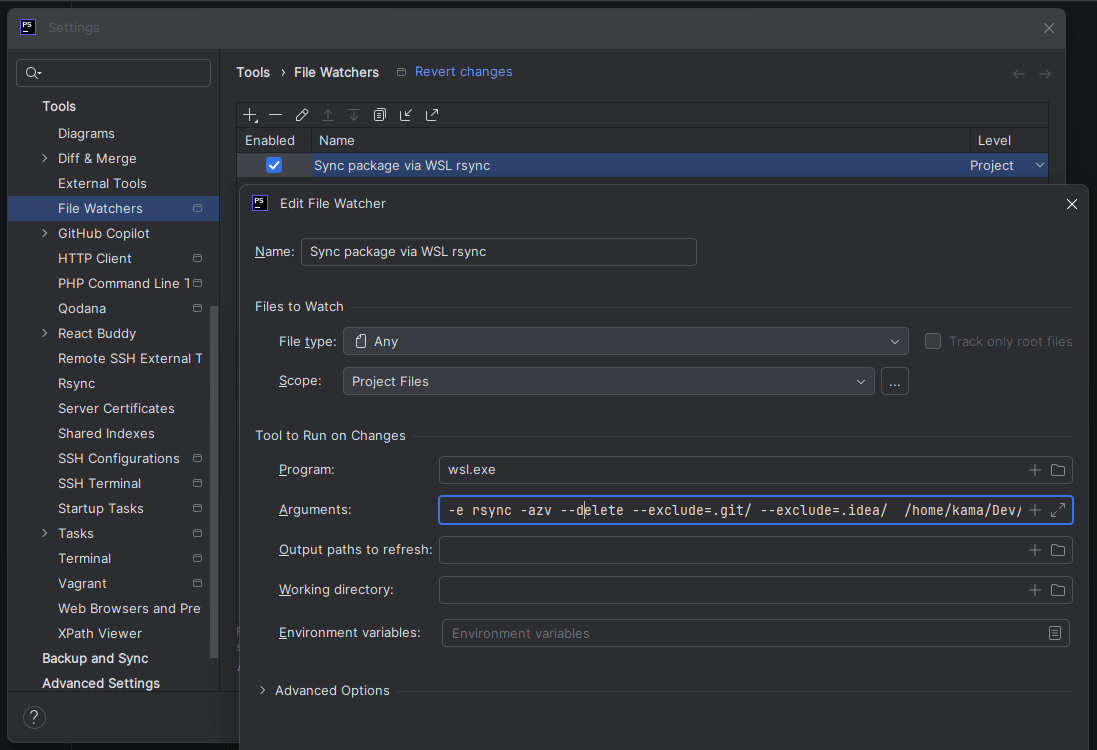
- Name:
Sync package via WSL rsync - File type:
Any - Scope:
Project Files - Program:
wsl.exe - Arguments:
-e rsync
-azv
--delete
--exclude=.idea/
--exclude=.git/
--exclude=.github/
--exclude=vendor/
--exclude=node_modules/
--exclude=tests/
--exclude=tmp/
--exclude=phpunit.xml
--exclude=composer.json
--exclude=composer.lock
--exclude=.distignore
--exclude=.gitignore
--exclude=.gitattributes
--exclude=.editorconfig
/home/user/packs/composer-package/
/home/user/sites/mysite/vendor/vendor-name/pack-name/
Notes:
-
The
--deleteparameter keeps the target folder up to date if the file is deleted in the source. -
The
{...}construction for--excludedoes not work in this mode. - More details about rsync