display_site_states
Allows you to change the site status string displayed in the Sites list table in the network admin area.
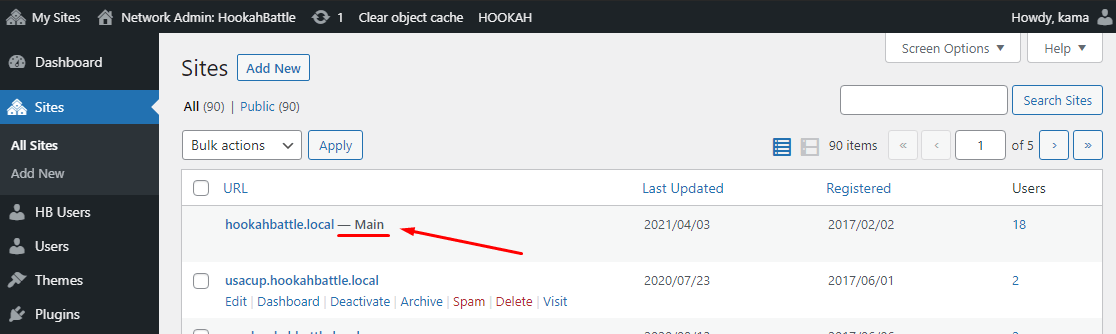
By default, WordPress provides the following list of statuses:
// For the network's main site.
$site_states['main'] = __( 'Main' );

// For network subsites.
array(
	'archived' => array( 'site-archived', __( 'Archived' ) ),
	'spam'     => array( 'site-spammed', _x( 'Spam', 'site' ) ),
	'deleted'  => array( 'site-deleted', __( 'Deleted' ) ),
	'mature'   => array( 'site-mature', __( 'Mature' ) ),
);
This filter allows you to add custom statuses or simply information about the site that you want displayed beside its name in the network admin Sites table.
Usage
add_filter( 'display_site_states', 'wp_kama_display_site_states_filter', 10, 2 );

/**
 * Function for `display_site_states` filter-hook.
 *
 * @param string[] $site_states An array of site states.
 * @param WP_Site  $site        The current site object.
 *
 * @return string[]
 */
function wp_kama_display_site_states_filter( $site_states, $site ){
	// filter...
	return $site_states;
}
- $site_states(array)
- Array of strings (site statuses).
Default: 'Main', 'Archived', 'Mature', 'Spam', 'Deleted' - $site(WP_Site)
- Current site object.
Examples
#1 Add custom site information
This is a nonstandard use of the hook because, in theory, this location is intended for site statuses that should be added and handled separately.
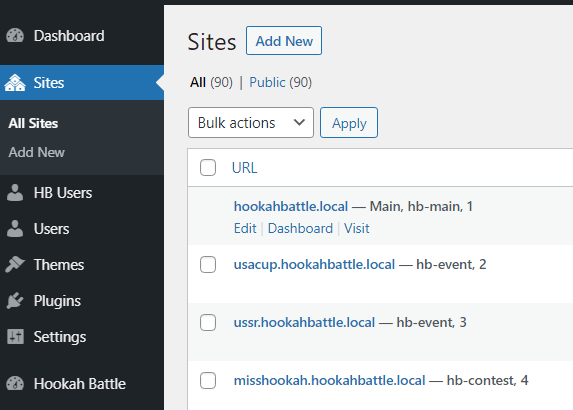
For this example, we simply add useful information for administrators. Suppose we often need to know the network site ID and the theme it uses.
add_filter( 'display_site_states', 'add_sites_status_string', 10, 2 );

// Add the theme name to the site status information string.
function add_sites_status_string( $site_states, $site ){

	switch_to_blog( $site->blog_id );

	$site_states['them'] = get_stylesheet(); // Theme name.
	$site_states['id'] = $site->blog_id;     // Site ID.

	restore_current_blog();

	return $site_states;
}
The result:
Changelog
| Since 5.3.0 | Introduced. |
Where the hook is called
display_site_states
wp-admin/includes/class-wp-ms-sites-list-table.php 696
$site_states = apply_filters( 'display_site_states', $site_states, $_site );