Kama Spamblock


More reliable compared to the previous, the method of getting rid of auto-spam in WordPress comments. I've already tried to fight auto-spam in comments, but as they say, the first pancake is lumpy. Although the previous method successfully protects against auto-spam, it has drawbacks: complex installation; not such good protection.
In two words, the essence of the method: a comment can be left only by clicking the "Submit Comment" button (submit); no other ways to leave a comment will pass. Robots cannot click (almost always), so we will get rid of auto-spam.
Advantages of the plugin:
- No captchas, checkboxes, images, and other anti-human stuff. The plugin’s presence is visually invisible.
- No auto-spam!
The plugin is useful to install even if you use an external commenting system on your site, such as Disqus. Because the plugin blocks all requests sent to the page wp-comments-post.php.
Checking the plugin’s operation
- Log out if you are currently logged in.
-
Try to leave a comment. There will be two possible outcomes:
- The comment was published — OK, the plugin works!
-
When sending the comment you see the message:
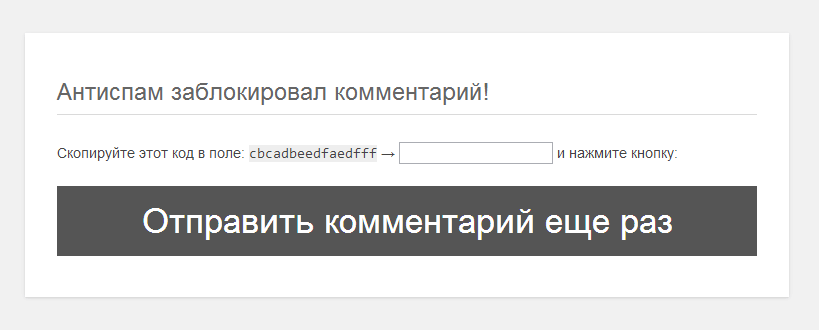
This may happen when the ID of the submit button does not match:
To fix this, go to "
Settings > Discussion", at the bottom there will be the plugin settings: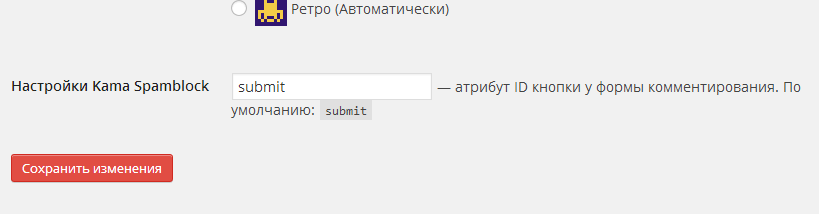
Enter the ID of your comment submission button there. Usually the button ID is: id="submit". To find your ID, go to a page on your site that has a comment form, and press
Ctrl+U(view page source), then search for the phrasetype="submit". This is how you will find the button; look at its ID. Here is an example of how the button code may look:<input name="submit" type="submit" id="submit" tabindex="5" value="Submit Comment" />
How the plugin appeared
The previously used protection method for spam protection on one of my sites turned out to be vulnerable — it could still be bypassed. After figuring out the bypass mechanism, I decided to improve the protection and ultimately created a new variant in the form of a full-fledged plugin. Now to activate protection, it is enough to install and activate the plugin — editing templates is no longer required.
The main problem of the previous solution was that when a comment was directly sent to the file wp-comments-post.php, the protection did not work. Later I introduced a Referer check: if the header did not match the URL of the page from which the comment was sent, it was blocked. However, it turned out that some spammers learned to substitute the correct Referer, making such a check almost useless.
The current solution became the introduction of temporary code that is updated daily and checked when a comment is sent. This is a kind of “pseudo-captcha”: the user does not enter anything, but the form contains a unique code that must be present for the comment to be accepted. This approach effectively blocks automatic spam requests by imitating a captcha protection mechanism without unnecessary inconvenience to the user.
Removing the plugin
The plugin must be removed from the plugins page. Only in this case will the plugin delete all its settings from the database.