WordPress Quicktags API – additional buttons in the HTML editor
Since WordPress version 3.3, developers have improved the HTML editor, so now we have the ability to add our own buttons to it using a few lines of code; this is briefly called the Quicktags API. Sometimes it’s necessary, and sometimes even very!

Despite the fact that there are not few plugins on this topic, knowing the API is necessary, and what’s more, everything is very simple in it, plus there is an opportunity to attach your JS function to the created button!
Quicktags library code quicktags.js.
Quicktags API js function
/**
 * Main API function for adding buttons to Quicktags
 *
 * Adding qt.Button or qt.TagButton depends on the arguments. The first 3 are mandatory.
 * To add a button, your script must go after the script "quicktags"
 * and must be output in the footer. If you output JS from PHP, use the hook
 * add_action( 'admin_print_footer_scripts', 'output_my_js', 100 )
 * or add_action( 'wp_footer', 'output_my_js', 100 )
 *
 * Minimum requirements for adding a button with an external function:
 *     QTags.addButton( 'my_id', 'my button', my_callback );
 *     function my_callback() { alert('yeah!'); }
 *
 * Minimum requirements for adding a button that inserts tags:
 *     QTags.addButton( 'my_id', 'my button', '<span>', '</span>' );
 *     QTags.addButton( 'my_id2', 'my button', '<br />' );
 */

QTags.addButton( id, display, arg1, arg2, access_key, title, priority, instance );
- id(string) (required)
- Button ID. The HTML id attribute of the input tag:
<input id="">. - display(string) (required)
- Button name. The HTML value attribute of the input tag:
<input value="">. - arg1(string) (required)
- Opening tag that will be inserted on click, for example:
<span>. Or the name of the function that will be executed on click — the callback function. - arg2(string)
- Closing tag that will be inserted on click, for example:
</span>. Leave it empty if the tag doesn’t need to be closed, for example:<hr />. - access_key(string)
- Short access path to the button. Write any letter, for example:
s - title(string)
- Button description. The HTML title attribute of the input tag:
<input title="">. - priority(integer)
- Button position among other buttons: 1-9 = first, 11-19 = second, 21-29 = third, etc.
- instance(string)
- Place the button into a specific class instance. If nothing is specified, it is added to the general instance.
Examples
We’re done with the theory; let’s move on to the examples!
Now our HTML editor looks like the picture at the beginning of the post.
Let’s add 3 buttons with tags: <h3>, <hr /> and <pre lang="php">. For that, add the following code to your theme’s functions.php file:
<?php
add_action( 'admin_print_footer_scripts', 'appthemes_add_quicktags', 99 );
function appthemes_add_quicktags() {
	if ( ! wp_script_is('quicktags') )
		return;

	?>
	<script>
	document.addEventListener( 'DOMContentLoaded', function(){

		QTags.addButton( 'eg_h3', 'h3', '<h3>', '</h3>', 'h', 'h3 heading', 1 );
		QTags.addButton( 'eg_hr', 'hr', '<hr />', '', 'h', 'Horizontal line', 201 );
		QTags.addButton( 'eg_pre', 'pre', '<pre lang="php">', '</pre>', 'q', 'PHP syntax highlighting', 111 );
	} );
	</script>
	<?php
}
?>
Note: To avoid an error, we check whether the quicktags script is used: wp_script_is( 'quicktags' ).
Here’s what we got:
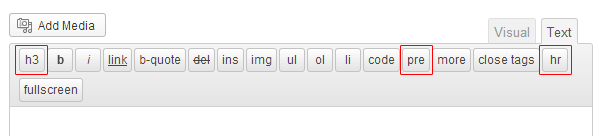
The HTML code for the buttons looks like this:
<input type="button" id="qt_content_eg_h3" accesskey="h" class="ed_button" title="h3 heading" value="h3">
Note: A prefix is automatically added to the ID: qt_content_
Another example
Let’s add a button that, when clicked, triggers an arbitrary function:
<?php
add_action( 'admin_print_footer_scripts', 'appthemes_add_quicktags' );
function appthemes_add_quicktags() {
	if ( wp_script_is('quicktags') ){
	?>
	<script>
		QTags.addButton( 'my_id', 'my button', my_callback );
		function my_callback() { alert('Hooray!'); }
	</script>
	<?php
	}
}
After updating the page, we’ll see a new button “my button”; when you click it, a message will pop up: “Hooray!”.
Default buttons
This is the list of values for buttons added by default in WordPress. Accesskey and ID must always be unique, so when adding your own buttons, don’t use these values:
| Accesskey | ID | Value | Tag Start | Tag End |
|---|---|---|---|---|
| a | link | link | <a href="' + URL + '"> |
</a> |
| b | strong | b | <strong> |
</strong> |
| c | code | code | <code> |
</code> |
| d | del | del | <del datetime="' + _datetime + '"> |
</del> |
| f | fullscreen | fullscreen | ||
| i | em | i | <em> |
</em> |
| l | li | li | \t<li> |
</li>\n |
| m | img | img | <img src="' + src + '" alt="' + alt + '"/> |
|
| o | ol | ol | <ol>\n |
</ol>\n\n |
| q | block | b-quote | \n\n<blockquote> |
</blockquote>\n\n |
| s | ins | ins | <ins datetime="' + _datetime + '"> |
</ins> |
| t | more | more | <!--more--> |
|
| u | ul | ul | <ul>\n |
</ul>\n\n |
| spell | lookup | |||
| close | close |
Removing buttons from the WordPress HTML editor
If you need to remove the default buttons from the HTML editor, you can use the hook: quicktags_settings, to which you can attach your function and override the default buttons, leaving only the ones you need.
The default buttons are located in the line strong,em,link,block,del,ins,img,ul,ol,li,code,more,close,fullscreen. Let’s remove from them: del,ins,more,close, I don’t use them:
// remove unnecessary buttons
add_filter('quicktags_settings', 'set_buttons_for_html_editor');
function set_buttons_for_html_editor( $buttons ) {
	$buttons['buttons'] = 'strong,em,link,block,img,ul,ol,li,code,fullscreen';
	return $buttons;
	// default: $buttons['buttons'] = 'strong,em,link,block,del,ins,img,ul,ol,li,code,more,close,fullscreen';
}
Plugins
Kama Quicktags
Wrote an article (my first article on this blog) about adding a button to the HTML editor. The button converts code into a readable HTML form: the symbols < and > are replaced with their corresponding entities: < and >, and as a result the code inserted into the post will be displayed correctly. Over time, the button I made for this: Code in HTML stopped working. Today I sat down, fixed it.
A plugin for adding buttons to the WordPress HTML editor with a code conversion button to the appropriate HTML format:

Post Editor Buttons Fork
For more details about the plugin, see in the WordPress directory.