Configuring the Trash in WordPress
By default, deleted posts, pages, and comments in WordPress are moved to the trash, where they can be restored for 30 days. You can also empty the trash manually.
WordPress has the ability to disable this feature or change how long items stay in the trash.
Here is what the standard screen looks like without modifying this feature:
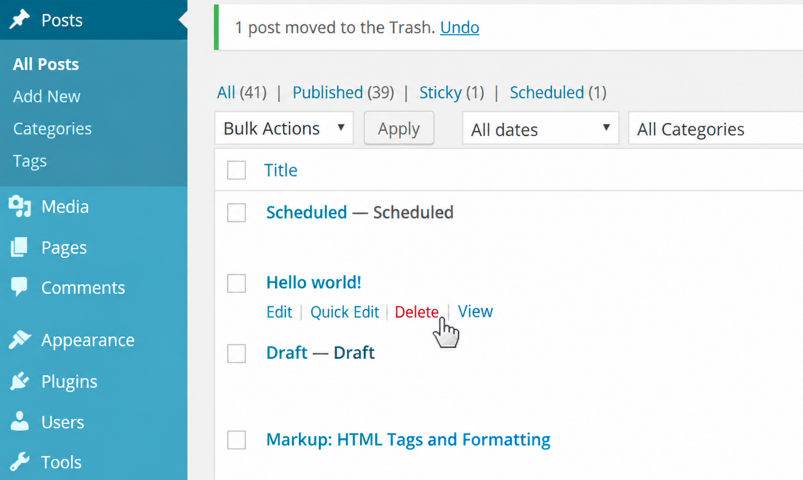
To change the retention period in the trash, add the following line to the wp-config.php file:
define( 'EMPTY_TRASH_DAYS', 7 );
Here 7 is the number of days (default is 30), after which data older than this period will be permanently deleted. If you want to completely disable this capability, add the following:
define( 'EMPTY_TRASH_DAYS', 0 );
With this, when deleting a post, page, and comment, they will be permanently deleted, and there will be no confirmation prompt for deletion, so you need to be careful not to delete the wrong item. Here is how the screen will look after disabling the trash:
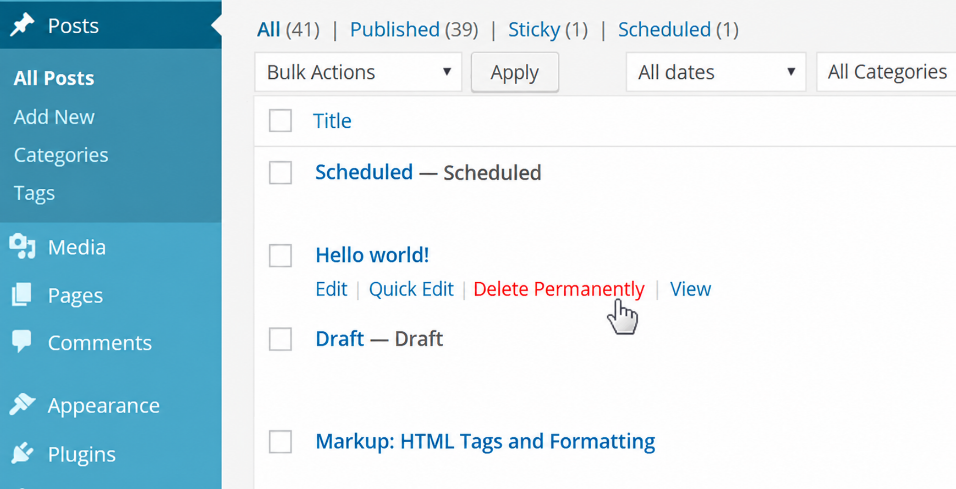
Instead of Delete there appears the link Delete permanently.
How to disable the trash for a post type
Sometimes it is useful to have trash for posts and pages, but for newly created post types this functionality is not needed at all.
Problem: WordPress does not allow disabling the trash for a post type — the EMPTY_TRASH_DAYS constant disables the trash entirely. This can be circumvented via the wp_trash_post hook.
Suppose we want to disable the trash for the post types team and page:
add_filter( 'pre_trash_post', 'disable_trash_for_post_type', 10, 2 );
function disable_trash_for_post_type( $null, $post ){

	if( in_array( $post->post_type, ['team','page'] ) ){
		return wp_delete_post( $post->ID, true );
	}

	return $null;
}
It’s worth noting that the function wp_delete_post( $post_id, $forse_delete ) sends to the trash only posts of type page and post. That is, if you delete a post via this function, any post of any type will be deleted permanently, even if the $force_delete parameter is not specified.