add_options_page()
Adds a child page (submenu) to the admin panel menu "Settings".
The function should be called during the action admin_menu.
Notes
-
This function is a wrapper for the function add_submenu_page(). The first parameter
$parent_slugis specified as'options-general.php', and all other parameters are simply passed as is. - In the function that outputs the page content, user access (capability) should be checked separately.
No Hooks.
Returns
string|false. hook_suffix of the inserted page (menu item), what the function add_submenu_page() returns.
Usage
add_options_page( $page_title, $menu_title, $capability, $menu_slug, $function );
- $page_title(string) (required)
Text that will be used in the title tag on the settings page.
Then, when generating the admin page, this value can be retrieved using the function get_admin_page_title().
- $menu_title(string) (required)
- Text that will be used as the name for the menu item.
- $capability(string) (required)
- The name of the access right for the user to see this menu item. See the capabilities table here. This parameter also controls access to the page of this menu item.
- $menu_slug(string) (required)
Menu identifier. You need to enter a unique string.
Do not use the magic constant
__FILE__and spaces. Spaces will be trimmed when forming the URL!You can also specify the path from the plugin folder to the file that will be responsible for the plugin settings page, e.g.
my-plugin/options.php. In this case, the next parameter$functionis not required.- $function(string)
- The name of the function that is responsible for the code of the page of this menu item.
Default: ''
Examples
#1 Adding a submenu (OOP-style)
This example shows how to add a submenu to the Settings section using PHP Class:
class Option_Page {

	function __construct() {
		add_action( 'admin_menu', [ $this, 'admin_menu' ] );
	}

	function admin_menu () {
		add_options_page( 'Page Title', 'Circle Tree Login', 'manage_options', 'options_page_slug', [ $this, 'settings_page' ] );
	}

	function  settings_page () {
		?>
		<p>This is the content of the settings page</p>
		<?php
	}
}

new Option_Page();

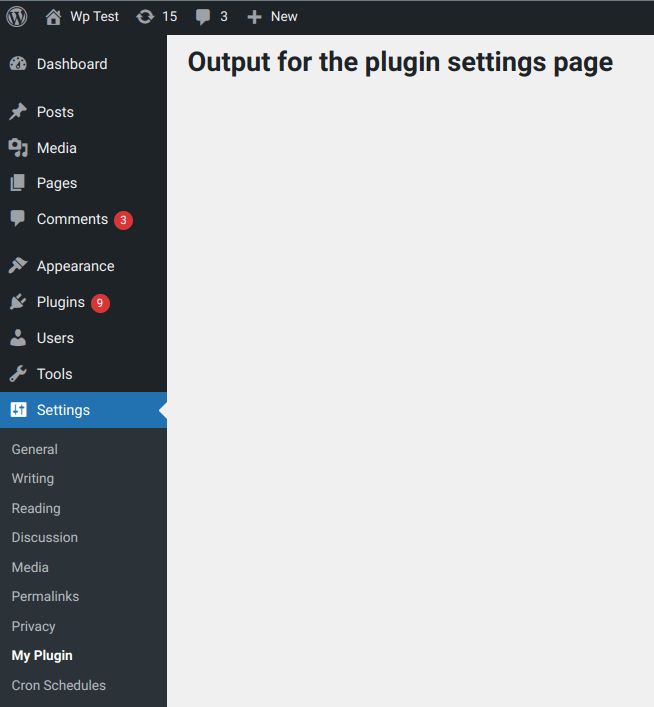
#2 Basic use
The example shows how to add an additional menu item to the "Settings" section of the admin panel menu.
add_action( 'admin_menu', 'my_plugin_menu' );

function my_plugin_menu() {
	add_options_page( 'My Options', 'My Plugin', 'manage_options', 'my-plugin', 'my_plugin_page' );
}

function my_plugin_page(){
	echo "Output for the plugin settings page";
}
Changelog
| Since 1.5.0 | Introduced. |
| Since 5.3.0 | Added the $position parameter. |
add_options_page() add options page code WP 7.1.2
function add_options_page( $page_title, $menu_title, $capability, $menu_slug, $callback = '', $position = null ) {
	return add_submenu_page( 'options-general.php', $page_title, $menu_title, $capability, $menu_slug, $callback, $position );
}