add_settings_field()
Creates an options field for the specified section (specified settings block).
This function is used in conjunction with other functions from the Settings API, which simplify the creation of the plugin settings page.
For this function, the parameters must already be known:
$page- the plugin or admin page.$section- the block on the page where the field will be displayed.
Important: each option must be registered with the register_setting(), and this function is only responsible for adding the options field (HTML code) to the page in the required section.
$callback - parameter - callback function. It should output the HTML code for the input field and fill it with existing data from the database.
The name attribute of the <input> tag must be equal to the $option_name parameter in register_setting(), and the id of the <input> tag must be equal to the $id parameter. The result should be immediately output to the screen (echo). The value of the value attribute is usually filled by the get_option().
Data saving occurs automatically.
This function can also be used to add additional options fields to already existing WordPress settings pages, such as: media files, reading.
Fields can be added to existing sections or a new section can be created using add_settings_section(), into which fields can then be added.
No Hooks.
Returns
null. Does not return anything.
Usage
add_settings_field( $id, $title, $callback, $page, $section, $args );
- $id(string) (required)
- The slug of the option, used as the field identifier. Used in the ID attribute of the tag.
- $title(string) (required)
- The title of the field.
- $callback(string|callable) (required)
The name of the callback function. The function should fill the field with the required
<input>tag, which will become part of one large form.- The
nameattribute must be equal to the $option_name parameter from register_setting(). - The
idattribute is usually equal to the $id parameter. - The result should be immediately output to the screen (echo).
- The
- $page(string) (required)
- The menu page to which the field will be added. The slug of the page should be specified.
It must be equal to the$menu_slugparameter from add_theme_page(). The base WordPress pages have names like:general,reading,writing, etc. by analogy...
Or it must be equal to the$pageparameter from do_settings_sections( $page ); - $section(string)
- The name of the settings section to which the field will be added. By default, default or it can be a section added by the add_settings_section().
Default: default - $args(array/mixed)
Additional parameters to be passed to the callback function. For example, in a key/value pair, we can pass the $id parameter, which can then be used for the id attribute of the input field, so that when clicking on the label in the final output, the cursor focus goes to our field.
Special values:
label_for- String. If specified, the setting title will be wrapped in a<label for="FIELD VALUE">tag.class- String. CSS class to be added to the<tr>tag in which the options field is displayed.
Default: []
Examples
#1 OOP Usage template
class ClassName {

	public function __construct() {
		add_action( 'admin_init', [ $this, 'your_function' ] );
	}

	function your_function() {

		add_settings_field(
			'myprefix_setting-id',
			'This is the setting title',
			[ $this, 'myprefix_setting_callback_function' ],
			'general',
			'default',
			[ 'label_for' => 'myprefix_setting-id' ]
		);
	}

	function myprefix_setting_callback_function( $args ) {
		echo 'Content here';
	}
}

$ClassName = new ClassName();
#2 Checkbox settings field
A checkbox settings field can be checked on the front end by simply looking for isset. No need to add additional checks like 1, 0, true, false… . if a checkbox is not set then it returns false.
add_action( 'admin_menu', 'add_option_field_to_general_admin_page' );

function add_option_field_to_general_admin_page() {

	// settings checkbox
	add_settings_field(
		'wpdevref_removestyles_field',
		esc_attr__( 'Remove Plugin Styles', 'wpdevref' ),
		'wpdevref_removestyles_field_cb',
		'general',
		'default',
		[
			'type'         => 'checkbox',
			'option_group' => 'wpdevref_options',
			'name'         => 'wpdevref_removestyles_field',
			'label_for'    => 'wpdevref_removestyles_field',
			'value'        => (int) ( get_option( 'wpdevref_options' )['wpdevref_removestyles_field'] ?? 0 ),
			'description'  => __( 'Check to remove preset plugin overrides.', 'wpdevref' ),
			'checked'      => get_option( 'wpdevref_options' )['wpdevref_removestyles_field'] ?? 0,
			// Used 0 in this case but will still return Boolean not[see notes below]
			'tip'          => esc_attr__( 'Use if plugin fields drastically changed when installing this plugin.', 'wpdevref' ),
		]
	);
}

/**
 * switch for 'remove styles' field
 * @since 2.0.1
 * @input type checkbox
 */
function wpdevref_removestyles_field_cb( $args ) {

	$options = get_option( $args['option_group'] );

	$value = $options[ $args['name'] ] ?? null;

	// Could use ob_start.
	$html = '
	<label title="{TIP}">
		<input id="{ID}" name="{NAME}" type="checkbox" {CHECKED}/>
		<span class="wndspan">{DESCRIPTION}</span>
		<b class="wntip">?</b>
	</label>
	';

	$html = strtr( $html, [
		'{TIP}' => esc_attr( $args['tip'] ),
		'{ID}' => esc_attr( $args['name'] ),
		'{NAME}' => esc_attr( $args['option_group'] . "[{$args['name']}]" ),
		'{CHECKED}' => $value ? ' checked="checked" ' : '',
		'{DESCRIPTION}' => esc_html( $args['description'] ),
	] );

	echo $html;
}
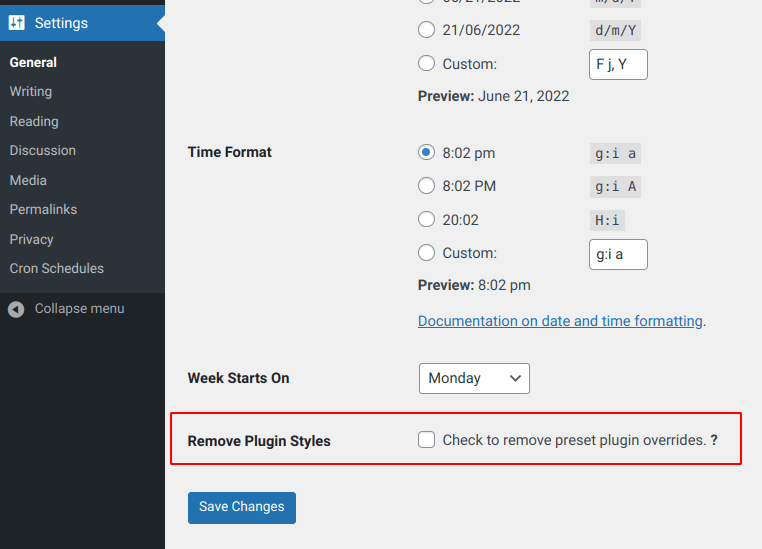
and checking to render action on the front side would use:
// Options getter could be a function with arguments.
$options = get_option( 'wpdevref_options' );
$value = $options['wpdevref_removestyles_field'] ?? '';
if( ! $value ){
	// Do some
}
Optionally you can add a ‘false’ into any conditional( empty, null, ”, 0 ) .
#3 Add a new option field to the main WordPress settings page (general).
myprefix must be unique, for example with some prefix of your plugin or theme. Also, let's pass the last parameter where we specify id and option name for the corresponding tag attributes:
<?php

add_action( 'admin_menu', 'add_option_field_to_general_admin_page' );

function add_option_field_to_general_admin_page() {

	$option_name = 'my_option';

	// register the option
	register_setting( 'general', $option_name );

	// add a field
	add_settings_field(
		'myprefix_setting-id',
		'Option Name',
		'myprefix_setting_callback_function',
		'general',
		'default',
		[
			'id'          => 'myprefix_setting-id',
			'option_name' => 'my_option'
		]
	);
}

function myprefix_setting_callback_function( $val ) {

	$id = $val['id'];
	$option_name = $val['option_name'];
	?>
	<input
		type="text"
		name="<?= $option_name ?>"
		id="<?= $id ?>"
		value="<?= esc_attr( get_option( $option_name ) ) ?>"
	/>
	<?php
}
As a result, on the "general" page, at the very end, we get a new fully working option:
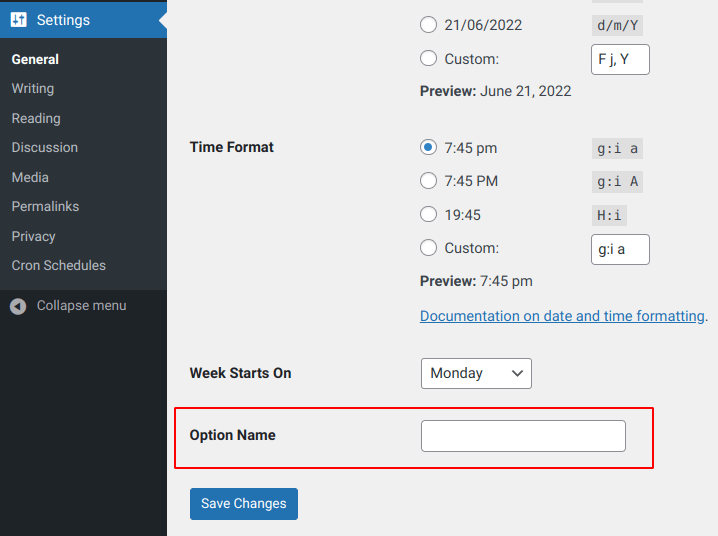
Notes
Global. Array. $wp_settings_fields Storage array of settings fields and info about their pages/sections. |
Changelog
| Since 2.7.0 | Introduced. |
| Since 4.2.0 | The $class argument was added. |