plugin_action_links
Allows you to remove or add links displayed below each plugin name in the admin Plugins table, such as Activate, Deactivate, and Delete.
The network_admin_plugin_action_links hook is identical but is used on the network administrator's Plugins page.
The plugin_action_links_(plugin_file) hook is identical but more convenient because the plugin can be specified directly. With plugin_action_links, that parameter must be checked inside the callback to add links to the required plugin. For a multisite network, the hook is network_admin_plugin_action_links_(plugin_file).
By default, network administrators have these links: Network Activate, Network Deactivate, Edit, and Delete.
Other filters related to changing data in the Plugins table:
Usage
add_filter( 'plugin_action_links', 'wp_kama_plugin_action_links_filter', 10, 4 );

/**
 * Function for `plugin_action_links` filter-hook.
 *
 * @param string[] $actions     An array of plugin action links. By default this can include
 *                              'activate', 'deactivate', and 'delete'. With Multisite active this
 *                              can also include 'network_active' and 'network_only' items.
 * @param string   $plugin_file Path to the plugin file relative to the plugins directory.
 * @param array    $plugin_data An array of plugin data. See get_plugin_data() and the {@see
 *                              'plugin_row_meta'} filter for the list of possible values.
 * @param string   $context     The plugin context. By default this can include 'all', 'active',
 *                              'inactive', 'recently_activated', 'upgrade', 'mustuse', 'dropins',
 *                              and 'search'.
 *
 * @return string[]
 */
function wp_kama_plugin_action_links_filter( $actions, $plugin_file, $plugin_data, $context ){
	// filter...
	return $actions;
}
- $actions(array)
- Array of links. A custom link can be added here.
- $plugin_file(string)
- Plugin file path relative to the plugins directory, including the file itself:
plugin-name/plugin-file.php. - $plugin_data(array)
- Plugin data array.
- $context(string)
- Plugins subpage on which the filter is used. Possible values: 'All', 'Active', 'Inactive', 'Recently Activated', 'Upgrade', 'Must-Use', 'Drop-ins', and 'Search'.
Examples
#1 Add a link to the plugin settings page
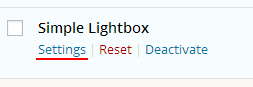
Suppose a link to the plugin settings page should be added to the plugin's row in the admin Plugins table. Such links appear below the plugin name:
add_filter( 'plugin_action_links', 'wpcf_plugin_action_links', 10, 2 );

function wpcf_plugin_action_links( $actions, $plugin_file ){

	if( false === strpos( $plugin_file, basename(__FILE__) ) ){
		return $actions;
	}

	$settings_link = '<a href="options-general.php?page='. basename(dirname(__FILE__)).'/options.php' .'">Settings</a>';
	array_unshift( $actions, $settings_link );

	return $actions;
}
The result:
#2 Use the plugin_action_links_{$plugin_file} filter
The same result can be achieved with the equivalent plugin_action_links_{$plugin_file} filter. It is used in the same location as plugin_action_links, so the choice usually makes no practical difference.
// Add a settings page link to the Plugins table.
function plugin_settings_link($links) {
	$settings_link = '<a href="options-general.php?page=your_plugin_slug">Settings</a>';
	array_unshift( $links, $settings_link );
	return $links;
}

$plugin_file = plugin_basename(__FILE__);
add_filter( "plugin_action_links_$plugin_file", 'plugin_settings_link' );
#3 Use the plugin_row_meta filter
Use plugin_row_meta to add links and text below the plugin description. This example adds a settings page link to the plugin metadata:
add_filter( 'plugin_row_meta', 'plugin_row_meta_1111', 10, 4 );
function plugin_row_meta_1111( $meta, $plugin_file ){
	if( false === strpos( $plugin_file, basename(__FILE__) ) )
		return $meta;

	$meta[] = '<a href="options-general.php?page='. basename(dirname(__FILE__)).'/options.php' .'">Settings</a>';
	return $meta;
}

Changelog
| Since 2.5.0 | Introduced. |
| Since 2.6.0 | The $context parameter was added. |
| Since 4.9.0 | The 'Edit' link was removed from the list of action links. |
Where the hook is called
$actions = apply_filters( 'plugin_action_links', $actions, $plugin_file, $plugin_data, $context );