What’s New in PHP 7
-
Wiki: PHP 7.0
-
php.net: What’s New in PHP 7
- skillz.ru: PHP 7 New Features - part 1 and part 2
On December 3, 2015, the release of PHP 7 was announced. The new version is based on an experimental branch of PHP, which was initially called phpng (PHPNextGeneration - the next generation), and was developed with a focus on increasing performance and reducing memory consumption.
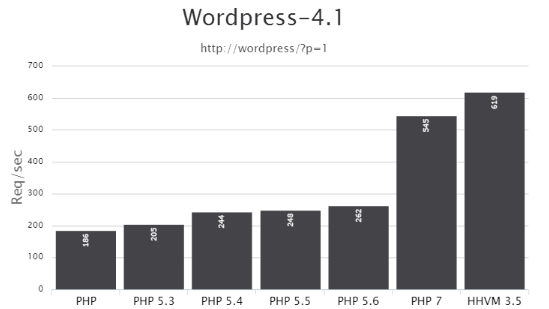
The most important novelty was the change of the interpreter core: now it is called PHPNG (Next Generation). Thanks to PHPNG, the script processing speed increased by almost a factor of two compared to PHP 5.x. A more efficient memory manager also appeared.
The speed increase is clearly visible in practice in this image. And for WordPress, the speed gain looks like this:

Syntactic novelties of PHP 7:
$a ?? '' — isset and value retrieval
Wiki: Null Coalesce Operator
The new NULL coalescing operator ?? is a shorthand for checking isset and retrieving the value if the check passes.
This check was often needed in the ternary operator ?::
// Will get the value of $_GET['foo'] if the variable is set or not empty, otherwise will get 'default'
$foo = $_GET['foo'] ?? 'default';

// The equivalent postion of this
$foo = isset($_GET['foo']) ? $_GET['foo'] : 'default';
// or this
$foo = @ $_GET['foo'] ?: 'default';

// convenient check when retrieving a $_GET parameter
if( $_GET['foo'] ?? 0 ){ }
// earlier written as
if( isset($_GET['foo']) && $_GET['foo'] ){ }
Also, you can chain checks:
$foo = $_GET['foo'] ?? $_POST['foo'] ?? 'default';
// returns: $_GET['foo'], if not set then $_POST['foo'], if not set then 'default'
$a <=> $b — three-way comparison: greater, equal, less
Wiki: Combined Comparison (Spaceship) Operator
The new comparison operator <=> — the "spaceship operator". Compares 2 variables and returns the comparison result as a number:
-1— if the first operator symbol is the match for the comparison0— if the second symbol matches1— if the third symbol matches
// Numbers
echo 1 <=> 1; // 0
echo 1 <=> 2; // -1
echo 2 <=> 1; // 1

// Decimal numbers
echo 1.5 <=> 1.5; // 0
echo 1.5 <=> 2.5; // -1
echo 2.5 <=> 1.5; // 1

// Strings
echo "a" <=> "a"; // 0
echo "a" <=> "b"; // -1
echo "b" <=> "a"; // 1
| Operator | Equivalent <=> |
|---|---|
$a < $b |
($a <=> $b) === -1 |
$a <= $b |
($a <=> $b) === -1 || ($a <=> $b) === 0 |
$a == $b |
($a <=> $b) === 0 |
$a != $b |
($a <=> $b) !== 0 |
$a >= $b |
($a <=> $b) === 1 || ($a <=> $b) === 0 |
$a > $b |
($a <=> $b) === 1 |
Convenient for use in usort():
usort( $products, function( $product1, $product2 ){
	return $product1->price() <=> $product2->price();
} );
You can use this hack to avoid nested ternary operators:
$count = 1;

// this
$class = ( $count === 0 ) ? 'null' : ( $count > 0 ? 'plus' : 'minus' ); // plus

// can be written as
$class = [ 'minus', 'null', 'plus' ][ ( $count <=> 0 ) + 1 ]; // plus
define( 'FOO', [1,2] ); — array in a define constant
Constants can contain arrays since PHP 5.6 as well. But back then they could be passed only with the keyword const. Now they can also be specified via define().
define('ANIMALS', ['dog', 'cat', 'bird']);

echo ANIMALS[2]; //> bird
use name\space\{A, B, C as c}; — grouping of imports
Wiki: Group Use Declarations
Now for a concise syntax, you can group imports into our namespace:
// PHP 7

use some\namespace\{ ClassA, ClassB, ClassC as C };
use function some\namespace\{ fn_a, fn_b, fn_c };
use const some\namespace\{ CONST_A, CONST_B, CONST_C };

// same as before PHP 7

use some\namespace\ClassA;
use some\namespace\ClassB;
use some\namespace\ClassC as C;

use function some\namespace\fn_a;
use function some\namespace\fn_b;
use function some\namespace\fn_c;

use const some\namespace\CONST_A;
use const some\namespace\CONST_B;
use const some\namespace\CONST_C;
int, float, bool — new function/method parameter types
Auto type checking of data passed to functions/methods, known as “type hinting,” continues to evolve and now understands scalars: int, float, bool, string. Previously only types like array, class name, or callable were understood (since 5.4).
Example:
function foo( int $a, bool $b, callable $c, array $d, WP_Post $e ) {
	return var_dump( $a, $b, $c, $d, $e );
}

foo( 1, true, 'trim', array(1), get_post(1) );

/* outputs:
int(1)
bool(true)
NULL
array(1) { [0]=> int(1) }
object(WP_Post)#2660 (24) { ...object data... }
*/

// if an incorrect type is specified:
foo( 'foo', true, 'trim', array(1), get_post(1) );
// We get a Fatal error: Argument 1 passed to A::foo() must be of the type integer, string given
Strong typing mode
If the type int is specified and you pass a string '123', the check will still pass, and PHP will convert the string to a number.
function func( int $num ){
	var_dump( $num );
}
func('123'); //> int(123)
But what if you need to get exactly the number 123? For this you can enable strict typing mode by placing at the very beginning of the file this line:
declare(strict_types=1);
This declaration must be the first line in the file, before any code executes. It affects only the file and only the calls and return values in that file.
Note: if strict typing is declared in file X but not in file Y, and a function from file X is called in file Y, the call to that function will not be subject to strict typing!
Read about typing an article on Habr and this other interesting article.
int, float, bool, array — return types of functions/methods
Declaring the accepted type is possible since PHP 5.3. But declaring what type a function/method should return is available only since PHP 7. Here all types are understood: string, int, float, bool, array, callable, self (in methods), parent (in methods), Closure, class name, interface name.
Syntax:
function func( $var ): int{ /* function code */ }
function func( $var ): string{  }
function func( $var ): float{  }
function func( $var ): bool{  }
function func( $var ): array{  }
function func( $var ): callable{  }
function func( $var ): Closure{  }
function func( $var ): WP_Post{  } // can only return an object of class WP_Post

class A extends B {
	function func( $var ): self{ }
	function func( $var ): parent{ }
}
Working examples:
// Example 1:
function func( $var ): int {
	return $var;
}
echo func( 123 );    //> 123
echo func( 'asfd' ); //> will cause an error: Fatal error: Uncaught TypeError: Return value of func() must be of the type integer, string returned

// Example 2: Closure
function func(): Closure {
	return function( $var ){ return $var .' + 2 = 3'; };
}
echo func()( 1 ); //> 1 + 2 = 3
Return types when inheriting class methods
When inheriting in classes, child methods must have the same return types as in the parent class/interface:
class A {
	function func() : int {
		return 123;
	}
}
class B extends A {
	function func() : string {
		return '123';
	}
	// this function declaration will cause an error:
	// Fatal error: Declaration of B::func(): string must be compatible with A::func(): int
	// i.e. the int type must match!
}
Advanced example of how you can write in PHP 7
Here are several novelties at once:
- accepted and return type;
- union and unpacking of parameters with
...; - example of creating an anonymous function with a return type.
function arraysSum( array ...$arrays ): array {
	return array_map( function( array $array ): int {
		return array_sum( $array );
	}, $arrays );
}

print_r(  arraysSum( [1,2,3], [4,5,6], [7,8,9] )  );
/*
Output:
Array
(
	[0] => 6
	[1] => 15
	[2] => 24
)
*/
foo()(), $a::$b::$c, $$foo->bar — unified syntax: LEFT TO RIGHT
An important novelty! Now accesses to complex variables are analyzed sequentially LEFT TO RIGHT.
Examples of new capabilities:
// you may omit combining brackets
$foo()['bar']()
[ $obj1, $obj2 ][0]->prop
getStr()[0]

// supports nesting ::
$foo['bar']::$baz   // > ( $foo['bar'] )::$baz
$foo::$bar::$baz    // > ( $foo::$bar )::$baz
$foo->bar()::baz()  // > ( $foo->bar() )::$baz

// supports nested ()
foo()()        // calls the result of foo() → ( foo() )()
$foo->bar()()  // > ( $foo->bar() )()
Foo::bar()()   // > ( Foo::bar() )()
$foo()()       // > ( $foo() )()

// IIFE JS-like syntax
( function() { ... } )() // IIFE JS syntax
( $obj->closure )()
// etc.
(...)['foo']
(...)->foo
(...)->foo()
(...)::$foo
(...)::foo()
(...)()

// all scalar dereferencing operations
"string"->toLower()
[ $obj, 'method' ]()
'Foo'::$bar
Differences between old and new recognition:
// string             // old understanding       // new understanding
$$foo['bar']['baz']   ${ $foo['bar']['baz'] }   ( $$foo )['bar']['baz']
$foo->$bar['baz']     $foo->{ $bar['baz'] }     ( $foo->$bar )['baz']
$foo->$bar['baz']()   $foo->{ $bar['baz'] }()   ( $foo->$bar )['baz']()
Foo::$bar['baz']()    Foo::{ $bar['baz'] }()    ( Foo::$bar )['baz']()
Old code written using {} for handling variables may not work in the new PHP 7 version.
foreach — changed logic
wiki: Fix "foreach" behavior
Now foreach does not automatically switch the inner pointer of the iterated array:
$arr = [ 1, 2, 3, 4 ];
foreach( $arr as $val ){
	echo key( $arr ) . ' ';
}
// PHP 5.6: 1 1 1 1
// PHP 7.0: 0 0 0 0

$arr = [ 1, 2, 3, 4 ];
foreach( $arr as & $val ){
	echo key( $arr ) . ' ';
}
// PHP 5.6: 1 2 3
// PHP 7.0: 0 0 0 0
Another example of magical behavior in older versions:
$a = [1,2,3];          foreach( $a as $v ) { echo current($a) . " "; }
$a = [1,2,3]; $b = $a; foreach( $a as $v ) { echo current($a) . " "; }

// PHP 5.6: 2 2 2 1 1 1
// PHP 7.0: 1 1 1 1 1 1
foreach always works with a copy of the array, i.e., the result of foreach will not change when the original array is changed inside foreach:
$arr = [ 1, 2, 3, 4 ];
foreach( $arr as $val ){
	echo "$val ";
	unset( $arr[1] );
}

// PHP 5.6: 1 2 3 4
// PHP 7.0: 1 2 3 4
HOWEVER, if the array value is passed by reference, foreach always works with the original array, i.e. changing the array inside foreach will change the foreach result:
$arr = [ 1, 2, 3, 4 ];
foreach( $arr as & $val ){
	echo "$val ";
	unset( $arr[1] );
}

// PHP 5.6: 1 3 4
// PHP 7.0: 1 3 4
$class = new class{} — anonymous classes
Wiki: Anonymous Classes
Anonymous classes allow doing the same as ordinary classes: passing data to the constructor, extending other classes, using traits, etc.
$class = new class {
	public function echo( $msg ){
		echo $msg;
	}
};
$class->echo('Hello!'); // will print: "Hello!"
Class extension works as expected:
class Foo {}

$child = new class extends Foo {};

var_dump( $child instanceof Foo ); //> true
Using traits:
trait Foo {
	public function method() {
	  return "bar";
	}
}

$class = new class {
	use Foo;
};

var_dump( $class->method() ); //> string(3) "bar"
Read more about anonymous classes in the documentation.
yield ... return 99; — returning expressions in generators
Wiki: Generator Return Expressions
Generators appeared in PHP 5.5. But there you could use return only to terminate the generator. Now return can return an expression (value/array/another generator), and not only NULL. But this can be done only at the end of the generator.
You can obtain the returned value using the getReturn() method, but only after the generator finishes.
The ability to explicitly return the last value simplifies working with generators:
you no longer need to check whether the value is the last one, simply call getReturn().
function gen() {
	yield 1;
	yield 2;

	return 3;
}

$gen = gen();

// if the generator has not returned anything yet, calling this line
// echo $gen->getReturn();
// will cause an error: Fatal error: Uncaught Exception: Cannot get return value of a generator that hasn't returned

foreach( $gen as $val ) {
	echo $val;
}

echo $gen->getReturn();

// the result of this code will print: 123
yield from func() — delegation of generators
Wiki: Generator Delegation
Allows splitting a complex generator into several simpler ones.
For this, a new syntax is used: yield from <expr>, where <expr> can be a value (scalar), an array, or another generator.
<expr> will work as long as data is returned, then execution continues in the generator from where <expr> was invoked. See the example:
function gen() {
	yield 1;
	yield from gen2();
	yield 4;
}

function gen2(){
	yield 2;
	yield 3;
}

$gen = gen();

foreach ( $gen as $val ) {
	echo $val;
}

// result: 1234
Example with an array:
function g() {
  yield 1;
  yield from [2, 3, 4];
  yield 5;
}

$g = g();
foreach ( $g as $yielded ) {
	echo $yielded;
}

// outputs: 12345
Example with return from a child generator:
function gen() {
  yield 1;
  $sub_gen = yield from sub_gen();
  yield 4;

  return $sub_gen;
}

function sub_gen() {
  yield 2;
  yield 3;

  return 42;
}

$gen = gen();
foreach( $gen as $val ) {
	echo $val;
}
echo ' - '. $gen->getReturn();

// outputs: 1234 - 42
Other PHP 7.0 additions
-
The constructor syntax in PHP 4 style (the constructor method name matches the class name) is now deprecated.
-
Static calls of non-static methods using
::are now deprecated. -
list()— changed behavior. In PHP 5, list() assigned values starting from the rightmost element of the given array; in PHP 7, the assignments occur from the leftmost element. Also in PHP 5,list()could split strings into characters, in PHP 7 it does not work with strings at all...// Example 1: reverse reading // If ordinary variables are used, there is no difference list( $a, $b, $c ) = ['apple', 'bannana', 'cherry', 'damson']; var_dump( $a, $b, $c ); // php5 and php7 return: apple bannana cherry // But if you assign array elements, the order will differ $arr = []; list( $arr['a'], $arr['b'], $arr['c'] ) = ['apple', 'bannana', 'cherry', 'damson']; print_r( $arr ); /* PHP 7 Array ( [a] => apple [b] => bannana [c] => cherry ) PHP 5 Array ( [c] => cherry [b] => bannana [a] => apple ) */ // Example 2: splitting strings $str = 'ab'; list( $a, $b ) = $str; var_dump( $a, $b ); // In PHP 7: NULL NULL // In PHP 5: string(1) "a" string(1) "b"
-
Unicode control (escape) sequences support. That is, in strings
""and heredoc you can use the\uXXXXconstruct to create a Unicode character. Like this:echo "\u{1F602}"; //> ? -
The IntlChar class. Contains methods and constants for working with Unicode.
printf('%x', IntlChar::CODEPOINT_MAX); // 10ffff echo IntlChar::ord('@'); //> 64 echo IntlChar::chr( 64 ); //> @ echo "\u{1F602}"; //> ? echo IntlChar::ord("\u{1F602}"); //> 128514 echo IntlChar::chr( 128514 ); //> ? -
The
intdiv()function — divides 2 numbers and returns only the integer part of the division:echo intdiv(10, 3); //> 3 echo intdiv(5, 2); //> 2
-
session_start()can take parameters (standard session settings from php.ini):session_start(['cache_limiter' => 'private']);
-
The
preg_replace_callback_array()function — an alternative to preg_replace_callback(). It allows passing the callback as an array['/regex'/ => callback, ...]:$str = 'a1a2a3'; $array = [ '~[0-9]~' => function ( $m ){ return $m[0] * 2; }, '~a~' => function ( $m ){ return $m[0] . '-'; } ]; echo preg_replace_callback_array( $array, $str ); //> a-2a-4a-6 -
You can use global keywords in method names. Previously you could not name a method with words like: with/new/for/foreach/... — this would cause an error. Now you can:
Class::new('Project Name');
$class->for('purpose here');
metadata_lines_are_truncated
—