PHP 5.3 – 8.5 — Syntax, What’s New
In this article we'll discuss important points in the evolution of PHP syntax and obtain a list of changes in PHP.
The main goal of this article is to create a change log for syntax so you can quickly refresh in memory the “tips” of PHP syntax. It is often necessary to ensure what is allowed in a specific PHP version and what is not.
When writing WordPress plugins or themes you can use only PHP 7.4 features. Everything available in later versions should be addressed via polyfills or in the form of old syntax.
PHP 8.4

- Release: https://www.php.net/releases/8.4/ru.php
- Wiki: PHP 8.3
- github: PHP 8.3 changelog
- https://habr.com/ru/news/776250/
public $foo { set () } — Property hooks
Doc: https://www.php.net/manual/ru/migration84.new-features.php
Wiki: https://wiki.php.net/rfc/property-hooks
Property hooks allow you to add logic when reading/writing (get/set) a property — without creating separate methods getFoo() and setFoo() (getters and setters).
Before:
class User {
	private string $name;

	public function setName( string $name ): void {
		if ( $name === '' ) throw new ValueError('Empty');
		$this->name = $name;
	}

	public function getName(): string {
		return ucfirst( $this->name );
	}
}
Now:
class User {
	public string $name {
		set {
			if ( $value === '' ) throw new ValueError('Empty');
			$this->name = $value;
		}
		get => ucfirst( $this->name );
	}

	public function __construct(string $name) {
		$this->name = $name;
	}
}
Now you can write $user->name = 'Tim'; and when setting the value, the set function will be called:
$user = new User();
$user->name = 'tim'; // goes through the set hook
echo $user->name; // Tim
Shorthand get => expr; supported:
public string $fullName { get => $this->first . ' ' . $this->last; }
Interfaces with get and set properties:
Previously interfaces could require only methods, and now they can require properties — readable (get) and/or writable (set).
That is, you can now say:
“Any class implementing this interface must have
$namethat can be read (or written)”
Example:
interface Named {
	public string $name { get; }  // required readable property
}

class User implements Named {
	public string $name = 'Tim';  // fits, get exists by default
}

class Person implements Named {
	public string $name {
		get => strtoupper( $this->realName ); // fits, get hook exists
	}
}
This brings interfaces closer to “data contracts” rather than just method sets.
Makes properties “smart” without extra magic __get/__set:
public string $slug {
	set {
		$this->slug = strtolower( trim( $value ) );
	}
}
// No magic and extra code
In summary: Property hooks provide support for computed properties that can be understood by IDEs and static analysis tools, without needing to write DocBlock comments that may not match. They also allow reliable pre- or post-processing of values without checking whether the corresponding getter or setter exists in the class.
public private(set) string $ver — Asymmetric property visibility
Doc: https://www.php.net/manual/ru/language.oop5.visibility.php#language.oop5.visibility-members-aviz
Wiki: https://wiki.php.net/rfc/asymmetric-visibility-v2
In PHP 8.4 you can set an asymmetric visibility scope for properties — separately for reading and writing.
set-visibility is specified as private(set) or protected(set) immediately after the visibility modifier.
class Book {
	public function __construct(
		public    private(set)   string $title,
		public    protected(set) string $author,
		protected private(set)   int    $year,
	) {}
}

class SpecialBook extends Book {
	public function update( string $author, int $year ): void {
		$this->author = $author; // All good
		$this->year = $year; // Critical error
	}
}

$b = new Book( 'PHP', 'Peter', 2024 );

echo $b->title;   // OK
echo $b->author;  // OK
echo $b->pubYear; // Fatal

$b->title   = 'How not to PHP';    // Fatal
$b->author  = 'Pedro H. Peterson'; // Fatal
$b->pubYear = 2023;                // Fatal
Features:
-
Get always has the same or broader scope than
set.
In other words, the restriction for set must be equal to or stricter than for get:public protected(set) // OK protected public(set) // error
-
private(set)makes the property final - it cannot be overridden or re-declared in a descendant class. -
Works only with typed properties - can be used only on properties with a type - e.g., string, int, array, etc.:
public private(set) string $title; // OK
public private(set) $title;        // fatal
-
Getting a reference to a property follows the set visibility, not get. This is because the reference allows modifying the property value.
Similarly, an attempt to write into an array contained in a property involves both an internal read - get, and a write - set, and therefore follows the set visibility, since the write visibility restriction is stronger.
- Spaces are not allowed:
private( set )- a space will cause an error.
Inheritance
When inheriting you can loosen read or write access, but private(set) is final and cannot be overridden:
class Book {
	protected                string $title;
	public    protected(set) string $author;
	protected private(set)   int    $year;   // final
}

class SpecialBook extends Book {
	// OK - read restriction is looser, and write restriction is the same
	public protected(set) string $title;

	// OK - read restriction is the same, and write is looser
	public string $author;

	// Fatal Error - properties with private(set) are final!
	public protected(set) int $year;
}
new MyClass()->method() — without parentheses
Doc: https://www.php.net/manual/ru/migration84.new-features.php#migration84.new-features.core.new-chaining
Wiki: https://wiki.php.net/rfc/new_without_parentheses
Properties and methods of a newly initialized object can now be accessed without wrapping the new expression in parentheses.
// Was:
$ver = ( new PhpVersion() )->getVersion();

// Now:
$ver = new PhpVersion()->getVersion();
#[\Deprecated] — Attribute
Doc: https://www.php.net/manual/ru/class.deprecated.php
Wiki: https://wiki.php.net/rfc/deprecated_attribute
The attribute #[\Deprecated] allows declaring functions, methods, constants, and enum cases as deprecated.
When such (deprecated) elements are called, a E_USER_DEPRECATED warning will be issued.
You can specify a message $message and a version $since, which will appear in the warning text. For example:
#[\Deprecated('Use newMethod() instead', since: '2.4')]
function oldMethod() {}

oldMethod(); // Deprecated: Function oldMethod() is deprecated since 2.4, Use newMethod() instead
More usage examples:
#[\Deprecated]
function test() {
}

#[\Deprecated("use test() instead")]
function test2() {
}

#[\Deprecated("use test() instead", since: "2.4")]
function test3() {
}

#[\Deprecated(since: "2024-05-07")]
function test4() {
}

class Clazz {
	#[\Deprecated]
	public const OLD_WAY = 'foo';

	#[\Deprecated]
	function test() {
	}

	#[\Deprecated("use test() instead")]
	function test2() {
	}
}

enum MyEnum {
	#[\Deprecated]
	case OldCase;
}
Reflection
Method isDeprecated() of ReflectionFunctionAbstract and ReflectionClassConstant will return true:
#[\Deprecated]
function test() {}

$r = new ReflectionFunction('test');

var_dump( $r->isDeprecated() ); // bool(true)
class Clazz {
	#[\Deprecated]
	public const OLD_WAY = 'foo';
}

$r = new ReflectionClassConstant( Clazz::class, 'OLD_WAY' );

var_dump( $r->isDeprecated() ); // bool(true)
The attribute #[\Deprecated] in stub files will work the same as the documentation comment /** @deprecated */.
- Old functions with such a comment will not automatically receive the attribute.
- It is recommended for extension authors to add
#[\Deprecated]manually for consistency.
In the global namespace you cannot declare a class named Deprecated.
PHP 8.3

- Release: https://www.php.net/releases/8.3/ru.php
- Wiki: PHP 8.3
- github: Список изменений PHP 8.3
- https://habr.com/ru/news/776250/
typed class constants — типы для констант классов
Doc: https://www.php.net/manual/ru/functions.first_class_callable_syntax.php
Wiki: https://wiki.php.net/rfc/typed_class_constants
interface I {
	const string PHP = 'PHP 8.3';
}

class Foo implements I {
	const string PHP = [];
}

// Fatal error: Cannot use array as value for class constant
// Foo::PHP of type string
json_validate() — функция для проверки строки
Doc: https://php.net/json_validate
Wiki: https://wiki.php
json_validate() позволяет проверить, является ли строка правильным JSON. Более эффективна, чем json_decode().
$json = json_validate( '{ "test": { "foo": "bar" } }' ); // true
if( $json ){
	// do staff
}
До PHP 8.3 нужно было проверять так:
function json_validate( string $string ): bool {
	json_decode( $string );

	return json_last_error() === JSON_ERROR_NONE;
}

$json = json_validate( '{ "test": { "foo": "bar" } }' ); // true
if( $json ){
	// do staff
}
#[\Override] — новый атрибут
wiki: https://wiki.php.net/rfc/marking_overriden_methods
Добавив к методу атрибут #[\Override], PHP убедится, что метод с таким же именем существует в родительском классе или в интерфейсе. Добавление атрибута дает понять, что переопределение родительского метода является намеренным, и упрощает рефакторинг, поскольку удаление переопределенного родительского метода будет обнаружено.
use PHPUnit\Framework\TestCase;

final class MyTest extends TestCase {
	protected $logFile;

	protected function setUp(): void {
		$this->logFile = fopen( '/tmp/logfile', 'w' );
	}

	#[\Override]
	protected function taerDown(): void { // tearDown - правильно имя метода
		fclose( $this->logFile );
		unlink('/tmp/logfile');
	}
}

// Fatal error: MyTest::taerDown() has #[\Override] attribute,
// but no matching parent method exists
PHP 8.2

- Release: https://www.php.net/releases/8.2/ru.php
- Wiki: PHP 8.2
- 8.1>8.2 Migration: https://www.php.net/manual/ru/migration82.new-features.php
- github: PHP 8.2 changelog
- habr: https://habr.com/ru/company/hexlet/blog/705194/
null, false, true ― standalone types
Wiki: https://wiki.php.net/rfc/null-false-standalone-types
Wiki: https://wiki.php.net/rfc/true-type
class Falsy
{
	public function alwaysFalse(): false { /* ... */ *}

	public function alwaysTrue(): true { /* ... */ *}

	public function alwaysNull(): null { /* ... */ *}
}
Dynamic properties of a class are deprecated
Doc: https://www.php.net/manual/ru/migration82.deprecated.php#migration82.deprecated.core.dynamic-properties
Wiki: https://wiki.php.net/rfc/deprecate_dynamic_properties
To help avoid errors and typos, it is no longer recommended to define dynamic properties.
Use the attribute #[\AllowDynamicProperties] on the class when you need to allow dynamic properties.
In stdClass instances dynamic properties are still allowed.
class User {
	public $name;
}

$user = new User();
$user->last_name = 'Doe'; // Deprecated notice

$user = new stdClass();
$user->last_name = 'Doe'; // Allowed
This change does not affect the use of magic methods __get()/__set().
Constants in traits
Doc: https://www.php.net/manual/ru/migration82.new-features.php#migration82.new-features.core.constant-in-traits
Wiki: https://wiki.php.net/rfc/constants_in_traits
You cannot access a constant via the trait name, but you can through the class that uses this trait:
trait Foo {
	public const CONSTANT = 1;
}

class Bar {
	use Foo;
}

var_dump( Bar::CONSTANT ); // 1
var_dump( Foo::CONSTANT ); // Error
PHP 8.1

- Release: https://www.php.net/releases/8.1/ru.php
- Wiki: PHP 8.1
- github: Changelog PHP 8.1
- https://habr.com/ru/news/591739/
['a' => 1, ...$array] — unpacking an array with string keys
DOC: https://www.php.net/manual/ru/language.types.array.php#language.types.array.unpacking
RFC: https://wiki.php.net/rfc/array_unpacking_string_keys
C PHP 7.4 there was array unpacking using the ... operator. But it worked only with indexed arrays (arrays with integer keys). Now it also works with associative arrays (arrays with string keys).
$arrayA = [ 'a' => 1 ];
$arrayB = [ 'b' => 2 ];

$result = [ 'a' => 0, ...$arrayA, ...$arrayB ]; // ['a' => 1, 'b' => 2]
Later string keys overwrite earlier ones
Array unpacking with the ... operator follows the semantics of array_merge(). That is, later string keys overwrite earlier ones, and integer keys are reindexed:
// string key
$arr1 = ["a" => 1];
$arr2 = ["a" => 2];
$arr3 = ["a" => 0, ...$arr1, ...$arr2]; // ["a" => 2]

// integer key
$arr4 = [1, 2, 3];
$arr5 = [4, 5, 6];
$arr6 = [...$arr4, ...$arr5]; // [1, 2, 3, 4, 5, 6]
// original integer keys are not preserved.
readonly — object properties
Wiki: https://wiki.php.net/rfc/readonly_properties_v2
Doc: readonly-properties
The readonly modifier prevents modification of a property after initialization.
Now you don't need to write a separate getter for a private property; you can simply declare the property as public readonly:
class BlogData {
	public readonly Status $status;

	public function __construct( Status $status ){
		$this->status = $status;
	}
}
Earlier you would have to do:
class BlogData {
	private Status $status;

	public function __construct( Status $status ){
		$this->status = $status;
	}

	public function getStatus(): Status {
		return $this->status;
	}
}
readonly can be applied only to typed properties. AReadonly property without a type constraint can be created using the Mixed type.
Static readonly properties are not supported.
A Readonly property can be initialized only once and only from the scope in which it was declared. Any other assignment or modification of the property will throw an Error.
class Foo {
	public readonly string $prop;
}

$obj = new Foo();
$obj->prop = 'bar'; // Error: initialization outside of the restricted scope.
Specifying a default value is not allowed, because that is effectively a constant.
class Test {
	// Error: cannot have a default value
	public readonly int $prop = 42;
}
Readonly properties cannot be destroyed with unset() after initialization. But they can be destroyed before initialization from the scope in which the property was declared.
Readonly properties allow internal mutation. Objects (or resources) stored in readonly can still be mutated internally:
class Test {
	public function __construct( public readonly object $obj ){
	}
}

$test = new Test( new stdClass );
$test->obj->foo = 1; // Valid internal mutation.
$test->obj = new stdClass; // Invalid reassignment.
never — return type of a function
RFC: https://wiki.php.net/rfc/noreturn_type
Doc: https://www.php.net/manual/ru/language.types.never.php
A function or method declared with the never type indicates that it does not return a value and will either throw an exception or terminate the script by calling die(), exit(), trigger_error(), or something similar.
function redirect( string $uri ): never {
	header( "Location: $uri" );
	exit();
}

function redirectToLoginPage(): never {
	redirect( '/login' );

	echo 'Hello'; // <- dead code detected by static analysis
}
enum — Enumerations
Doc: https://www.php.net/manual/ru/language.enumerations.php
Wiki: https://wiki.php.net/rfc/enumerations
Enums are needed to describe types. Use enumerations instead of a set of constants to validate them automatically during writing and executing code.
Enum:
enum Color {
	case Red;
	case Black;
	case White;
}
Usage:
function foo( Color $color ){
	if( $color === Color::Red ){
		echo 'I`m red!';
	}
}

foo( Color::Red ); //> I`m red!
Each case: Color::Red, Color::Black is a separate object enum(Color::Red), enum(Color::Black). Each such object inherits from the type (object) Color:
var_dump( Color::Red ); // enum(Color::Red)
var_dump( Color::Red instanceof Color ); // bool(true)
That is, under the hood these are not numbers 0,1,2 as in some languages, but objects. Each such object has a built-in property $name:
echo Color::Red->name; //> Red
Enum with values:
enum Color: string {
	case Red = 'R';
	case Black = 'B';
	case White = 'W';
}
Usage:
echo Color::Red->name; //> Red
echo Color::Red->value; //> R
var_dump( Color::from( 'R' ) ); // enum(Color::Red)
Why is this needed?
To answer this question, consider an example without enums and with them.
Suppose we sell cars of three colors: red, black, and white. How to describe the color, which type to choose?
If we describe the car color as a string:
class Car {
	private string $color;

	function setColor( string $color ): void {
		$this->color = $color;
	}
}
Then when calling $myCar->setColor(...) it is unclear which exact string to write: "red" or "RED" or "#ff0000". Also, it is easy to make mistakes by writing something unnecessary (rad or Red, for example). Moreover, IDE won't suggest possible values, and a static analyzer won't be able to analyze this moment.
This leads developers to group constants in a class to clearly see all variants.
class Color {
	public const RED   = "red";
	public const BLACK = "black";
	public const WHITE = "white";
}
And when setting the color, they write:
$myCar->setColor( Color::RED );
That seems to be exactly what is needed. But if a new developer works with the code and first encounters the method $myCar->setColor(...), they may not know that there are color constants somewhere. They can still pass any string without any error message.
Therefore, here you need not a class with constants, but a separate type. And this is where enums come to the rescue:
enum Color {
	case Red;
	case Black;
	case White;
}
Now we can use the type Color wherever necessary:
class Car {
	private Color $color;

	function setColor( Color $color ): void {
		$this->color = $color;
	}
}
From the method signature, any newcomer immediately sees which options exist (IDE will suggest them). When calling the method $myCar->setColor() you cannot pass anything except: $myCar->setColor( Color::White ). Readability and maintainability of the code are on point.
Iteration over an enum
To iterate over all values of an enum, you can generate a list using the method ::cases() and pass it to "foreach":
enum Shapes {
	case RECTANGLE;
	case SQUARE;
	case CIRCLE;
	case OVAL;
}

foreach( Shapes::cases() as $shape ){
	echo $shape->name . "\n";
}
We get:
RECTANGLE
SQUARE
CIRCLE
OVAL
enum as a class
In addition to the field "case", an enum can contain a lot of other things. Essentially it is a kind of class. It can contain methods, implement interfaces, and use traits.
interface Colorful {
	public function color(): string;
}

trait Rectangle {
	public function shape(): string {
		return 'Rectangle';
	}
}

enum Suit implements Colorful {
	use Rectangle;

	case Hearts;
	case Diamonds;
	case Clubs;
	case Spades;

	public function color(): string {
		return match( $this ){
			self::Hearts, self::Diamonds => 'Red',
			self::Clubs, self::Spades => 'Black',
		};
	}
}

echo Suit::Spades->color(); //> Black
echo Suit::Hearts->color(); //> Red
echo Suit::Hearts->shape(); //> Rectangle
$this will be the specific object of the case for which we call the method.
callable(...) — Callback functions as a first-class object
Doc: https://www.php.net/manual/ru/functions.first_class_callable_syntax.php
Wiki: https://wiki.php.net/rfc/first_class_callable_syntax
callable(...) is a way to create anonymous functions from callable objects — it is an alternative to the syntax of callable objects in the form of strings Class::method or arrays [ 'Class', 'method' ].
Example:
$fn = Closure::fromCallable('strlen'); // before
$fn = strlen(...);                     // now

$fn = Closure::fromCallable( [ $this, 'method' ] ); // before
$fn = $this->method(...)                            // now

$fn = Closure::fromCallable( [ Foo::class, 'method' ] ); // before
$fn = Foo::method(...);                                  // now
The syntax callable(...) creates a Closure object from a callable object. The part callable accepts any expression that can be called in PHP.
A partial list of possible syntaxes:
class Foo
{
   public function method() {}
   public static function staticmethod() {}
   public function __invoke() {}
}

$obj = new Foo();
$classStr = 'Foo';
$methodStr = 'method';
$staticmethodStr = 'staticmethod';
$f1 = strlen(...);
$f2 = $obj(...);  // Callable object
$f3 = $obj->method(...);
$f4 = $obj->$methodStr(...);
$f5 = Foo::staticmethod(...);
$f6 = $classStr::$staticmethodStr(...);

// Traditional callable syntax with strings and arrays
$f7 = 'strlen'(...);
$f8 = [ $obj, 'method' ](...);
$f9 = [ Foo::class, 'staticmethod' ](...);
The advantage of the syntax is that it is easily analyzable statically and uses the scope where the object is created.
// Scope example
Scope is defined where the callable object is created, not where it is invoked. For example, if you use an array callable [ $this, 'privateMethod' ], the scope corresponds to the method call site, while using the new syntax $this->privateMethod(...) — to the place where the callable object is created.
Consider:
class Test {
	public function getPrivateMethod() {
		return [ $this, 'privateMethod' ]; // Fatal error: Call to private method Foo::privateMethod() from global scope
		return Closure::fromCallable( [ $this, 'privateMethod' ] ); // works, but ugly
		return $this->privateMethod(...); // works
	}

	private function privateMethod() {
		echo __METHOD__, "\n";
	}
}

$test = new Test;
$privateMethod = $test->getPrivateMethod();
$privateMethod();
Note: You cannot create an object with this syntax (for example, new Foo(...)), because the syntax new Foo() is not a call.
Note: you cannot combine with the Nullsafe operator. Both of the following results lead to a compilation error:
$obj?->method(...);
$obj?->prop->method(...);
A&X $var — intersection types
Doc: https://www.php.net/manual/en/language.types.declarations.php
Wiki: https://wiki.php.net/rfc/pure-intersection-types
Full support for intersection types, to create new types whose values must conform to multiple types simultaneously.
function count_and_iterate( Iterator&Countable $value ) {
	foreach( $value as $val ){
		echo $val;
	}

	count( $value );
}

// Previously you had to write this:

function count_and_iterate( Iterator $value ) {
	if( ! ( $value instanceof Countable ) ){
		throw new TypeError( 'value must be Countable' );
	}

	foreach( $value as $val ){
		echo $val;
	}

	count( $value );
}
NOTE: You cannot combine Intersection types and Union types. For example: A&B|C.
= new Class() — extended initialization of objects
RFC: https://wiki.php.net/rfc/new_in_initializers
Objects can now be used as values:
- as default parameters.
- as static variables.
- as global constants.
- in attribute arguments.
- when creating nested attributes (annotations).
Default parameters
function test(
	$foo = new A,
	$bar = new B( 1 ),
	$baz = new C( x: 2 ),
) {
}
Another example:
// Now you can write like this:

class MyController {

	public function __construct(
		private Logger $logger = new NullLogger(),
	) {}

}

// Before you would write like this:
class Test {

	private Logger $logger;

	public function __construct(
		?Logger $logger = null,
	) {
		$this->logger = $logger ?? new NullLogger();
	}

}
Static variables
class MyClass {
	public static function getInstance() {
		static $instance = new self();
		return $instance;
	}
}
Global constants
class Config {
	public $setting = 'default';
}

const GLOBAL_CONFIG = new Config();

echo GLOBAL_CONFIG->setting; // 'default'
In nested attributes (annotations)
class MyAttribute {
	public function __construct( public $value ) {}
}

#[MyAttribute( new DateTime('now') )]
class TestClass {
	// Class with an attribute
}
Another example:
class User {
	#[\Assert\All(
		new \Assert\NotNull,
		new \Assert\Length( min: 5 )
	)]
	public string $name = '';
}
In PHP attributes (annotations) can be useful in various contexts, but without reflection their use becomes limited, since reflection is the main mechanism for dynamic access to metadata (attributes) at runtime.
Example of using custom attributes and accessing them via reflection:
#[Attribute(Attribute::TARGET_PROPERTY)]
class Validate {
	public function __construct(
		public bool $notNull = false,
		public int $minLength = 0
	) {}
}

class User {
	#[Validate( notNull: true, minLength: 5 )]
	public string $name = '';

	public function validate() {
		$reflectionClass = new ReflectionClass( $this );
		$properties = $reflectionClass->getProperties();

		foreach( $properties as $property ){
			$attributes = $property->getAttributes( Validate::class );
			if( ! empty( $attributes ) ){
				$value = $this->{$property->getName()};
				$validate = $attributes[0]->newInstance();

				// NotNull validation
				if( $validate->notNull && is_null( $value ) ){
					throw new Exception( "The {$property->getName()} cannot be null." );
				}

				// Length validation
				if( strlen( $value ) < $validate->minLength ){
					throw new Exception( "The {$property->getName()} must be at least {$validate->minLength} characters long." );
				}
			}
		}
	}
}
Now we use:
try{
	$user = new User();
	$user->name = 'John';  // This name is too short (less than 5 characters)
	$user->validate();
}
catch( Exception $e ){
	echo $e->getMessage(); // Output: "The name must be at least 5 characters long."
}
array_is_list() — new function
DOC: https://www.php.net/manual/en/function.array-is-list.php
A new function array_is_list() has been added.
Determines whether the passed array is a list. An array is considered a list if its keys consist of consecutive integers from 0 to count($array)-1.
Example:
array_is_list( [] ); // true
array_is_list( [ 'apple', 2, 3 ] ); // true
array_is_list( [ 0 => 'apple', 'orange' ] ); // true

// The array does not start at 0
array_is_list( [ 1 => 'apple', 'orange' ] ); // false

// The keys are not in the correct order
array_is_list( [ 1 => 'apple', 0 => 'orange' ] ); // false

// Non-integer keys
array_is_list( [ 0 => 'apple', 'foo' => 'bar' ] ); // false

// Non-consecutive keys
array_is_list( [ 0 => 'apple', 2 => 'bar' ] ); // false
PHP 8.0

- Release: https://www.php.net/releases/8.0/ru.php
- Wiki: PHP 8.0
- github: PHP 8.0 changelog
__construct( public int $num ) — declaring properties in the constructor
Name: Constructor Property Promotion
wiki: https://wiki.php.net/rfc/constructor_promotion
doc: https://www.php.net/manual/ru/language.oop5.decon.php#language.oop5.decon.constructor.promotion
This novelty allows writing less boilerplate code for defining and initializing properties.
class Point {
	public function __construct(
		public float $x = 0.0,
		public float $y = 0.0,
		public float $z = 0.0,
	) {
	}
}
Previously the same was written like this:
class Point {
	public float $x;
	public float $y;
	public float $z;

	public function __construct(
		float $x = 0.0,
		float $y = 0.0,
		float $z = 0.0
	) {
		$this->x = $x;
		$this->y = $y;
		$this->z = $z;
	}
}
If the constructor argument declaration includes a visibility modifier (public, protected, private), PHP interprets it as both a constructor argument and a property of the object, and will automatically assign the value passed to the constructor to the property.
The constructor code will execute after all arguments have been assigned to all corresponding properties.
If no additional logic is intended, the constructor body can be left empty.
func(foo: 'bar') — named arguments (parameters)
Pros:
- Allow skipping default values.
- The order of arguments is not important.
- Args are self-documenting.
Cons:
- You cannot just rename a function/method parameter. Now it matters, since it is specified at call time.
Example:
// PHP < 8:
array_fill(0, 100, 50);

// PHP 8+:
array_fill(start_index: 0, num: 100, value: 50);

// Or you can break the order
array_fill(value: 50, num: 100, start_index: 0);
You can mix named and unnamed parameters:
htmlspecialchars($string, double_encode: false);
// Also equivalent to:
htmlspecialchars($string, ENT_COMPAT|ENT_HTML401, 'UTF-8', false);
An example of how auto-documentation is produced:
array_slice($array, $offset, $length, true);
// and
array_slice($array, $offset, $length, preserve_keys: true);
Unpacking an array with parameters:
$input = [
	'start_index' => 5,
	'num' => 100,
	'value' => 50,
];
array_fill(...$input);

// or like this (positional parameters can be specified without a key)
$input = [
	5,
	'num' => 100,
	'value' => 50,
];
array_fill(...$input);
Important: If the array contains an element (key) that is not among the function parameters, you will get an error.
Nullsafe (?) — null-check operator
Instead of checking for null, you can use a chain of calls with the new Nullsafe operator. If any element of the sequence returns null, execution is interrupted and the entire sequence returns null.
$country = $session?->user?->getAddress()?->country;
Previously the same was written like this:
$country = null;

if ( $session !== null ) {
  $user = $session->user;

  if ( $user !== null ) {
	$address = $user->getAddress();

	if ( $address !== null ) {
	  $country = $address->country;
	}
  }
}
This operator is also called:
- null-safe
- safe navigation
- optional chaining
- null-conditional
match — equivalent to switch or if...elseif...else
Analogous to the switch operator, the match expression takes an input expression that is compared to specified values.
Unlike switch:
- It uses strict comparison
===. - Returns a result.
- Executes only one, the first matching, branch of code, whereas in switch execution falls through from the matched condition to the first encountered break.
If the tested expression does not match any of the conditions, an UnhandledMatchError exception is thrown.
Usage example:
$food = 'cake';

$return_value = match( $food ){
	'apple'  => 'Apple',
	'banana' => 'Banana',
	'cake'   => 'Cake',
};

echo $return_value; //> Cake
Comparison with switch:
// Before
switch( $this->type ){
	case T_SELECT:
		$statement = $this->SelectStatement();
		break;

	case T_UPDATE:
		$statement = $this->UpdateStatement();
		break;

	case T_DELETE:
		$statement = $this->DeleteStatement();
		break;

	default:
		$this->syntaxError( 'SELECT, UPDATE or DELETE' );
		break;
}

// After
$statement = match( $this->type ){
	T_SELECT => $this->SelectStatement(),
	T_UPDATE => $this->UpdateStatement(),
	T_DELETE => $this->DeleteStatement(),
	default => $this->syntaxError('SELECT, UPDATE or DELETE'),
};
match lazily checks for matches and lazily runs value handlers.
The left side executes sequentially until a suitable condition is found.
The right side executes only if the left condition fired (matched).
Example:
$result = match ($x) {
	foo() => foo_val(), // foo_val() will not execute if $x === $this->bar() or $this->baz
	$this->bar() => ..., // $this->bar() will not be executed if $x === foo()
	$this->baz => beep(), // beep() will be executed only if $x === $this->baz
	// etc.
};
Multiple conditions in match.
In this case they should be separated by commas. Multiple conditions work on the OR principle and are effectively a shorthand form for cases where several conditions should be handled identically.
$result = match( $x ){
	// Multiple condition:
	$a, $b, $c => 5,
	// Equivalent to three single ones:
	$a => 5,
	$b => 5,
	$c => 5,
};
default value:
$result = match( $x ){
	1, 2 => foo(),
	3, 4 => bar(),
	default => baz(),
};
Using match to check complex conditions
match can be used for any expressions that return a boolean value. In this case a true expression is passed as the input:
$age = 23;

$result = match( true ){
	( $age >= 65 ) => 'elder',
	( $age >= 25 ) => 'adult',
	( $age >= 18 ) => 'of legal age',
	default => 'child',
};

echo $result; //> adult
Using match to branch based on string content
$text = 'Bienvenue chez nous';

$result = match( true ){
	str_contains( $text, 'Welcome' ) || str_contains( $text, 'Hello' ) => 'en',
	str_contains( $text, 'Bienvenue' ) || str_contains( $text, 'Bonjour' ) => 'fr',
	// ...
};

echo $result; //> fr
foo( int|string $val ) — union types
wiki: https://wiki.php.net/rfc/union_types_v2
doc: https://www.php.net/manual/ru/language.types.declarations.php#language.types.declarations.composite.union
Instead of PHPDoc annotations for union types, you can use union type declarations, which are checked at runtime.
class Number {
	public function __construct(
		private int|float $number
	) {
	}
}

new Number('str'); // TypeError
Previously you would write like this:
class Number {
	/** @var int|float */
	private $number;

	/**
	* @param float|int $number
	*/
	public function __construct( $number ) {
		$this->number = $number;
	}
}

new Number('NaN'); // No error
Another example
function foo( int|string $val ) {
	var_dump( $val );
}

echo foo( 'one' ); // string(3) "one"
echo foo( 1 ); // int(1)
'' + 123 — Fatal Error
Fatal when adding a number and a non-numeric string
In PHP 8 the expression like 1 + 'foo' throws a TypeError, rather than silently converting the string to 0 as before.
This is done for safety and predictability: now bugs are visible immediately. The strict_types flag does not affect this.
PHP 7.4
- Wiki: PHP 7.4
- github: PHP 7.4 changelog

[ ...$arr ] — array unpacking inside an array
Wiki: Spread operator for array
The ... operator is also called the “Splat Operator”, “Scatter operator” or “Spread operator”.
Unpacking works since PHP 5.6. And with the 7.4 release, we can use it inside arrays.
$parts  = [ 'apple', 'pear' ];
$fruits = [ 'banana', 'orange', ...$parts, 'watermelon' ];
// [ 'banana', 'orange', 'apple', 'pear', 'watermelon' ];
Unpacking can be used multiple times, and unlike argument unpacking, ... can be used anywhere. You can add regular array elements before and after the ... operator.
Spread operator works for both the normal array syntax array() and the short [].
$arr1 = [ 1, 2, 3 ];
$arr2 = [ ...$arr1 ];    // [1, 2, 3]
$arr3 = [ 0, ...$arr1 ]; // [0, 1, 2, 3]
$arr4 = array( ...$arr1, ...$arr2, 111 ); // [1, 2, 3, 1, 2, 3, 111]
$arr5 = [ ...$arr1, ...$arr1 ]; // [1, 2, 3, 1, 2, 3]
You can unpack a function call that returns an array.
function getArr(){
	return [ 'a', 'b' ];
}
$arr6 = [ ...getArr(), 'c' ]; // ['a', 'b', 'c']

$arr7 = [ ...new ArrayIterator(['a', 'b', 'c']) ]; // ['a', 'b', 'c']

function arrGen(){
	for( $i = 11; $i < 15; $i++ ){
		yield $i;
	}
}
$arr8 = [ ...arrGen() ]; // [11, 12, 13, 14]
IMPORTANT: String keys of an array are not supported!
To maintain compatibility with argument unpacking, string keys are not supported. If a string key is encountered, an error (recoverable error) will be thrown.
Unpacking by reference
It is not possible to unpack an array by reference.
$arr1 = [ 1, 2, 3] ;
$arr2 = [ ...&$arr1 ]; // ERROR: invalid syntax
However, if the elements in the unpacked array are stored by reference, they will also be stored by reference in the new array.
$one = 1;
$arr1 = [ & $one, 2, 3 ];
$arr2 = [ 0, ...$arr1 ];
var_dump( $arr2 );
/*
array(4) {
  [0]=>    int(0)
  [1]=>  & int(1)
  [2]=>    int(2)
  [3]=>    int(3)
}
*/
Advantages over array_merge()
-
Spread operator should have better performance than
array_merge()because it is a language construct, whilearray_merge()is a function call, and constant arrays can benefit from compile-time optimization. -
array_merge()supports only arrays, while...also supports Traversable objects.// when getting iterators array_merge( iterator_to_array($iter1), iterator_to_array($iter2) ) // when you may get either an iterator or an array array_merge( is_array($iter1) ? $iter1 : iterator_to_array($iter1), is_array($iter2) ? $iter2 : iterator_to_array($iter2) ) // all variants covered [ ...$iter1, ...$iter2 ]
public int $id — typing for class properties
Added support for types on class properties. For example:
class User {
	public int $id;
	public string $name;
}
Now $user->id can be only an integer, and $user->name can be assigned only strings.
More information via this RFC: https://wiki.php.net/rfc/typed_properties_v2
fn( $x ) => $x — arrow functions
Added support for arrow functions with implicit value-based scope binding. For example:
$factor = 10;
$nums = array_map( fn( $num ) => $num * $factor, $nums );
As another example of the usefulness of this approach, consider how it was written before and how it can be written now:
function array_values_from_keys( $arr, $keys ) {
	return array_map( function ($x) use ($arr) { return $arr[$x]; }, $keys );
}
The operation of passing the $arr parameter by closure is trivial, but it loses a bit in syntax. Arrow functions can shorten this function to the following:
function array_values_from_keys( $arr, $keys ) {
	return array_map( fn( $x ) => $arr[$x], $keys );
}
Syntax
fn( array $x ) => $x;
fn(): int => $x;
fn( $x = 42 ) => $x;
fn( & $x ) => $x;
fn&( $x ) => $x;
fn( $x, ...$rest ) => $rest;
More details in the RFC: https://wiki.php.net/rfc/arrow_functions_v2
covariance & contravariance
Added support for covariance of the return type and contravariance of the parameter type. Now the following code will work:
class A {}
class B extends A {}

class Producer {
	public function method(): A {}
}

class ChildProducer extends Producer {
	public function method(): B {}
}
Full variance support is available only when using autoloading. Within a single file, only non-cyclic type references are allowed, because all classes must be available before they are referenced.
A short note on Covariance and Contravariance.
More details on the RFC: https://wiki.php.net/rfc/covariant-returns-and-contravariant-parameters
??= — coalesce assign operator
Added support for the coalesce assign operator ??=. For example:
$this->data['foo']['bar'] = $this->data['foo']['bar'] ?? 'value';

// Now you can write it as
$this->data['foo']['bar'] ??= 'value';
Another example:
if ( ! isset( $array['key'] ) ) {
	$array['key'] = computeDefault();
}

// the same, but short
$array['key'] ??= computeDefault();
More details on the RFC: https://wiki.php.net/rfc/null_coalesce_equal_operator
299_792 — underscore in numbers
Added support for underscore separators in numeric literals. For example:
6.674_083e-11; // float
299_792_458;   // decimal
0xCAFE_F00D;   // hexadecimal
0b0101_1111;   // binary
RFC details: https://wiki.php.net/rfc/numeric_literal_separator
WeakReference — weak references
Added support for weak references (WeakReferences).
Weak references allow a programmer to keep a reference to an object without preventing its destruction; they are useful for implementing cache-like structures. Currently they are supported in PHP via an extension.
final class WeakReference {
	public static function create(object $object) : WeakReference;

	public function get() : ?object;
}
More details on the RFC: https://wiki.php.net/rfc/weakrefs
strip_tags( $str, ['a', 'p'] )
strip_tags() now also accepts an array of allowed tags:
// Instead of
strip_tags( $str, '<a><p>' );

// you can now write
strip_tags( $str, ['a', 'p'] );
__serialize() __unserialize() — magic methods
A new serialization mechanism for objects has been added, using two new magic methods:
// Returns an array containing all necessary object state.
public function __serialize(): array;

// Restores the object's state from the given data array.
public function __unserialize( array $data ): void;
The new serialization mechanism replaces the Serializable interface, which will be deprecated in the future.
array_merge() — call with no arguments
array_merge() and array_merge_recursive() can now be called with no arguments, in which case they return an empty array. This is useful in combination with the spread operator, for example:
array_merge( ...$arrays )
Exceptions from __toString()
It is now allowed to throw exceptions from __toString(). Previously this caused a fatal error. Existing recoverable fatal errors during string conversion were converted to exceptions of type Error.
More details on the RFC: https://wiki.php.net/rfc/tostring_exceptions
PHP 7.3
- Wiki: PHP 7.3
- github: PHP 7.3 changelog
Heredoc и Nowdoc ― Улучшен синтаксис
wiki: https://wiki.php.net/rfc/flexible_heredoc_nowdoc_syntaxes
The closing marker now may have indentation of TABs or spaces.
The syntax of heredoc and nowdoc had very strict requirements. This led developers to avoid them because their usage in code looked ugly and reduced readability.
Therefore two changes were made:
Разрешить отступ для закрывающего маркера.
// новый синтаксис:
class foo {
	public $bar = <<<EOT
	bar
	EOT;
}

// раньше приходилось писать так:
<?php
class foo {
	public $bar = <<<EOT
bar
EOT;
}
Еще примеры как это работает с отступами:
// no indentation
echo <<<END
	 b
	c
END;
/*
	 b
	c
*/

// 4 spaces of indentation
echo <<<END
	 b
	c
	END;
/*
 b
c
*/
Убрать требование новой строки после закрывающего маркера.
Стало возможно писать так:
stringManipulator<<<END
  b
 c
END);

$values = [<<<END
b
c
END, 'd e f'];
Было так:
stringManipulator(<<<END
   a
  b
 c
END
);

$values = [<<<END
a
b
c
END
, 'd e f'];
list( &$a ) — cсылки в list()
In PHP there has long existed list() and references. However until PHP 7.3 there was no way to use reference assignment with list().
$array = [ 1, 2 ];
list( $a, &$b ) = $array;

// or via destructuring
[ $a, &$b ] = $array;
Of course, it works the same as the usual list(), so you can use it with nested list() and skip values:
$array = [ 1, 2, 3, [3, 4] ];
list( &$a, $b,, list( &$c, $d ) ) = $array;
It also works with the foreach() function:
$array = [ [1, 2], [3, 4] ];
foreach ( $array as list( &$a, $b ) ) {
	$a = 7;
}
var_dump( $array )
/*
array(2) {
  [0]=> array(2) {
	[0]=> int(7)
	[1]=> int(2)
  }
  [1]=> array(2) {
	[0]=> &int(7)
	[1]=>  int(4)
  }
}
*/
is_countable() — функция
This RFC proposes a new function that returns true if the given value is an array type or an instance of the Countable interface.
It used to be checked like:
if ( is_array($foo) || $foo instanceof Countable ) {
	// $foo is countable
}
Now you can do:
if ( is_countable($foo) ) {
	// $foo is countable
}
Other examples:
var_dump(is_countable([1, 2, 3])); // bool(true)
var_dump(is_countable(new ArrayIterator(['foo', 'bar', 'baz']))); // bool(true)
var_dump(is_countable(new ArrayIterator())); // bool(true)
var_dump(is_countable(new stdClass())); // bool(false)
$foo = [ '', [] ];

if ( is_countable( $foo ) ) {
	var_dump( count( $foo ) ); // int(2)
}
array_(key|value)_(first|last)() — новые функции
Поскольку массивы являются мощной структурой данных, в некоторых случаях удобно получить первый или последний ключ/значение массива без обходного пути. Для выполнения этой задачи данный RFC добавляет в ядро четыре функции:
$key = array_key_first( $array );
$key = array_key_last( $array );
$value = array_value_first( $array );
$value = array_value_last( $array );
PHP 7.2
- Wiki: PHP 7.2
- github: List of changes PHP 7.2
Trailing comma for any lists
wiki: https://wiki.php.net/rfc/list-syntax-trailing-commas
In the following lists trailing commas are allowed:
- Grouped namespaces.
- Function/method arguments (declarations and calls).
- Interface implementations in a class.
- Trait implementations in a class.
- Lists of class members.
- Inheriting variables from the parent scope in anonymous functions.
// Arrays (already possible)
$array = [1, 2, 3,];

// Grouped namepaces
use Foo\Bar\{ Foo, Bar, Baz, };

// Function/method arguments (call)
fooCall($arg1, $arg2, $arg3,);

class Foo implements
	// Interface implementations on a class
	FooInterface,
	BarInterface,
	BazInterface,
{
	// Trait implementations on a class
	use
		FooTrait,
		BarTrait,
		BazTrait,
	;

	// Class member lists
	const
		A = 1010,
		B = 1021,
		C = 1032,
		D = 1043,
	;
	protected
		$a = 'foo',
		$b = 'bar',
		$c = 'baz',
	;
	private
		$blah,
	;

	// Function/method arguments (declaration)
	function something(FooBarBazInterface $in, FooBarBazInterface $out,) : bool
	{
	}
}

// Inheriting variables from the parent scope in anonymous functions
$foo = function ( $bar ) use (
	$a,
	$b,
	$c,
) {
	// . . .
};
PHP 7.1
-
Wiki: PHP 7.1
-
github.com: Список изменений PHP 7.1
-
php.net: Новые возможности PHP 7.1
- skillz.ru: Список изменений PHP 7.1
?string — Nullable type (and null type)
Types for parameters and return values can be marked as nullable by prefixing with a question mark. This means that the specified parameters and return values can be either the indicated type or NULL.
function testReturn(): ?string {
	return 'elePHPant';
}

var_dump( testReturn() ); // string(10) "elePHPant"

function testReturn(): ?string {
	return null;
}

var_dump( testReturn() ); // NULL

function test( ?string $name ) {
	var_dump( $name );
}

test('elePHPant'); // string(10) "elePHPant"
test(null);        // NULL
test();            // Uncaught Error: Too few arguments to function test(), 0 passed in...
void — return type
Now functions and methods that should not return anything can be marked with a return type void. The return statement must be absent or empty - return;. Calling return null; will cause an error.
function someMethod(): void {
	// works if return is absent
	// works with return;
	// does not work if return null;
	// does not work if return 123;
}
['key'=>$var] = ['key'=>'Value'] — Destructuring arrays
Wiki: Destructuring assignment from an array to variables (short list syntax).
The syntax [] = [] can be used for destructuring arrays and assigning array values to variables — an alternative to the list() function.
Example with a numeric array:
list( $one, $two ) = [ 'один', 'два' ]; // list style

[ $one, $two ] = [ 'один', 'два' ];     // [] style

echo "$one, $two"; //> один, два
The same can be done with an associative array, extracting values by keys. The names of the extracted variables can be anything, the key match is what matters.
$person = [ 'first' => 'Rasmus', 'last' => 'Lerdorf', 'manager' => true ];

// Order of extraction does not matter
[ 'last' => $lastname, 'first' => $firstname ] = $person;

echo "$lastname, $firstname"; //> Lerdorf, Rasmus
Nested destructuring.
You can also assign values from nested arrays:
[ [$a, $b], [$c, $d] ] = [ [1, 2], [3, 4] ];
$options = [ 'enabled' => true, 'compression' => ['algo' => 'gzip'] ];

[
	'enabled' => $enabled,
	'compression' => [
		'algo' => $algo,
	]
] = $options;
Destructuring in foreach.
The syntax list() is allowed not only on the left side of an assignment, but also as the loop variable in foreach. The new syntax [] works here as well:
$persons = [
	[ 'first' => 'Rasmus', 'last' => 'Lerdorf' ],
	[ 'first' => 'Egor',   'last' => 'Drujo' ],
	[ 'first' => 'Telia',  'last' => 'Masterok' ],
];

foreach( $persons as [ 'first' => $first, 'last' => $last ] ){

	echo "$first, $last";
}
Destructuring with adding an element to an array.
Destructure directly while adding a new element to the array:
$data = [];

[ $data[] ] = ['foo'];
[ $data[] ] = ['bar'];

print_r( $data );

/**
 * Array (
 *   [0] => foo
 *   [1] => bar
 * )
 */
list( 'id'=>$id ) = $data — Keys support in list()
Now the list() operator supports keys. This allows destructuring arrays with non-numeric or non-sequential keys.
$data = [
	["id" => 1, "name" => 'Tom'],
	["id" => 2, "name" => 'Fred'],
];

// list() style
list("id" => $id1, "name" => $name1) = $data[0];

// [] style
[ "id" => $id1, "name" => $name1 ] = $data[0];

// foreach style
foreach ( $data as list("id" => $id, "name" => $name) ) {
	// logic here with $id and $name
}

// foreach style
foreach ( $data as ["id" => $id, "name" => $name] ) {
	// logic here with $id and $name
}
Closure::fromCallable() — new static method Closure
In the Closure class, a new static method has been added to easily convert a callable into Closure objects.
class Test {

	public function exposeFunction(){
		return Closure::fromCallable( [$this, 'privateFunction'] );
	}

	private function privateFunction( $param ){
		var_dump( $param );
	}

}

$privFunc = (new Test)->exposeFunction();

$privFunc('значение'); //> string(16) "значение"
private const — Constant visibility in classes
No more public constants placeholders; you can now specify visibility for constants:
class ConstClass {
	const CONST_ONE = 1; // public
	public const CONST_TWO = 2;
	protected const CONST_THREE = 3;
	private const CONST_FOUR = 4;
}
iterable — new pseudo-type
Wiki: RFC: Iterable
A new type iterable for input/return values has been introduced. It can be used when passing arrays or objects that implement the Traversable interface.
function myfunc( iterable $data ){
	foreach( $data as $k => $v ){
		echo $k, ':', $v, PHP_EOL;
	}
}

// array
myfunc([10, 20, 30]); // 0:10 1:20 2:30

// object
myfunc( new SplFixedArray(3) ) // 0: 1: 2:

// generator
function myGen(){
	yield 10;
	yield 20;
	yield 30;
}
myfunc( myGen() ); // 0:10 1:20 2:30
?int = null — type of input/return values
Wiki: Nullable Types
In PHP 7.0 it became possible to specify return/input value types, but the type did not allow using null as a parameter value.
In PHP 7.1 to allow null before the parameter type, a ? is placed:
function myfunc( ?int $i ) : ?int {
  var_dump($a);
  return $a;
}

myfunc( 20 );   // int(20)
myfunc( null ); // null
myfunc();       // Error: Uncaught Error: Too few arguments to function name(), 0 passed
$string[-1] — negative offset in strings
Added the ability to use a negative offset in strings
echo $string[-1]; // last character
catch (First | Second $e) — handling multiple exceptions in one catch block
In a catch block you can now handle multiple exceptions, listing them with the pipe symbol (|). This can be useful when different exceptions are handled the same way.
try {
	// Some code
}
catch ( FirstException | SecondException $e ) {
	// Handle both exceptions
}
PHP 7.1 Notes
PHP is moving toward stronger data typing, and when upgrading to 7.1 I ran into a FATAL error. And that seemed very strange to me. Here is an example:
$foo = '';

$foo['bar'] = 'мир';   // Warning: Illegal string offset 'bar'

$foo['bar'][] = 'мир'; // Fatal error: Uncaught Error: Cannot use string offset as an array
					   // fatal error: cannot use string offset as an array...
With a Warning PHP still works, but after that it stops! And in 7.0 the code simply worked, even without warnings and notices... It seems to be a shortcoming in PHP 7.1.
PHP 7
-
Wiki: PHP 7.0
-
php.net: What’s New in PHP 7
- skillz.ru: PHP 7 New Features - part 1 and part 2
On December 3, 2015, the release of PHP 7 was announced. The new version is based on an experimental branch of PHP, which was initially called phpng (PHPNextGeneration - the next generation), and was developed with a focus on increasing performance and reducing memory consumption.
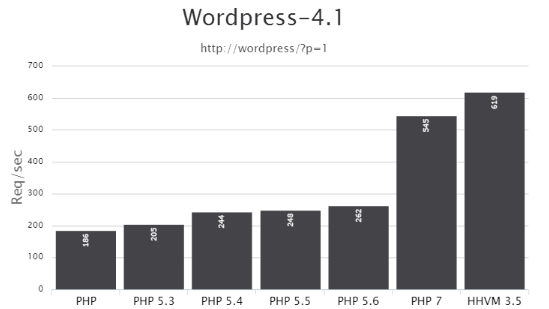
The most important novelty was the change of the interpreter core: now it is called PHPNG (Next Generation). Thanks to PHPNG, the script processing speed increased by almost a factor of two compared to PHP 5.x. A more efficient memory manager also appeared.
The speed increase is clearly visible in practice in this image. And for WordPress, the speed gain looks like this:

Syntactic novelties of PHP 7:
$a ?? '' — isset and value retrieval
Wiki: Null Coalesce Operator
The new NULL coalescing operator ?? is a shorthand for checking isset and retrieving the value if the check passes.
This check was often needed in the ternary operator ?::
// Will get the value of $_GET['foo'] if the variable is set or not empty, otherwise will get 'default'
$foo = $_GET['foo'] ?? 'default';

// The equivalent postion of this
$foo = isset($_GET['foo']) ? $_GET['foo'] : 'default';
// or this
$foo = @ $_GET['foo'] ?: 'default';

// convenient check when retrieving a $_GET parameter
if( $_GET['foo'] ?? 0 ){ }
// earlier written as
if( isset($_GET['foo']) && $_GET['foo'] ){ }
Also, you can chain checks:
$foo = $_GET['foo'] ?? $_POST['foo'] ?? 'default';
// returns: $_GET['foo'], if not set then $_POST['foo'], if not set then 'default'
$a <=> $b — three-way comparison: greater, equal, less
Wiki: Combined Comparison (Spaceship) Operator
The new comparison operator <=> — the "spaceship operator". Compares 2 variables and returns the comparison result as a number:
-1— if the first operator symbol is the match for the comparison0— if the second symbol matches1— if the third symbol matches
// Numbers
echo 1 <=> 1; // 0
echo 1 <=> 2; // -1
echo 2 <=> 1; // 1

// Decimal numbers
echo 1.5 <=> 1.5; // 0
echo 1.5 <=> 2.5; // -1
echo 2.5 <=> 1.5; // 1

// Strings
echo "a" <=> "a"; // 0
echo "a" <=> "b"; // -1
echo "b" <=> "a"; // 1
| Operator | Equivalent <=> |
|---|---|
$a < $b |
($a <=> $b) === -1 |
$a <= $b |
($a <=> $b) === -1 || ($a <=> $b) === 0 |
$a == $b |
($a <=> $b) === 0 |
$a != $b |
($a <=> $b) !== 0 |
$a >= $b |
($a <=> $b) === 1 || ($a <=> $b) === 0 |
$a > $b |
($a <=> $b) === 1 |
Convenient for use in usort():
usort( $products, function( $product1, $product2 ){
	return $product1->price() <=> $product2->price();
} );
You can use this hack to avoid nested ternary operators:
$count = 1;

// this
$class = ( $count === 0 ) ? 'null' : ( $count > 0 ? 'plus' : 'minus' ); // plus

// can be written as
$class = [ 'minus', 'null', 'plus' ][ ( $count <=> 0 ) + 1 ]; // plus
define( 'FOO', [1,2] ); — array in a define constant
Constants can contain arrays since PHP 5.6 as well. But back then they could be passed only with the keyword const. Now they can also be specified via define().
define('ANIMALS', ['dog', 'cat', 'bird']);

echo ANIMALS[2]; //> bird
use name\space\{A, B, C as c}; — grouping of imports
Wiki: Group Use Declarations
Now for a concise syntax, you can group imports into our namespace:
// PHP 7

use some\namespace\{ ClassA, ClassB, ClassC as C };
use function some\namespace\{ fn_a, fn_b, fn_c };
use const some\namespace\{ CONST_A, CONST_B, CONST_C };

// same as before PHP 7

use some\namespace\ClassA;
use some\namespace\ClassB;
use some\namespace\ClassC as C;

use function some\namespace\fn_a;
use function some\namespace\fn_b;
use function some\namespace\fn_c;

use const some\namespace\CONST_A;
use const some\namespace\CONST_B;
use const some\namespace\CONST_C;
int, float, bool — new function/method parameter types
Auto type checking of data passed to functions/methods, known as “type hinting,” continues to evolve and now understands scalars: int, float, bool, string. Previously only types like array, class name, or callable were understood (since 5.4).
Example:
function foo( int $a, bool $b, callable $c, array $d, WP_Post $e ) {
	return var_dump( $a, $b, $c, $d, $e );
}

foo( 1, true, 'trim', array(1), get_post(1) );

/* outputs:
int(1)
bool(true)
NULL
array(1) { [0]=> int(1) }
object(WP_Post)#2660 (24) { ...object data... }
*/

// if an incorrect type is specified:
foo( 'foo', true, 'trim', array(1), get_post(1) );
// We get a Fatal error: Argument 1 passed to A::foo() must be of the type integer, string given
Strong typing mode
If the type int is specified and you pass a string '123', the check will still pass, and PHP will convert the string to a number.
function func( int $num ){
	var_dump( $num );
}
func('123'); //> int(123)
But what if you need to get exactly the number 123? For this you can enable strict typing mode by placing at the very beginning of the file this line:
declare(strict_types=1);
This declaration must be the first line in the file, before any code executes. It affects only the file and only the calls and return values in that file.
Note: if strict typing is declared in file X but not in file Y, and a function from file X is called in file Y, the call to that function will not be subject to strict typing!
Read about typing an article on Habr and this other interesting article.
int, float, bool, array — return types of functions/methods
Declaring the accepted type is possible since PHP 5.3. But declaring what type a function/method should return is available only since PHP 7. Here all types are understood: string, int, float, bool, array, callable, self (in methods), parent (in methods), Closure, class name, interface name.
Syntax:
function func( $var ): int{ /* function code */ }
function func( $var ): string{  }
function func( $var ): float{  }
function func( $var ): bool{  }
function func( $var ): array{  }
function func( $var ): callable{  }
function func( $var ): Closure{  }
function func( $var ): WP_Post{  } // can only return an object of class WP_Post

class A extends B {
	function func( $var ): self{ }
	function func( $var ): parent{ }
}
Working examples:
// Example 1:
function func( $var ): int {
	return $var;
}
echo func( 123 );    //> 123
echo func( 'asfd' ); //> will cause an error: Fatal error: Uncaught TypeError: Return value of func() must be of the type integer, string returned

// Example 2: Closure
function func(): Closure {
	return function( $var ){ return $var .' + 2 = 3'; };
}
echo func()( 1 ); //> 1 + 2 = 3
Return types when inheriting class methods
When inheriting in classes, child methods must have the same return types as in the parent class/interface:
class A {
	function func() : int {
		return 123;
	}
}
class B extends A {
	function func() : string {
		return '123';
	}
	// this function declaration will cause an error:
	// Fatal error: Declaration of B::func(): string must be compatible with A::func(): int
	// i.e. the int type must match!
}
Advanced example of how you can write in PHP 7
Here are several novelties at once:
- accepted and return type;
- union and unpacking of parameters with
...; - example of creating an anonymous function with a return type.
function arraysSum( array ...$arrays ): array {
	return array_map( function( array $array ): int {
		return array_sum( $array );
	}, $arrays );
}

print_r(  arraysSum( [1,2,3], [4,5,6], [7,8,9] )  );
/*
Output:
Array
(
	[0] => 6
	[1] => 15
	[2] => 24
)
*/
foo()(), $a::$b::$c, $$foo->bar — unified syntax: LEFT TO RIGHT
An important novelty! Now accesses to complex variables are analyzed sequentially LEFT TO RIGHT.
Examples of new capabilities:
// you may omit combining brackets
$foo()['bar']()
[ $obj1, $obj2 ][0]->prop
getStr()[0]

// supports nesting ::
$foo['bar']::$baz   // > ( $foo['bar'] )::$baz
$foo::$bar::$baz    // > ( $foo::$bar )::$baz
$foo->bar()::baz()  // > ( $foo->bar() )::$baz

// supports nested ()
foo()()        // calls the result of foo() → ( foo() )()
$foo->bar()()  // > ( $foo->bar() )()
Foo::bar()()   // > ( Foo::bar() )()
$foo()()       // > ( $foo() )()

// IIFE JS-like syntax
( function() { ... } )() // IIFE JS syntax
( $obj->closure )()
// etc.
(...)['foo']
(...)->foo
(...)->foo()
(...)::$foo
(...)::foo()
(...)()

// all scalar dereferencing operations
"string"->toLower()
[ $obj, 'method' ]()
'Foo'::$bar
Differences between old and new recognition:
// string             // old understanding       // new understanding
$$foo['bar']['baz']   ${ $foo['bar']['baz'] }   ( $$foo )['bar']['baz']
$foo->$bar['baz']     $foo->{ $bar['baz'] }     ( $foo->$bar )['baz']
$foo->$bar['baz']()   $foo->{ $bar['baz'] }()   ( $foo->$bar )['baz']()
Foo::$bar['baz']()    Foo::{ $bar['baz'] }()    ( Foo::$bar )['baz']()
Old code written using {} for handling variables may not work in the new PHP 7 version.
foreach — changed logic
wiki: Fix "foreach" behavior
Now foreach does not automatically switch the inner pointer of the iterated array:
$arr = [ 1, 2, 3, 4 ];
foreach( $arr as $val ){
	echo key( $arr ) . ' ';
}
// PHP 5.6: 1 1 1 1
// PHP 7.0: 0 0 0 0

$arr = [ 1, 2, 3, 4 ];
foreach( $arr as & $val ){
	echo key( $arr ) . ' ';
}
// PHP 5.6: 1 2 3
// PHP 7.0: 0 0 0 0
Another example of magical behavior in older versions:
$a = [1,2,3];          foreach( $a as $v ) { echo current($a) . " "; }
$a = [1,2,3]; $b = $a; foreach( $a as $v ) { echo current($a) . " "; }

// PHP 5.6: 2 2 2 1 1 1
// PHP 7.0: 1 1 1 1 1 1
foreach always works with a copy of the array, i.e., the result of foreach will not change when the original array is changed inside foreach:
$arr = [ 1, 2, 3, 4 ];
foreach( $arr as $val ){
	echo "$val ";
	unset( $arr[1] );
}

// PHP 5.6: 1 2 3 4
// PHP 7.0: 1 2 3 4
HOWEVER, if the array value is passed by reference, foreach always works with the original array, i.e. changing the array inside foreach will change the foreach result:
$arr = [ 1, 2, 3, 4 ];
foreach( $arr as & $val ){
	echo "$val ";
	unset( $arr[1] );
}

// PHP 5.6: 1 3 4
// PHP 7.0: 1 3 4
$class = new class{} — anonymous classes
Wiki: Anonymous Classes
Anonymous classes allow doing the same as ordinary classes: passing data to the constructor, extending other classes, using traits, etc.
$class = new class {
	public function echo( $msg ){
		echo $msg;
	}
};
$class->echo('Hello!'); // will print: "Hello!"
Class extension works as expected:
class Foo {}

$child = new class extends Foo {};

var_dump( $child instanceof Foo ); //> true
Using traits:
trait Foo {
	public function method() {
	  return "bar";
	}
}

$class = new class {
	use Foo;
};

var_dump( $class->method() ); //> string(3) "bar"
Read more about anonymous classes in the documentation.
yield ... return 99; — returning expressions in generators
Wiki: Generator Return Expressions
Generators appeared in PHP 5.5. But there you could use return only to terminate the generator. Now return can return an expression (value/array/another generator), and not only NULL. But this can be done only at the end of the generator.
You can obtain the returned value using the getReturn() method, but only after the generator finishes.
The ability to explicitly return the last value simplifies working with generators:
you no longer need to check whether the value is the last one, simply call getReturn().
function gen() {
	yield 1;
	yield 2;

	return 3;
}

$gen = gen();

// if the generator has not returned anything yet, calling this line
// echo $gen->getReturn();
// will cause an error: Fatal error: Uncaught Exception: Cannot get return value of a generator that hasn't returned

foreach( $gen as $val ) {
	echo $val;
}

echo $gen->getReturn();

// the result of this code will print: 123
yield from func() — delegation of generators
Wiki: Generator Delegation
Allows splitting a complex generator into several simpler ones.
For this, a new syntax is used: yield from <expr>, where <expr> can be a value (scalar), an array, or another generator.
<expr> will work as long as data is returned, then execution continues in the generator from where <expr> was invoked. See the example:
function gen() {
	yield 1;
	yield from gen2();
	yield 4;
}

function gen2(){
	yield 2;
	yield 3;
}

$gen = gen();

foreach ( $gen as $val ) {
	echo $val;
}

// result: 1234
Example with an array:
function g() {
  yield 1;
  yield from [2, 3, 4];
  yield 5;
}

$g = g();
foreach ( $g as $yielded ) {
	echo $yielded;
}

// outputs: 12345
Example with return from a child generator:
function gen() {
  yield 1;
  $sub_gen = yield from sub_gen();
  yield 4;

  return $sub_gen;
}

function sub_gen() {
  yield 2;
  yield 3;

  return 42;
}

$gen = gen();
foreach( $gen as $val ) {
	echo $val;
}
echo ' - '. $gen->getReturn();

// outputs: 1234 - 42
Other PHP 7.0 additions
-
The constructor syntax in PHP 4 style (the constructor method name matches the class name) is now deprecated.
-
Static calls of non-static methods using
::are now deprecated. -
list()— changed behavior. In PHP 5, list() assigned values starting from the rightmost element of the given array; in PHP 7, the assignments occur from the leftmost element. Also in PHP 5,list()could split strings into characters, in PHP 7 it does not work with strings at all...// Example 1: reverse reading // If ordinary variables are used, there is no difference list( $a, $b, $c ) = ['apple', 'bannana', 'cherry', 'damson']; var_dump( $a, $b, $c ); // php5 and php7 return: apple bannana cherry // But if you assign array elements, the order will differ $arr = []; list( $arr['a'], $arr['b'], $arr['c'] ) = ['apple', 'bannana', 'cherry', 'damson']; print_r( $arr ); /* PHP 7 Array ( [a] => apple [b] => bannana [c] => cherry ) PHP 5 Array ( [c] => cherry [b] => bannana [a] => apple ) */ // Example 2: splitting strings $str = 'ab'; list( $a, $b ) = $str; var_dump( $a, $b ); // In PHP 7: NULL NULL // In PHP 5: string(1) "a" string(1) "b"
-
Unicode control (escape) sequences support. That is, in strings
""and heredoc you can use the\uXXXXconstruct to create a Unicode character. Like this:echo "\u{1F602}"; //> ? -
The IntlChar class. Contains methods and constants for working with Unicode.
printf('%x', IntlChar::CODEPOINT_MAX); // 10ffff echo IntlChar::ord('@'); //> 64 echo IntlChar::chr( 64 ); //> @ echo "\u{1F602}"; //> ? echo IntlChar::ord("\u{1F602}"); //> 128514 echo IntlChar::chr( 128514 ); //> ? -
The
intdiv()function — divides 2 numbers and returns only the integer part of the division:echo intdiv(10, 3); //> 3 echo intdiv(5, 2); //> 2
-
session_start()can take parameters (standard session settings from php.ini):session_start(['cache_limiter' => 'private']);
-
The
preg_replace_callback_array()function — an alternative to preg_replace_callback(). It allows passing the callback as an array['/regex'/ => callback, ...]:$str = 'a1a2a3'; $array = [ '~[0-9]~' => function ( $m ){ return $m[0] * 2; }, '~a~' => function ( $m ){ return $m[0] . '-'; } ]; echo preg_replace_callback_array( $array, $str ); //> a-2a-4a-6 -
You can use global keywords in method names. Previously you could not name a method with words like: with/new/for/foreach/... — this would cause an error. Now you can:
Class::new('Project Name');
$class->for('purpose here');
metadata_lines_are_truncated
Where did PHP 6 go?
Died before birth... In the core of PHP 6, they planned to implement full Unicode support, but the idea turned out to be too ambitious, and the amount of work was too large. By the time it became clear, there were already many articles written about PHP 6. To avoid confusion, because the new version started pursuing completely different goals (performance) and differed significantly in concept from PHP 6, it was decided to skip PHP 6. Another reason was the presence of a substantial amount of unfinished code in the PHP repository, which they decided not to touch, so as not to bother it either...
PHP 5.6
-
Wiki: PHP 5.6
-
php.net: New features of PHP 5.6.
- habrahabr.ru: Other PHP 5.6 features not related to syntax.
const PLUS = 1 + 2; — scalar expressions in constants/properties/function arguments
Now it is possible to specify primitive PHP expressions in constant values.
More precisely, the feature concerns not only constants, but everything where PHP previously expected a static value. Now instead of static value you can specify an expression of numbers/strings/constants. If more precise, the PHP expression can be specified: in constants/class properties and in the default value of a function argument.
const ONE = 1;
const TWO = ONE * 2;

class C {
	const THREE = TWO + 1;
	const ONE_THIRD = ONE / self::THREE;
	const SENTENCE = 'The value of THREE is '. self::THREE;

	public function f( $a = ONE + self::THREE ){
		return $a;
	}
}

echo (new C)->f() .' - '. C::SENTENCE; //> 4 - The value of THREE is 3
const ARR = ['a', 'b']; — a constant can hold an array
It became possible to hold arrays in a constant:
const ARR = ['a', 'b'];

echo ARR[0]; //> a
func( ...$args ) or func( ...[2, 3] ) — packing/unpacking function parameters
Wiki: Argument Unpacking
The operator ... is also called the “Splat Operator”, the “Scatter operator” or the “Spread operator”.
When we did not know in advance how many parameters a function could receive, we had to process the passed parameters inside the function using special functions: func_num_args(), func_get_arg(), func_get_args().
Packing transmitted parameters into a single variable when declaring a function
Now they are not needed and we can receive all parameters in a single variable; to do this, place the operator ... before that variable:
function sum( ...$numbers ){
	$plus = 0;
	foreach( $numbers as $n ){
		$plus += $n;
	}
	return $plus;
}

echo sum( 1, 2, 3 ); //> 6
Another example:
function func( ...$numbers ){
	print_r( $numbers, 1 );
}

func( 1, 2, 3 );
/*
We get:
Array
(
	[0] => 1
	[1] => 2
	[2] => 3
)
*/
Unpacking transmitted parameters when calling a function
Now using the splat operator ..., you can specify function parameters directly from array values:
function plus( $a, $b, $c ){
	return $a + $b + $c;
}

$array = [ 2, 3 ];
echo plus( 1, ...$array ); //> 6

// or like this
echo plus( 1, ...[ 2, 3 ] ); //> 6
Replacing the call_user_func_array() function
Now call_user_func_array( $callback, $param_arr ), which is usually not the fastest, can be replaced like this:
$params = [ 1, 2, 3 ];
$callback( ...$params );
Unpacking into an array
Associative arrays cannot be unpacked.
// $arr1 = [ 'key' => 1 ] would cause a Fatal error
$arr1 = [ 'foo', 100 ];
$arr2 = [ 'val', 200 ];
$arr = [ 1,89, 'str', ...$arr1, 22 ,...$arr2, 456, 52 ];

print_r( $arr );

/*
Array
(
	[0] => 1
	[1] => 89
	[2] => str
	[3] => foo
	[4] => 100
	[5] => 22
	[6] => val
	[7] => 200
	[8] => 456
	[9] => 52
)
*/
** — exponentiation operator
Until PHP 5.6, to raise a number to a power you had to use the pow(2,2); function, and now there is the ** operator:
// example 1
echo $a = 2 ** 2; //> 4

// example 2
$a = 2;
echo $a **= 2; //> 4

// example 3
echo $a = 2 ** 3 ** 2; //> 512 = 2^9
use function and use const — importing functions and constants into the namespace
Now it is possible using the use keyword to import functions or constants from another namespace into ours:
namespace our\space {
	const FOO = 42;
	function func() { echo __FUNCTION__; }
}

namespace my\space {
	use const our\space\FOO;
	use function our\space\func;

	echo FOO .' - '. func(); //> 42 - our\space\func
}
PHP 5.5
- Wiki: PHP 5.5
[1,3,4][2], "foobar"[2] — dereferencing created arrays/strings
echo array(1, 2, 3)[0]; // 1
echo [1,3,4][2];        // 4
echo "foobar"[0]        // f

// this can be handy for quick generation:
echo 'abcdefghijk'[ rand(0,10) ]; // will get one of the letters: 'abcdefghijk'
empty() — can be applied to results of functions and expressions
Previously empty() could take only variables; now you can pass expressions themselves without needing to store the result in a separate variable:
empty( $object->get() );
list() in foreach
In foreach it became possible to use list():
$array = [
	[1, 2],
	[3, 4],
];

foreach( $array as list($a, $b) ){
	echo $a;
	echo $b;
}
// result: 1234
finally — in try/catch construction
You can throw and catch exceptions with PHP 5. This approach allows controlling code execution if there is a suspicion that something might go wrong.
And since version 5.5, a third block finally was added to this construct. The finally block is executed always after the try/catch construct finishes. It runs even when the try code threw a fatal error:
try {
	echo 'We are doing something here... ';
	// throw
	throw new Exception('Catch me! ');
}
// catch
catch( Exception $e ){
	echo $e->getMessage(); // will print: Catch me!
}
finally {
	echo 'And this is always printed!';
}
Finally is useful for convenience and additional capabilities. With it you can write less code and, for example, conveniently free up memory when needed.
A couple of demonstration examples:
Less code
Suppose we need to perform a function close() in any case, whether an exception was thrown or not:
try {
	my_function();
}
catch( Exception $e ){
	// close(); // this line would be needed without finally
	echo $e->getMessage(); // will print: Catch me!
}
finally {
	close();
}
//close(); // this line would be needed without finally
More capabilities
Suppose we opened a database connection before executing code and there is a possibility that the code will throw an error and the open connection will not close, and we need to close it in any case. finally comes in handy:
$db = mysqli_connect();

try {
   my_function( $db ); // the function's result may cause a fatal error...
}
// the exception may be left unhandled
finally {
   mysqli_close($db);
}
- Read more about finally in article on Habr (Habrahabr) at https://habrahabr.ru/post/149314/.
Class::class — to get class name in namespaces
A keyword class appeared for classes, which outputs the class name. In normal mode we don’t need it, but when working with namespaces — it’s convenient:
namespace test;
class A {}

echo A::class; //> test\A
yield — creation of generators
In simple terms: yield is like return; it also yields a value, but it doesn't terminate the function; it pauses it until the next value is requested. This makes generating generators more convenient.
Example of a generator:
function generator() {
	for( $i = 1; $i ≤ 3; $i++ ){
		yield $i; // emit a value
	}
}

foreach( generator() as $value ){
	echo "$value ";
}
// outputs: '1 2 3 '
How it actually works?
yield returns a special object — Generator. When the function generator() is called inside a loop, for example foreach, PHP will execute the function up to the first occurrence of the word yield, at which PHP will pause the function, remember the position, and yield a value (the Generator object). Then foreach will process that value and call the next() method on the Generator object. PHP will resume executing the function generator(), but starting from the last position, and again, until the yield word, which will yield the Generator object again. The loop will be interrupted when the function generator() reaches the end (does not return yield), or if it is interrupted with return;.
Example of passing a generator into a variable (repeated call in this case does not work):
function generator() {
	for( $i = 1; $i ≤ 3; $i++ ){
		yield $i; // emit a value
	}
}

$gen = generator();

foreach( $gen as $value ){
	echo "$value ";
}
// prints: '1 2 3 '

// Fatal error: Uncaught Exception: Cannot traverse an already closed generator
foreach( $gen as $value ){
	echo "$value ";
}
Example of a generator that returns a pair: key/value:
function generator( $input ){
	foreach( explode('.', $input) as $part ){
		list( $num, $name ) = explode(' - ', $part );

		yield $num => trim($name);
	}
}

$input = '1 - one. 2 - two. 3 - three';

foreach( generator( $input ) as $num => $name ){
	echo "$num ($name) ";
}
Brief about generators
- Do not add new language features
- Faster
- Resuming a generator happens from the last yield
- You can send values and exceptions into a generator (via throw())
- Generators are one-way; you cannot go back
- Less code in most cases, simpler constructs
-
To better understand generators, read this article on Habrahabr: https://habrahabr.ru/post/189796/
- Details about generators in the documentation (English)
API for password hashing
habrahabr.ru: API for password hashing in PHP 5.5.
Now PHP out of the box offers a proper way to hash passwords. The new password hashing API provides four functions:
-
password_hash()— used to hash a password. In WP there is a dedicated function wp_hash_password().$hash = password_hash( $passwod, PASSWORD_DEFAULT );
-
password_verify()— used to verify a password against a hash. In WP there is a dedicated function wp_check_password().if( password_verify( $password, $hash ) ){ // Success! } -
password_needs_rehash()— used to check whether it is necessary to create a new hash. password_get_info()— returns the name of the hashing algorithm and various parameters used during hashing.
PHP 5.4
- Wiki: PHP 5.4
<?= — short echo syntax always works
Wiki: https://wiki.php.net/rfc/shortags
The short syntax being discussed is <?= instead of <?php echo.
For the long and short syntax to work in versions below 5.4, the short_open_tag option in php.ini had to be enabled.
Example of long and short syntax:
<a href="#"><?php echo $page ?></a>
<a href="#"><?= $page ?></a>
[1,2] — array syntax, without the word array
wiki: Short syntax for arrays
$a = [ 1, 2, 3, 4 ];
$a = [ 'one' => 1, 'two' => 2, 'three' => 3, 'four' => 4 ];
trait Class {} — traits
A trait is an analogue of a class that contains methods. It is needed for “mixin” into an existing class so that the trait’s methods become methods of the class to which it is added.
Several traits can be specified separated by a comma:
trait TR_A {
	public $var = 'var';
	function foo() { return 'foo'; }
}

trait TR_B {
	function bar() { return 'bar'; }
}

class A {
	use TR_A, TR_B; // mix in

	function hello() { return 'hello A'; }
}

$A = new A();
echo $A->foo();   // foo
echo $A->bar();   // bar
echo $A->hello(); // hello A
echo $A->var;     // var

class B extends A {
	use TR_A, TR_B;

	function hello() { return 'hello B'; }
}

$B = new B();
echo $B->foo();   // foo
echo $B->bar();   // bar
echo $B->hello(); // hello B
Trait precedence
When property/method names collide, the priorities are as follows: the current class has the highest priority, then the trait, and then the extended class. In other words: elements from the current class override elements in the trait, which in turn override inherited elements.
Static access to a trait’s method from a class
When a trait is mixed into a class, its methods become class methods, including static and static access:
trait A {
	static function func(){ echo 'A'; }
}

class B {
	use A;
}

B::func(); //> A
Read more about traits in the documentation
http://php.net/manual/ru/language.oop5.traits.php
foo()[0] — fast array access
Now there is no need to store the array returned by a function/method in a variable and access an element of the array from that variable. You can directly access an element from a function/method:
$foo = func()[0];
$foo = Class::func()[0];
(new Foo)->method() — object element access at creation
$foo = (new Foo)->method();
$foo = (new Foo)->property;
$foo = (new Foo)[0];

// previously it was like
$obj = new Foo;
$foo = $obj->method();
Class::{ 'foo' }() — dynamic method invocation
To call a static class method/property without storing it in a separate variable:
class A {
	static function foo() {
		echo "Hello world!";
	}
 }
 $x = "f";
 A::{ $x .'oo' }();
callable — new type for function/method arguments
Auto-check of transferred data in functions/methods, known as type hinting, continues to develop and now understands the word callable.
Previously, for automatic type checking of a parameter, in the function/method arguments you could specify only: array or the class name.
Now you can also specify: callable — means that the passed argument must be callable, i.e. satisfies is_callable( $arg, false ).
Example:
function func( callable $callback ){
	return true;
}

func('trim'); //> true

func( function(){} ); //> true

$db = new wpdb();
func( array($db, 'query') ); //> true

func('my_trim'); //> fatal error: Argument 1 passed to func() must be callable, string given
@ — improved performance
The @ operator is used to suppress errors of any level. It is generally not recommended to use it, but sometimes it is shorter:
if( @ $_GET['foo'] ) echo 'OK';

// or like this
if( isset($_GET['foo']) && $_GET['foo'] )  echo 'OK';
// used to work faster by about 20 times, now about 5 times
Use @ as rarely as possible and very carefully, because notes and warnings often indicate that the code logic is not correct. For example, I’ve had occasions where I tried to fix a seemingly harmless NOTICE, but analysis shows the error appeared due to incorrect logic that changed during code expansion...
PHP 5.3
In PHP 5.3, as in the entire fifth branch of PHP, a new script engine Zend Engine 2.0 is included. Thanks to this, PHP started to run faster by about 15-20%.
- Wiki: PHP 5.3
?: — shorthand for the ternary operator
With PHP 5.3 it became possible not to write the middle part of the ternary operator. The expression expr1 ?: expr3 returns expr1 if expr1 is not empty, and expr3 otherwise.
Ternary — consisting of three parts, components.
$a = $expr1 ?: $expr3;
// equivalent to:
$a = $expr1 ? $expr1 : $expr3;
Example of the ternary operator:
// full form
if ( $a > 100 )
	$result = "Greater";
else
	$result = "Lower";

// short form
$result = $a > 100 ? "Greater" : "Lower";
In the short form there is also a performance nuance, for example:
// full form
if ( get_post_meta(25, 'meta_key', 1) )
	echo esc_html( get_post_meta(25, 'meta_key', 1) );
else
	echo 'Meta field does not exist';

// short form
echo esc_html( get_post_meta(25, 'meta_key', 1) ?: 'Meta field does not exist' );
In the full form the function get_post_meta() is invoked 2 times. In the short form, once, and if it returns something, the value is immediately passed to the second argument of the ternary operator: no extra variables are needed...
$func = function() use (){ } — anonymous (lambda) functions
Lambda functions are also called “anonymous functions” because they do not have a name.
Lambda functions are closures — a special kind of function defined inside another function and created each time it is executed. Syntactically it looks like a function entirely contained within the body of another function. As far as I understand, any function is a closure of the current context, i.e., the context will not be cleared while the function is running. But if a lambda function is inside a function, it becomes a closure, and if variables from the outer function are passed to it, they will not be cleared until the inner function finishes running...
In earlier versions, anonymous functions were created using the create_function() function.
Example of creating an anonymous function for sorting with usort():
$arr = array(3, 2, 5, 6, 1);

usort( $arr, function($a, $b) {
	if ( $a == $b )
		return 0;

	return ( $a > $b ) ? -1 : 1;
});
Another feature of lambda functions is lexical binding (using variables from the current scope) via the use operator:
$var = 'Hello, Bear!';
$func = function() use ( $var ) { echo $var; };
$func(); //> Hello, Bear!
Variables are passed by value, but you can pass a reference to a variable by using &:
$var = 'Hello, Bear!';
$func = function() use ( & $var ) { $var = $var .' We’re visiting!'; };
$func(); // call
echo $var; //> Hello, Bear! We’re visiting!
method()->var — obtaining an object from a method/function
This is convenient:
$object->method()->method()->method();
$object->method()->method()->member = 5;
In PHP below 5.3 it was written like this:
$tmp = & $object->method();
$tmp = & $tmp->method();
$tmp->method();
<<<'DOC' — NOWDOC support
In PHP 5.3 you can use the analog of HEREDOC, which is called NOWDOC. The feature is that inside it variables remain plain text, as if you wrote them in a single-quoted string: 'text $foo':
$foo = 'Summer';

// HEREDOC was in 5.2
$str = <<<DOC
	Text with variable '$foo'
DOC;

echo $str; // Text with variable 'Summer'

// NOWDOC appeared in 5.3
$str = '<<<DOC'
	Text with variable '. $foo .'
DOC;

echo $str; // Text with variable '. $foo .'
namespace — namespace support
Namespaces are needed to avoid conflicts when function/class/variable/constant names coincide. In short: identical names in different namespaces are different names.
The example below should explain almost everything that is possible in namespaces. For details, head to the official documentation here.
__DIR__ — new magic constant
__DIR__ contains the directory of the current file — the file in which it is used. Returns the full path to the current file without a trailing slash, except for the root directory.
__DIR__ can be replaced with:
dirname(__FILE__)
$class::$foo — dynamic class reference
This provides dynamic access to static methods/properties of a class:
class C {
	static $foo = 'foo';
}

$class = 'C';
echo $class::$foo; //> foo
const — keyword for creating constants outside classes
A simple example where everything is clear:
define('SHORTINIT', 'true');

// now you can declare a constant like this:
const SHORTINIT = 'true';
Unlike define(), such constants must be declared in the top-level scope, because they are defined at compile time. This means you cannot declare them inside functions/loops/expressions if or try/catch blocks.
static::method() — late static binding
Static binding of a method/property ties it to the class from which it is called, not the class in which it is defined. See the example:
class A {
	static function who() {
		echo __CLASS__;
	}

	static function test1() {
		self::who();
	}

	static function test2() {
		static::who(); // late static binding
	}
}

class B extends A {
	static function who() {
		echo __CLASS__;
	}
}

echo B::test1(); //> A
echo B::test2(); //> B
echo B::who(); //> B
Read more about late static binding in the documentation: http://php.net/manual/ru/language.oop5.late-static-bindings.php.
goto hell; — goto operator
Used to jump to another part of the program. The target label is indicated by a label followed by a colon; after the goto operator, the desired label for the jump is specified.
The target label must be in the same file and the same context. That is, you cannot exit the function or method, so you cannot jump inside any function.
You also cannot jump into any loop or switch statement. But you can exit from any loop, so "goto" is convenient as a replacement for multi-level breaks.
Example of using goto:
function rabbit(){
	$i = 1;
	$out = '';
	start: $out .= ($i > 1 ? '-' : '' ) .$i;

	if( $i++ < 5 ){ goto start; }

	return $out . ' the rabbit went for a walk';
}

echo rabbit(); //> 1-2-3-4-5 rabbit went for a walk
Example of using goto inside a loop:
for( $i=0, $j=50; $i<100; $i++ ) {
	while( $j-- ) {
		if( $j==17 ) goto end;
	}
}
echo "i = $i"; // will be skipped

end: echo 'j reached 17';
__callStatic(), __invoke() — magic methods
__callStatic() — fires when a non-existent static method is called: Foo::bar():
class A {
	static function __callStatic( $name, $args ){
		return $name .' '. print_r( $args, 1 );
	}
}
echo A::no_matter_what('bar');
/* Output:
no_matter_what Array
(
	[0] => bar
)
*/
__invoke() — fires when an object is invoked as a function: $obj():
class A {
	function __invoke( $var ){
		var_dump( $var );
	}
}
$obj = new A;
$obj('foo'); //> string(3) "foo"