Plugin translation (localization)
Democracy Poll- Plugin translation (localization)
- Changelog
Steps to translate into any language:
- Install Poedit
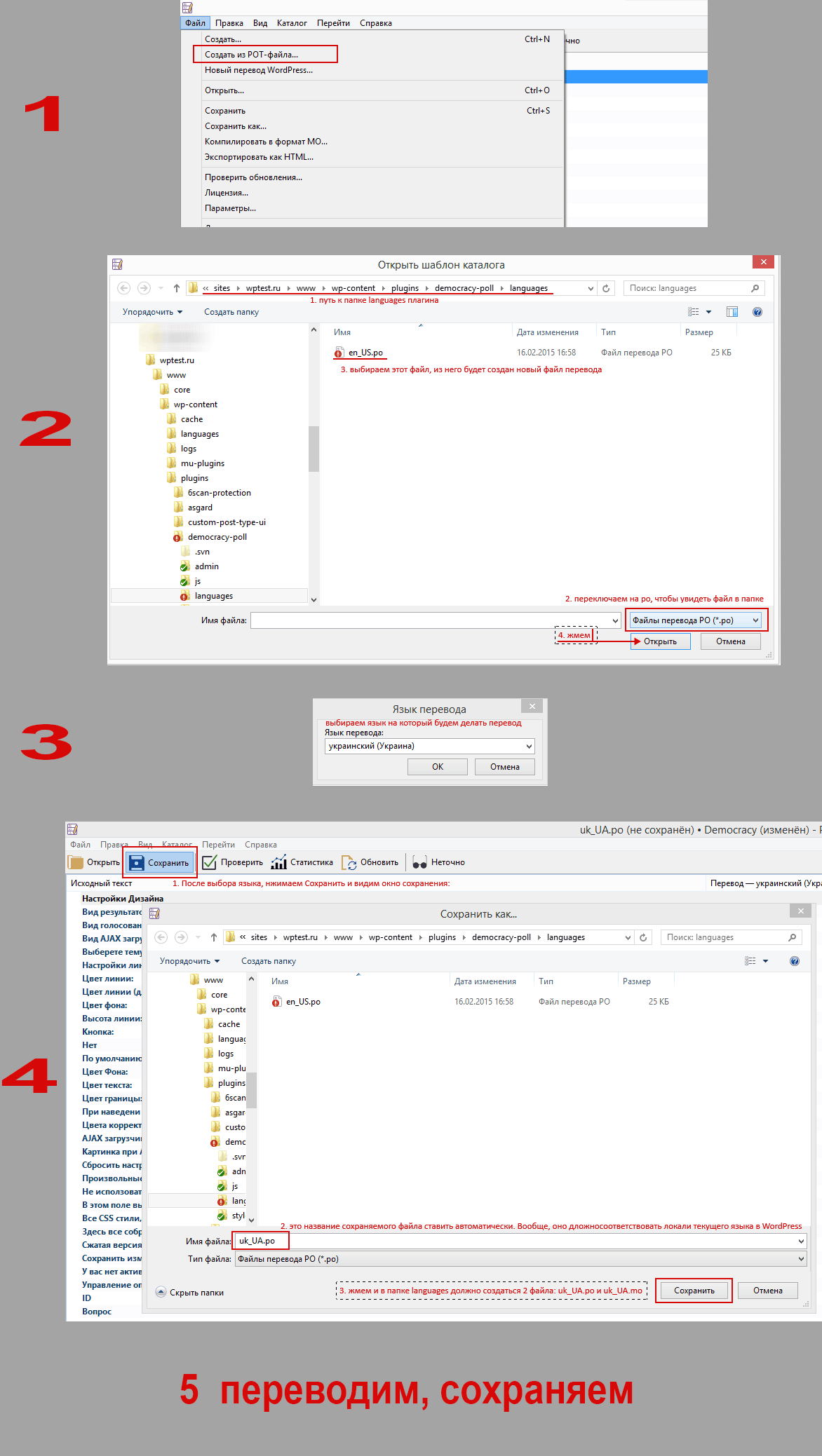
- Launch the program and go to the menu:
File > NEW form POT/PO file... - In the dialog window that opens, go to the plugin folder
lang, switch to displaying PO files (they are not visible by default), and select the fileru_RU.po. ClickOpenin the dialog window. - Select the language you will be translating into and click
OK. Now, just in case, update all translated strings: in the Poedit toolbar, click theUpdatebutton. -
Translate all strings and click the
Savebutton. And save the translated file in the plugin folderlang.plugin name should match the locale of your translation. See the list of locales here: http://svn.automattic.com/wordpress-i18n/.
- Translation is ready! The translation should enable automatically.
When updating the plugin, if there were changes and non-translated strings appeared, you need to open Poedit again, open the required .po file in it, and click "Update". All non-translated strings will appear in the translation file.