Registering Fields via PHP
Advanced Custom Fields (ACF)- All ACF Functions
- All ACF Hooks
- Registering Fields via PHP
- Adding Fields to a Specific Category
- Adding Fields to Taxonomy Terms
- Local JSON Function
In this article we will look at how to register fields and field groups in PHP, for example in the functions.php file, rather than via the ACF visual editor.
Pros of creating fields directly in PHP are useful:
- allows developers to avoid data desynchronization when working across different dev/staging/prod environments.
- reduces the number of database requests.
To support identical data (synchronization) across different environments, you can also use acf-json. Its drawback is that the data is still stored in the DB and you need to update it manually when updating the json file.
Notes
-
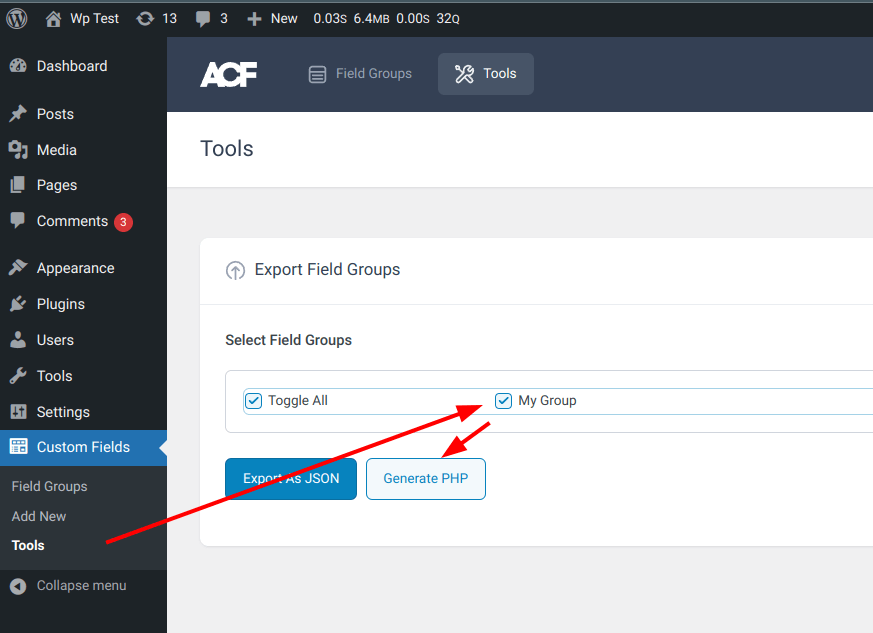
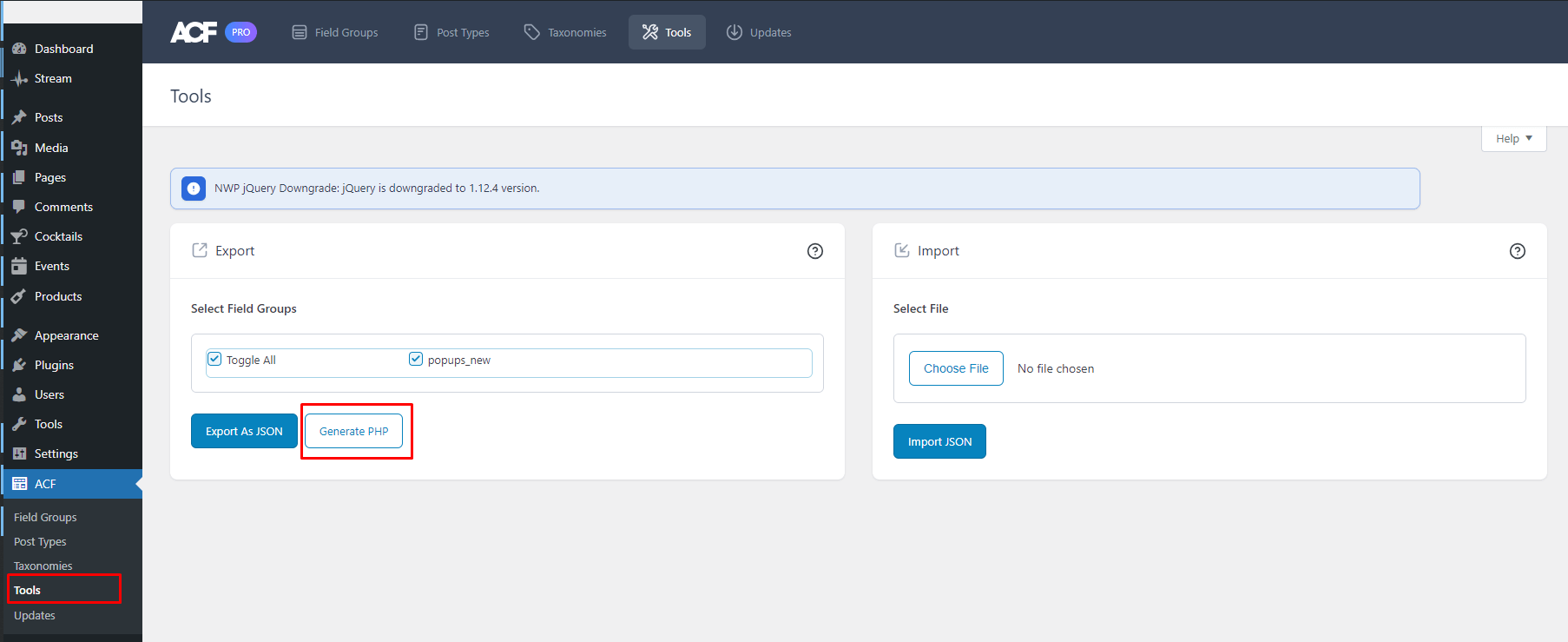
ACF can generate ready-made PHP code for creating fields via PHP. To do this, go to the Tools page—there is Import / Export:
-
The key of each field group and field must be unique. A key is an identifier for ACF to search, save, and load data. If there are duplicate keys for a group or field, the later key will take priority.
- Field groups and fields created via code will not be visible in the admin area.
Functions
Below is the list of functions that will be used in the examples below. You can find these and other functions in the file /acf/includes/local-fields.php.
| Function | Description |
|---|---|
| acf_add_local_field_group( $field_group ) | Registers an ACF field group and adds its fields to local storage. |
| acf_add_local_field( $field, $prepared ) | acf_add_local_field |
| acf_get_local_field( $key ) | acf_get_local_field |
| acf_remove_local_field( $key ) | acf_remove_local_field |
Examples
The group and field creation functions do not necessarily need to be called on the acf/init hook. However, this is the recommended approach that was added in ACF v5.2.7. This registration will not cause PHP errors if the plugin is deactivated.
Minimal code
This example shows how to add a group and fields to it.
Each field contains multiple settings, which can be removed to minimize the code. Missing fields will be filled with default values.
add_action( 'acf/init', 'my_acf_init' );

function my_acf_init() {

	acf_add_local_field_group( [
		'key'      => 'group_1',
		'title'    => 'My Group',
		'fields'   => [
			[
				'key'   => 'field_1',
				'label' => 'Sub Title',
				'name'  => 'sub_title',
				'type'  => 'text',
			],
		],
		'location' => [
			[
				[
					'param'    => 'post_type',
					'operator' => '==',
					'value'    => 'post',
				],
			],
		],
	] );
}
Full code
add_action( 'acf/init', 'my_acf_init' );

function my_acf_init() {

	acf_add_local_field_group( [
		'key'    => 'group_1',
		'title'  => 'My Group',
		'fields' => [
			[
				'key'               => 'field_1',
				'label'             => 'Sub Title',
				'name'              => 'sub_title',
				'type'              => 'text',
				'prefix'            => '',
				'instructions'      => '',
				'required'          => 0,
				'conditional_logic' => 0,
				'wrapper'           => [
					'width' => '',
					'class' => '',
					'id'    => '',
				],
				'default_value'     => '',
				'placeholder'       => '',
				'prepend'           => '',
				'append'            => '',
				'maxlength'         => '',
				'readonly'          => 0,
				'disabled'          => 0,
			],
		],
		'location' => [
			[
				[
					'param'    => 'post_type',
					'operator' => '==',
					'value'    => 'post',
				],
			],
		],
		'menu_order'            => 0,
		'position'              => 'normal',
		'style'                 => 'default',
		'label_placement'       => 'top',
		'instruction_placement' => 'label',
		'hide_on_screen'        => '',
	] );
}
Separate creation of groups and fields
You can add a group and a field separately. This allows you to define the field as a variable and add it to multiple field groups.
Note that in this case for field you need to specify the parent parameter, which matches the key of the field group or another parent field (repeater / flexible content). When fields are registered together with a group, ACF sets parent automatically.
add_action( 'acf/init', 'my_acf_init' );

function my_acf_init() {

	acf_add_local_field_group( [
		'key'      => 'group_1',
		'title'    => 'My Group',
		'fields'   => [],
		'location' => [
			[
				[
					'param'    => 'post_type',
					'operator' => '==',
					'value'    => 'post',
				],
			],
		],
	] );

	acf_add_local_field( [
		'key'    => 'field_1',
		'label'  => 'Sub Title',
		'name'   => 'sub_title',
		'type'   => 'text',
		'parent' => 'group_1',
	] );
}
Group (arguments)
Function: acf_validate_field_group().
Below is the list of available settings for a group. The full current list of parameters can be viewed when creating a group and a field in the admin.
$group = [
	'key'      => 'group_1',
	'title'    => 'My Group',
	'fields'   => [],
	'location' => [
		[
			[
				'param'    => 'post_type',
				'operator' => '==',
				'value'    => 'post',
			],
		],
	],
	'menu_order'      => 0,
	'position'        => 'normal',
	'style'           => 'default',
	'label_placement' => 'top',
	'hide_on_screen'  => '',
	'instruction_placement' => 'label',
];
- key(string)
- Unique identifier for field group. Must begin with
group_.
Default: 'group_' . acf_slugify( $field_group['title'], '_' ) - title(string)
- Visible in metabox handle
Default: '' - fields(array)
- An array of fields
Default: [] - location(array)
An array containing "rule groups", where each "rule group" is an array containing "rules". Groups are processed as "OR" with each other, and rules within groups as "AND".
'location' => [
	// rule group (considered OR)
	[
		// rule (considered AND)
		[
			'param'    => 'post_type',
			'operator' => '==',
			'value'    => 'post',
		],
		...
	],
	...
],
The
paramvalue is thenameproperty of the class ACF_Location_*{}. See: acf_register_location_type().attachment comment current_user current_user_role nav_menu nav_menu_item page page_type page_parent page_template post post_type post_category post_format post_status post_taxonomy post_template taxonomy user_form user_role widget block options_page
The
operatorvalue can be:== !=
The
valuedepends on what is specified inparam. See the method of the corresponding class ACF_Location_*{}.page_type > front_page | posts_page | top_level | parent | child page > 123 | ... post > 123 | ... post_type > post | page | ... post_category > category:aciform | category:sub-cat | ... post_taxonomy > category:aciform | post_format:post-aside | post_tag:alignment-2 | ... attachment > image | image/jpeg | audio | video ... comment > post | page | attachment | all current_user > logged_in | viewing_front | viewing_back nav_menu_item > location/primary | 178 | ... current_user_role > author | administrator | ... ...
Default: []
- menu_order(int)
- Field groups are shown from lowest to highest order. Defaults to 0
Default: 0 - position(string)
- Determines the position on the edit screen. Defaults to normal. Choices of 'acf_after_title', 'normal' or 'side'
Default: 'normal' - style(string)
- Determines the metabox style (theme). Defaults to
default. Choices ofdefaultorseamless(requires label_placement=left).
Default: 'default' - label_placement(string)
- Determines where field labels are placed in relation to fields. Defaults to
top. Choices oftop(Above fields) orleft(Beside fields).
Default: 'top' - instruction_placement(string)
- Determines where field instructions are placed in relation to fields. Defaults to 'label'. Choices of
label(Below labels) orfield(Below fields).
Default: 'label' - hide_on_screen(array)
An array of elements to hide on the screen. The metabox specified here is simply hidden via CSS. See: acf_get_field_group_style()
Possible values of the array:
array(
	'permalink',
	'the_content',
	'excerpt',
	'custom_fields',
	'discussion',
	'comments',
	'slug',
	'author',
	'format',
	'page_attributes',
	'featured_image',
	'revisions',
	'categories',
	'tags',
	'send-trackbacks',
);
Default: [] nothing is hidden
- active(bool)
- Whether the group is active or not. Inactive groups will be excluded from the list of groups.
Default: true - description(string)
- Shown in the field group list.
Default: ''
Fields (arguments)
See all core field classes here.
Common parameters
Class: acf_field{}
Below is the list of available common settings for a field. In addition to these common settings, each field type has its own settings listed below.
$field = [
	'key'               => 'field_1',
	'label'             => 'Sub Title',
	'name'              => 'sub_title',
	'type'              => 'text',
	'instructions'      => '',
	'required'          => 0,
	'conditional_logic' => 0,
	'default_value'     => '',
	'wrapper'           => [
		'width' => '',
		'class' => '',
		'id'    => '',
	],
];
- key(string) (required)
- Unique identifier for the field. Must begin with 'field_'.
- label(string) (required)
- Visible when editing the field value.
- name(string) (required)
- Used to save and load data. Single word, no spaces. Underscores and dashes allowed.
- type(string) (required)
- Type of field (text, textarea, image, etc).
- instructions(string)
- Instructions for authors. Shown when submitting data.
Default: '' - required(int)
- Whether or not the field value is required.
Default: 0 - wrapper(array)
An array of additional attributes for the field displayed in the admin.
Example: set the width of a select field:
[
	'key'     => 'target',
	'name'    => 'target',
	'label'   => 'Target',
	'type'    => 'select',
	'choices' => [
		'_self'  => '_self',
		'_blank' => '_blank',
	],
	'wrapper' => [
		'width' => 15,
		'class' => 'some-css-class',
		'id'    => 'some-css-id',
	],
],
Default: []
- default_value(mixed)
- A default value used by ACF if no value has yet been saved.
Default: null - aria-label(string)
- _______
- conditional_logic(mixed)
Conditions to hide or show the current field based on the values of other fields.
To build complex logic, it’s easier to build fields in the ACF UI and see how the
conditional_logicfield should look via export.Example: show the field popup_id only if is_active=true:
[
	'key'  => 'consent_is_active',
	'name' => 'is_active',
	'type' => 'true_false',
	//...
],
[
	'key'  => 'consent_popup_id',
	'name' => 'popup_id',
	//...
	'conditional_logic' =>
		[
			[
				[
					'field'    => 'consent_is_active',
					'operator' => '==',
					'value'    => '1',
				],
			],
		],
],
Example: combinations of
AND(will be shown if all fields match the condition) andOR(will be shown if at least one of the fields matches the condition):// AND [ //... 'conditional_logic' => [ [ [ 'field' => 'consent_include_pages', 'operator' => '==empty', ], [ 'field' => 'consent_is_active', 'operator' => '==', 'value' => '1', ], ], ], ], // OR [ //... 'conditional_logic' => [ [ [ 'field' => 'consent_include_pages', 'operator' => '==empty', ], ], [ [ 'field' => 'consent_is_active', 'operator' => '==', 'value' => '1', ], ] ], ],
Default: 0
separator
See: acf_field_separator{}.
Category: layout.
$separator_field = [
	'type'      => 'separator',
];
message
See: acf_field_message{}.
Cat: layout.
$message_field = [
	'type'      => 'message',
	'key'       => 'field_somekey',
	'label'     => 'Notes Title',
	'message'   => 'Note content',
	'new_lines' => '',              // br|wpautop|0. Default: wpautop
	'esc_html'  => 0,               // 1|0. Default 0. Use or not esc_html() for the content.
];
text, email, password
$text_field = array(

	/* ... Insert generic settings here ... */

	/* (string) Appears within the input. Defaults to '' */
	'placeholder' => '',

	/* (string) Appears before the input. Defaults to '' */
	'prepend' => '',

	/* (string) Appears after the input. Defaults to '' */
	'append' => '',

	/* (string) Restricts the character limit. Defaults to '' */
	'maxlength' => '',

	/* (bool) Makes the input readonly. Defaults to 0 */
	'readonly' => 0,

	/* (bool) Makes the input disabled. Defaults to 0 */
	'disabled' => 0,

);
textarea
$textarea_field = array(

	/* ... Insert generic settings here ... */

	/* (string) Appears within the input. Defaults to '' */
	'placeholder' => '',

	/* (string) Restricts the character limit. Defaults to '' */
	'maxlength' => '',

	/* (int) Restricts the number of rows and height. Defaults to '' */
	'rows' => '',

	/* (new_lines) Decides how to render new lines. Detauls to 'wpautop'.
	Choices of 'wpautop' (Automatically add paragraphs), 'br' (Automatically add <br>) or '' (No Formatting) */
	'new_lines' => '',

	/* (bool) Makes the input readonly. Defaults to 0 */
	'readonly' => 0,

	/* (bool) Makes the input disabled. Defaults to 0 */
	'disabled' => 0,

);
number
$number_field = array(

	/* ... Insert generic settings here ... */

	/* (string) Appears within the input. Defaults to '' */
	'placeholder' => '',

	/* (string) Appears before the input. Defaults to '' */
	'prepend' => '',

	/* (string) Appears after the input. Defaults to '' */
	'append' => '',

	/* (int) Minimum number value. Defaults to '' */
	'min' => '',

	/* (int) Maximum number value. Defaults to '' */
	'max' => '',

	/* (int) Step size increments. Defaults to '' */
	'step' => '',

);
$email_field = array(

	/* ... Insert generic settings here ... */

	/* (string) Appears within the input. Defaults to '' */
	'placeholder' => '',

	/* (string) Appears before the input. Defaults to '' */
	'prepend' => '',

	/* (string) Appears after the input. Defaults to '' */
	'append' => '',

);
url
$url_field = array(

	/* ... Insert generic settings here ... */

	/* (string) Appears within the input. Defaults to '' */
	'placeholder' => '',

);
password
$password_field = array(

	/* ... Insert generic settings here ... */

	/* (string) Appears within the input. Defaults to '' */
	'placeholder' => '',

	/* (string) Appears before the input. Defaults to '' */
	'prepend' => '',

	/* (string) Appears after the input. Defaults to '' */
	'append' => '',

);
color_picker
Doc: https://www.advancedcustomfields.com/resources/color-picker/
See: acf_field_color_picker{}
Cat: jquery
array(
	'type'           => 'color_picker',
	'default_value'  => '',
	'enable_opacity' => false,
	'return_format'  => 'string', // 'string'|'array'
);
wysiwyg
Doc: https://www.advancedcustomfields.com/resources/wysiwyg-editor/
See: acf_field_wysiwyg{}
Category: content
$wysiwyg_field = array(

	/* ... Insert generic settings here ... */

	/* (string) Specify which tabs are available. Defaults to 'all'.
	Choices of 'all' (Visual & Text), 'visual' (Visual Only) or text (Text Only) */
	'tabs' => 'all',

	/* (string) Specify the editor's toolbar. Defaults to 'full'.
	Choices of 'full' (Full), 'basic' (Basic) or a custom toolbar
	https://www.advancedcustomfields.com/resources/customize-the-wysiwyg-toolbars/ */
	'toolbar' => 'full',

	/* (bool) Show the media upload button. Defaults to 1 */
	'media_upload' => 1,

);
oembed
Doc: https://www.advancedcustomfields.com/resources/oembed/
See: acf_field_oembed{}
Category: content
$oembed_field = array(

	/* ... Insert generic settings here ... */

	/* (int) Specify the width of the oEmbed element. Can be overridden by CSS */
	'width' => '',

	/* (int) Specify the height of the oEmbed element. Can be overridden by CSS */
	'height' => '',

);
image
Doc: https://www.advancedcustomfields.com/resources/image/
See: acf_field_image{}
Cat: content
$image_field = array(

	/* ... Insert generic settings here ... */

	/* (string) Specify the type of value returned by get_field(). Defaults to 'array'.
	Choices of 'array' (Image Array), 'url' (Image URL) or 'id' (Image ID) */
	'return_format' => 'array',

	/* (string) Specify the image size shown when editing. Defaults to 'thumbnail'. */
	'preview_size' => 'thumbnail',

	/* (string) Restrict the image library. Defaults to 'all'.
	Choices of 'all' (All Images) or 'uploadedTo' (Uploaded to post) */
	'library' => 'all',

	/* (int) Specify the minimum width in px required when uploading. Defaults to 0 */
	'min_width' => 0,

	/* (int) Specify the minimum height in px required when uploading. Defaults to 0 */
	'min_height' => 0,

	/* (int) Specify the minimum filesize in MB required when uploading. Defaults to 0
	The unit may also be included. eg. '256KB' */
	'min_size' => 0,

	/* (int) Specify the maximum width in px allowed when uploading. Defaults to 0 */
	'max_width' => 0,

	/* (int) Specify the maximum height in px allowed when uploading. Defaults to 0 */
	'max_height' => 0,

	/* (int) Specify the maximum filesize in MB in px allowed when uploading. Defaults to 0
	The unit may also be included. eg. '256KB' */
	'max_size' => 0,

	/* (string) Comma separated list of file type extensions allowed when uploading. Defaults to '' */
	'mime_types' => '',

);
file
Doc: https://www.advancedcustomfields.com/resources/file/
See: acf_field_file{}
Cat: content
$file_field = array(

	/* ... Insert generic settings here ... */

	/* (string) Specify the type of value returned by get_field(). Defaults to 'array'.
	Choices of 'array' (File Array), 'url' (File URL) or 'id' (File ID) */
	'return_format' => 'array',

	/* (string) Specify the file size shown when editing. Defaults to 'thumbnail'. */
	'preview_size' => 'thumbnail',

	/* (string) Restrict the file library. Defaults to 'all'.
	Choices of 'all' (All Files) or 'uploadedTo' (Uploaded to post) */
	'library' => 'all',

	/* (int) Specify the minimum filesize in MB required when uploading. Defaults to 0
	The unit may also be included. eg. '256KB' */
	'min_size' => 0,

	/* (int) Specify the maximum filesize in MB in px allowed when uploading. Defaults to 0
	The unit may also be included. eg. '256KB' */
	'max_size' => 0,

	/* (string) Comma separated list of file type extensions allowed when uploading. Defaults to '' */
	'mime_types' => '',

);
gallery
Pro: PRO Version only.
Doc: https://www.advancedcustomfields.com/resources/gallery/
See: acf_field_gallery{}
Cat: content
$gallery_field = array(

	/* ... Insert generic settings here ... */

	/* (int) Specify the minimum attachments required to be selected. Defaults to 0 */
	'min' => 0,

	/* (int) Specify the maximum attachments allowed to be selected. Defaults to 0 */
	'max' => 0,

	/* (string) Specify the image size shown when editing. Defaults to 'thumbnail'. */
	'preview_size' => 'thumbnail',

	/* (string) Restrict the image library. Defaults to 'all'.
	Choices of 'all' (All Images) or 'uploadedTo' (Uploaded to post) */
	'library' => 'all',

	/* (int) Specify the minimum width in px required when uploading. Defaults to 0 */
	'min_width' => 0,

	/* (int) Specify the minimum height in px required when uploading. Defaults to 0 */
	'min_height' => 0,

	/* (int) Specify the minimum filesize in MB required when uploading. Defaults to 0
	The unit may also be included. eg. '256KB' */
	'min_size' => 0,

	/* (int) Specify the maximum width in px allowed when uploading. Defaults to 0 */
	'max_width' => 0,

	/* (int) Specify the maximum height in px allowed when uploading. Defaults to 0 */
	'max_height' => 0,

	/* (int) Specify the maximum filesize in MB in px allowed when uploading. Defaults to 0
	The unit may also be included. eg. '256KB' */
	'max_size' => 0,

	/* (string) Comma separated list of file type extensions allowed when uploading. Defaults to '' */
	'mime_types' => '',

);
select
$select_field = array(

	/* ... Insert generic settings here ... */

	/* (array) Array of choices where the key ('red') is used as value and the value ('Red') is used as label */
	'choices' => array(
		'red'   => 'Red'
	),

	/* (bool) Allow a null (blank) value to be selected. Defaults to 0 */
	'allow_null' => 0,

	/* (bool) Allow mulitple choices to be selected. Defaults to 0 */
	'multiple' => 0,

	/* (bool) Use the select2 interfacte. Defaults to 0 */
	'ui' => 0,

	/* (bool) Load choices via AJAX. The ui setting must also be true for this to work. Defaults to 0 */
	'ajax' => 0,

	/* (string) Appears within the select2 input. Defaults to '' */
	'placeholder' => '',

);
checkbox
$checkbox_field = array(

	/* ... Insert generic settings here ... */

	/* (array) Array of choices where the key ('red') is used as value and the value ('Red') is used as label */
	'choices' => array(
		'red'   => 'Red'
	),

	/* (string) Specify the layout of the checkbox inputs. Defaults to 'vertical'.
	Choices of 'vertical' or 'horizontal' */
	'layout' => 'vertical',

	/* (bool) Whether to allow custom options to be added by the user. Default false. */
	'allow_custom' => false,

	/* (bool) Whether to allow custom options to be saved to the field choices. Default false. */
	'save_custom' => false,

	/* (bool) Adds a "Toggle all" checkbox to the list. Default false. */
	'toggle' => false,

	/* (string) Specify how the value is formatted when loaded. Default 'value'.
	Choices of 'value', 'label' or 'array' */
	'return_format' => 'value',

);
radio
$radio_field = array(

	/* ... Insert generic settings here ... */

	/* (array) Array of choices where the key ('red') is used as value and the value ('Red') is used as label */
	'choices' => array(
		'red'   => 'Red'
	),

	/* (bool) Allow a custom choice to be entered via a text input */
	'other_choice' => 0,

	/* (bool) Allow the custom value to be added to this field's choices. Defaults to 0.
	Will not work with PHP registered fields, only DB fields */
	'save_other_choice' => 0,

	/* (string) Specify the layout of the checkbox inputs. Defaults to 'vertical'.
	Choices of 'vertical' or 'horizontal' */
	'layout' => 0,

);
true_false
Doc: https://www.advancedcustomfields.com/resources/true-false/
See: acf_field_true_false{}
Cat: choice
$true_false_field = array(

	/* ... Insert generic settings here ... */

	/* (string) Text shown along side the checkbox */
	'message' => 0,

	'default_value' => 0,

	'ui'            => 0,

	'ui_on_text'    => '',

	'ui_off_text'   => '',

);
post (object)
$post_object_field = array(

	/* ... Insert generic settings here ... */

	/* (mixed) Specify an array of post types to filter the available choices. Defaults to '' */
	'post_type' => '',

	/* (mixed) Specify an array of taxonomies to filter the available choices. Defaults to '' */
	'taxonomy' => '',

	/* (bool) Allow a null (blank) value to be selected. Defaults to 0 */
	'allow_null' => 0,

	/* (bool) Allow mulitple choices to be selected. Defaults to 0 */
	'multiple' => 0,

	/* (string) Specify the type of value returned by get_field(). Defaults to 'object'.
	Choices of 'object' (Post object) or 'id' (Post ID) */
	'return_format' => 'object',

);
page (object)
$page_link_field = array(

	/* ... Insert generic settings here ... */

	/* (mixed) Specify an array of post types to filter the available choices. Defaults to '' */
	'post_type' => '',

	/* (mixed) Specify an array of taxonomies to filter the available choices. Defaults to '' */
	'taxonomy' => '',

	/* (bool) Allow a null (blank) value to be selected. Defaults to 0 */
	'allow_null' => 0,

	/* (bool) Allow mulitple choices to be selected. Defaults to 0 */
	'multiple' => 0,

);
relatioinship
$relationship_field = array(

	/* ... Insert generic settings here ... */

	/* (mixed) Specify an array of post types to filter the available choices. Defaults to '' */
	'post_type' => '',

	/* (mixed) Specify an array of taxonomies to filter the available choices. Defaults to '' */
	'taxonomy' => '',

	/* (array) Specify the available filters used to search for posts.
	Choices of 'search' (Search input), 'post_type' (Post type select) and 'taxonomy' (Taxonomy select) */
	'filters' => array('search', 'post_type', 'taxonomy'),

	/* (array) Specify the visual elements for each post.
	Choices of 'featured_image' (Featured image icon) */
	'elements' => array(),

	/* (int) Specify the minimum posts required to be selected. Defaults to 0 */
	'min' => 0,

	/* (int) Specify the maximum posts allowed to be selected. Defaults to 0 */
	'max' => 0,

	/* (string) Specify the type of value returned by get_field(). Defaults to 'object'.
	Choices of 'object' (Post object) or 'id' (Post ID) */
	'return_format' => 'object',

);
taxonomy
$taxonomy_field = array(

	/* ... Insert generic settings here ... */

	/* (string) Specify the taxonomy to select terms from. Defaults to 'category' */
	'taxonomy' => '',

	/* (array) Specify the appearance of the taxonomy field. Defaults to 'checkbox'
	Choices of 'checkbox' (Checkbox inputs), 'multi_select' (Select field - multiple), 'radio' (Radio inputs) or 'select' (Select field) */
	'field_type' => 'checkbox',

	/* (bool) Allow a null (blank) value to be selected. Defaults to 0 */
	'allow_null' => 0,

	/* (bool) Allow selected terms to be saved as relatinoships to the post */
	'load_save_terms'   => 0,

	/* (string) Specify the type of value returned by get_field(). Defaults to 'id'.
	Choices of 'object' (Term object) or 'id' (Term ID) */
	'return_format'     => 'id',

	/* (bool) Allow new terms to be added via a popup window */
	'add_term'          => 1

);
user
$user_field = array(

	/* ... Insert generic settings here ... */

	/* (array) Array of roles to limit the users available for selection */
	'role' => array(),

	/* (bool) Allow a null (blank) value to be selected. Defaults to 0 */
	'allow_null' => 0,

	/* (bool) Allow mulitple choices to be selected. Defaults to 0 */
	'multiple' => 0,

);
Fields (additional)
repeater
Pro: PRO Version only.
Doc: https://www.advancedcustomfields.com/resources/repeater/
See: acf_field_repeater{}
Cat: layout
Allows you to create repeatable content. This field type serves as the parent for a set of sub fields that can be repeated over and over again. A special feature of this field type is its versatility—inside the repeater, any field type can be used.
Example
'fields'   => [
	[
		'key'               => 'field_scc-repeater-1',
		'label'             => 'Contact Cards',
		'name'              => 'scc-repeater-1',
		'type'              => 'repeater',
		'collapsed'         => '',
		'min'               => 1,
		'max'               => 3,
		'layout'            => 'block', // table, block, row
		'button_label'      => '',
		'sub_fields'        => [
			// base fields: text, image, etc...
			[...],
			[...],
			[...],
		],
	]
],
Options
- sub_fields
- Defines the set of repeatable sub fields.
- collapsed
- Sub field key to show when a row is collapsed. Ex:
'collapsed' => 'field_7346e9002b5e4',. - min
- Sets a limit on how many rows of data are required.
- max
- Sets a limit on how many rows of data are allowed.
- layout
Defines the layout style of the appearance of the sub fields.
table: Sub fields are displayed in a table. Labels will appear in the table header.block: Sub fields are displayed in blocks, one after the other.row: Sub fields are displayed in a two-column table. Labels will appear in the first column.
- button_label
- The text shown in the ‘Add Row’ button.
- pagination(ACF 6.0)
- Defines whether the repeater should only load a set number of rows per page when editing the repeater in the admin. If disabled (which it is by default), all rows will be loaded at once. This setting does not affect template usage or results returned via the REST API. Note: This setting is currently not supported inside flexible content and other repeater fields. In these cases, this setting will not be shown.
- rows_per_page(ACF 6.0)
- Sets the number of rows that are displayed on a page if the “Pagination” setting is enabled.
accordion
Doc: https://www.advancedcustomfields.com/resources/accordion/
See: acf_field__accordion{}
Category: layout
group
Doc: https://www.advancedcustomfields.com/resources/group/
See: acf_field__group{}
Category: layout
tab
Doc: https://www.advancedcustomfields.com/resources/tab/
See: acf_field_tab{}
Category: layout
relationship
Doc: https://www.advancedcustomfields.com/resources/relationship/
See: acf_field_relationship{}
Category: relational
link
Doc: https://www.advancedcustomfields.com/resources/link/
See: acf_field_link{}
Category: relational
clone
Pro: PRO Version only.
Doc: https://advancedcustomfields.com/resources/clone/
See: acf_field_clone{}
Category: layout
flexible_content
Pro: PRO Version only.
Doc: https://www.advancedcustomfields.com/resources/flexible-content/
See: acf_field_flexible_content{}
Category: layout
--
Off documentation: https://www.advancedcustomfields.com/resources/register-fields-via-php/