Local JSON Function
Advanced Custom Fields (ACF)- All ACF Functions
- All ACF Hooks
- Registering Fields via PHP
- Adding Fields to a Specific Category
- Adding Fields to Taxonomy Terms
- Local JSON Function
Local JSON is a new feature added in version 5 that saves group and field settings as .json files in your theme. The idea is similar to caching, and at the same time it significantly speeds up ACF and allows you to use version control systems for field settings!
Getting Started
To start using the Local JSON function, just create a new folder acf-json in your theme. This folder should have read and write permissions (in most cases 755 will work).
When this folder exists, each time you save a field group a JSON file with the field group and field settings will be created (or updated). The JSON file will be named using the field group’s unique key.
Now that the JSON file exists, ACF will load the corresponding field group and field settings from that file. This will reduce the number of database queries while loading the page!
How Saving Works
Each time you save a field group, a JSON file with the field group and field settings is created (or updated). The JSON file will be named using the field group’s unique key. There is only 1 save point (folder) that can be configured by adding the following code to your theme.
add_filter( 'acf/settings/save_json', 'my_acf_json_save_point' );

function my_acf_json_save_point( $path ) {

	// update path
	$path = get_stylesheet_directory() . '/my-custom-folder';

	// return
	return $path;
}
How Loading Works
During ACF initialization, all .json files from the acf-json folder will be loaded. By default, ACF looks for a folder in your theme named acf-json, however this is only one of the load points.
To add a new load point (folder) for ACF to search, add the following code to your theme or plugin.
add_filter( 'acf/settings/load_json', 'my_acf_json_load_point' );

function my_acf_json_load_point( $paths ) {

	// remove original path (optional)
	unset( $paths[0] );

	// append path
	$paths[] = get_stylesheet_directory() . '/my-custom-folder';

	return $paths;
}
This filter will allow plugin and theme developers to easily register field groups which cannot be edited by clients.
Synchronizing Changes
The real power of “local JSON” is the ability to synchronize changes. This allows multiple developers to work on a project, use git for push / pull of files, and synchronize all databases with the latest field group settings!
Field groups JSON will be available for synchronization when either the field group JSON does not exist in the database, or when the field group JSON contains a higher value of 'modified' (in the JSON array) than the post modification date in the database.
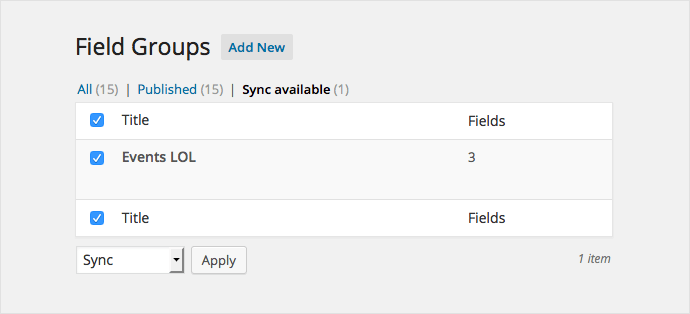
When the field groups are found for synchronization, you will see a new tab above the list of field groups, where you can select groups to import.
Security
If you want to hide a field group or field settings from the public, simply add an empty file index.php to the acf-json folder. WP uses the same method to hide the wp-content/themes folder.
<?php
// Silence is golden.