Types of posts and taxonomies in the widget
Custom post types in WordPress continue to gain momentum and today this is already an essential attribute on every second WordPress site. Rumors even say that this turn in development can create serious competition for such a cool CMS as Drupal. But we know that...
Plugin to improve the "Right Now" widget
It almost happened that I wrote a plugin; it may come in handy: https://github.com/doiftrue/kama-glance-dash-widget
So, we can already create custom post types and even create taxonomies and attach them to custom post types, but how to output the statistics of all this created in the WordPress dashboard in the "Right Now" widget, we still don't know.
We need to fix this gap in knowledge and extend the "Right Now" widget right now. For this, insert the following code into functions.php:
## Add all post types to the "Right Now" widget in the dashboard
add_action( 'dashboard_glance_items' , 'add_right_now_info' );
function add_right_now_info( $items ){

	if( ! current_user_can('edit_posts') ) return $items; // exit

	// post types
	$args = array( 'public' => true, '_builtin' => false );

	$post_types = get_post_types( $args, 'object', 'and' );

	foreach( $post_types as $post_type ){
		$num_posts = wp_count_posts( $post_type->name );
		$num       = number_format_i18n( $num_posts->publish );
		$text      = _n( $post_type->labels->singular_name, $post_type->labels->name, intval( $num_posts->publish ) );

		$items[] = "<a href=\"edit.php?post_type=$post_type->name\">$num $text</a>";
	}

	// taxonomies
	$taxonomies = get_taxonomies( $args, 'object', 'and' );

	foreach( $taxonomies as $taxonomy ){
		$num_terms = wp_count_terms( $taxonomy->name );
		$num       = number_format_i18n( $num_terms );
		$text      = _n( $taxonomy->labels->singular_name, $taxonomy->labels->name , intval( $num_terms ) );

		$items[] = "<a href='edit-tags.php?taxonomy=$taxonomy->name'>$num $text</a>";
	}

	// users
	global $wpdb;

	$num  = $wpdb->get_var("SELECT COUNT(ID) FROM $wpdb->users");
	$text = _n( 'User', 'Users', $num );

	$items[] = "<a href='users.php'>$num $text</a>";

	return $items;
}
After we insert this code, we will get roughly the following picture:
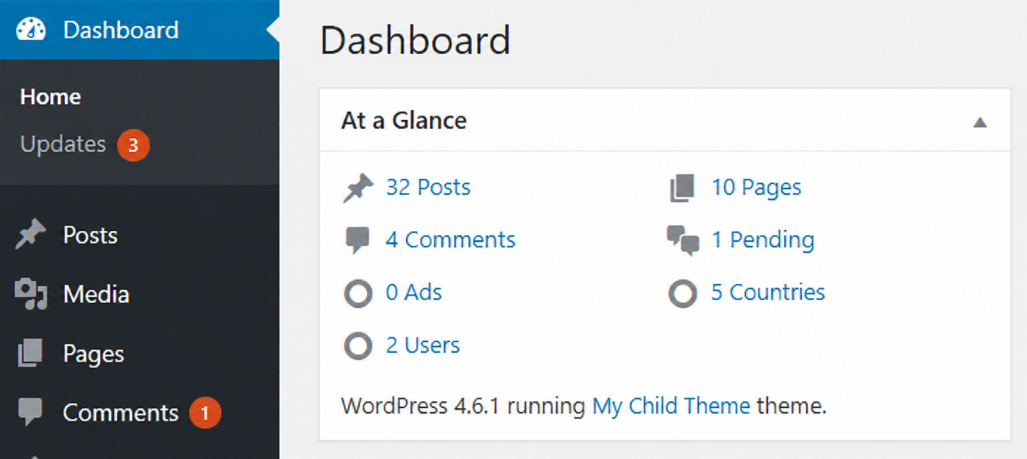
I probably won't explain how it works, those who need will figure it out, those who can't figure it out — install the plugin mentioned below.
More filters that can be used in the "In view" widget in the console.
-
rightnow_end— end of widget (the place where it says: you are using WordPress3.2). activity_box_end— end of widget (the place where it says: you are using WordPress3.2).