wp_admin_notice()
Forms and displays the HTML code of a note (message, error) at the top of the admin panel page.
Use wp_get_admin_notice() when you need to get the HTML code, not display it on the screen.
This function is typically called on one of the hooks:
In addition to these hooks, the function can be called anywhere in HTML (in the admin area). In this case, the notice will be moved under the header by a JS script. For example, if at the time the code is executed, the hooks admin_notices have already run, but we still need to display a notice, we can output it directly in the content or in the footer. Then the JS script will collect all notices (in the order of output) and place them under the header:
add_action( 'admin_head', function () {
	wp_admin_notice( 'Output on the admin_head hook, that is, at the very top.' );
} );

add_action( 'admin_footer', function () {
	wp_admin_notice( 'Output on the admin_footer hook, that is, at the very bottom.' );
} );

add_action( 'shutdown', function () {
	wp_admin_notice( 'And I am the very last hook in the system, but I will still be displayed under the header!' );
} );
The result of the code execution:

Previously, the HTML of such a notice had to be written manually and was usually output on the hook admin_notices. Now there is a standard.
An example of what notices look like:
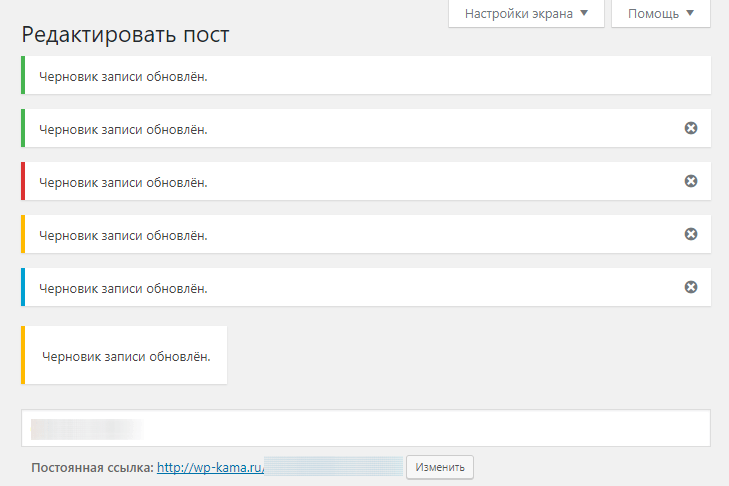
HTML template for a simple message (without additional arguments):
<div class="{class}"><p>{message}</p></div>
Hooks from the function
Returns
null. Nothing (null).
Usage
<?php wp_admin_notice( $message, $args ); ?>
- $message(string) (required)
- Text of the message (note). HTML can be used. Any content passed is filtered by the function wp_kses_post().
- $args(array)
Array of arguments for customizing the note.
Default:
empty array-
type(string)
Type of the note, for example:success— success.error— error.warning— warning.info— information.''— default - if not specified.
Default: empty string
-
dismissible(true|false)
Whether the note can be closed (hidden) by clicking the cross. The choice is not remembered, meaning after reloading the page the note will be displayed again.
Default: false -
id(string)
Value of the ID attribute for the HTML container of the note.
Default: empty string -
additional_classes(string[])
Array of CSS classes for the HTML container of the note. These classes will be added to the classes from the list:notice- base class, always present.notice-{type}is added if thetypeparameter is specified, for example, iftype=warning, then the classnotice-warningwill be added.notice-alt- the background will be tinted in the color corresponding to the type.is-dismissible- added if thedismissibleparameter is specified.inline- the notification will not be moved by the JS script under the header.
Default: empty array
-
attributes(array)
Additional attributes to the main<div>tag.
You need to specify an array of the form[ 'attribute_name' => 'value' ].
Value can be:bool- to add or not add the attribute name in HTML (without value). For example:[ 'hidden' => true ].int|string- will simply be cleaned and added as a value. For example:[ 'data-foo' => 'bar' ].
- paragraph_wrap(true|false)
Optional parameter. Whether to wrap the note message in the<p>tag.
Default: true
-
Examples
#1 Print a message if the site is not running over https
Let's check if the site works via https and if it doesn't, we'll display a message about it. To make the function's work clear, let's use additional arguments to customize the tag.
add_action( 'all_admin_notices', static function () {
	if ( ! is_ssl() ) {
		wp_admin_notice(
			'Your site does NOT work over https, it\'s not secure!',
			[
				'type'               => 'warning',
				'dismissible'        => true,
				'id'                 => 'my-note-id',
				'additional_classes' => [ 'my-note-class-1', 'my-note-class-2' ],
			]
		);
	}
} );
Result:

The layout:
<div id="my-note-id" class="notice notice-warning is-dismissible my-note-class-1 my-note-class-2">
	<p>Your site doesn't work over https, it's not secure!"</p>
	<button type="button" class="notice-dismiss">
		<span class="screen-reader-text">Hide this notice.</span>
	</button>
</div>
Changelog
| Since 6.4.0 | Introduced. |
wp_admin_notice() wp admin notice code WP 7.1.3
function wp_admin_notice( $message, $args = array() ) {
	/**
	 * Fires before an admin notice is output.
	 *
	 * @since 6.4.0
	 *
	 * @param string $message The message for the admin notice.
	 * @param array  $args    The arguments for the admin notice.
	 */
	do_action( 'wp_admin_notice', $message, $args );

	echo wp_kses_post( wp_get_admin_notice( $message, $args ) );
}