wp_sanitize_redirect()
Cleans the specified URL so that it can be safely used in redirects.
Removes invalid characters in URL parameters. Removes spaces!
To check the redirect link, use wp_validate_redirect()
Pluggable function — this function can be replaced from a plugin. It means that this function is defined (works) only after all plugins are loaded (included), but before this moment this function has not defined. Therefore, you cannot call this and all functions depended on this function directly from a plugin code. They need to be called on plugins_loaded hook or later, for example on init hook.
Function replacement (override) — in must-use or regular plugin you can create a function with the same name, then it will replace this function.
No Hooks.
Returns
string. Cleaned URL.
Usage
wp_sanitize_redirect( $location );
- $location(string) (required)
- URL for redirection.
Examples
#1 Example of cleaning a malicious URL
$url = 'http://test.example.com/redirect.php?page=%0d%0aContent-Type: text/html%0d%0aHTTP/1.1 200 OK%0d%0aContent-Type: text/html%0d%0aContent-
Length:%206%0d%0a%0d%0a%3Chtml%3EHACKED%3C/html%3E.';

echo wp_sanitize_redirect( $url );

//> http://test.example.com/~arpit/redirect.php?page=Content-Type:text/htmlHTTP/1.1200OKContent-Type:text/htmlContent-Length:%206%3Chtml%3EHACKED%3C/html%3E.
#2 Note - the function removes spaces
$url = '/inventory/certified new used/';

echo wp_sanitize_redirect( $url ); // /inventory/certifiednewused/
About redirect attacks
How the attack is created
Redirect attacks are carried out by inserting malicious or invalid characters into the URL, which, when processing status 3xx (HTTP redirection), alter the request and affect the HTTP header parameters "Location" or "Set-Cookie".
This is possible due to insufficient validation of input data for characters: CR (carriage return: %0d or \r) and LF (line feed: %0a or \n).
For example, this is how the server can process the redirect:
<?php
header( "Location: " . $_GET['page'] );
Then, the attacker can use the character sequence %0d%0a to add to the header data similar to the following:
http://test.example.com/arpit/redirect.php?page=%0d%0aContent-Type: text/html%0d%0aHTTP/1.1 200 OK%0d%0aContent-Type: text/html%0d%0aContent-
Length:%206%0d%0a%0d%0a%3Chtml%3EHACKED%3C/html%3E.
In a convenient format:
\r\n
Content-Type: text/html\r\n
HTTP/1.1 200 OK\r\n
Content-Type: text/html\r\n
Content-Length: 6\r\n
\r\n
<html>HACKED</html>
In the case of the victim of the attack clicking on this malicious link (shortened using special services), the server will send the following request:
GET /arpit/redirect.php?page=%0d%0aContent-Type: text/html%0d%0aHTTP/1.1 200 OK%0d%0aContent-Type: text/html%0d%0aContent-
Length:%206%0d%0a%0d%0a%3Chtml%3EHACKED%3C/font%3E%3C/html%3E.
Host: test.example.com
User-Agent: Mozilla/5.0 (Windows; U; Windows NT 5.1; en-US; rv:1.9)
Gecko/2008052960 Firefox/3.6.2
......
Accept-Language: en-us,en;q=0.5
Accept-Charset: ISO-8859-1,utf-8;q=0.7,*;q=0.7
Keep-Alive: 300
Connection: keep-alive
The server should respond as follows:
HTTP/1.1 302 Found [First standard response with HTTP status 302]
Date: Tue, 12 Apr 2005 22:09:07 GMT
Server: Apache/2.3.8 (Unix) mod_ssl/2.3.8 OpenSSL/1.0.0a
Location:
Content-Type: text/html
HTTP/1.1 200 OK [second response to the new request formed by the attacker]
Content-Type: text/html
Content-Length: 6
<html>HACKED</html> [Entered arbitrary data is displayed as the redirect page]
Content-Type: text/html
Connection: Close
As we can see in the description of the data exchange process above, the server sends a standard HTTP response with status 302, but entering arbitrary data in the query string leads to the transmission of a new HTTP response with status 200 OK, which allows the entered data to be shown to the attack victim as a regular web server response. The attack victim will see a web page with the text "HACKED".
The scheme described above:
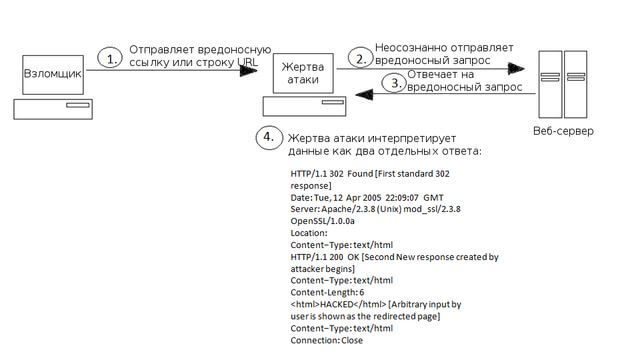
In cross-user attacks, the second response sent by the web server may be mistakenly interpreted as a response to another request, possibly sent by another user using the same TCP connection to the server. In this case, the request from one user is served using the data of another user.
What to do to enhance security
Cross-user vulnerabilities can lead to page replacement on the site by placing malicious data in the server cache (Web-cache poisoning) and to the possibility of using cross-site scripting vulnerabilities, but the following security enhancement methods can neutralize it:
-
Search all user-entered data for CR/LF characters, i.e.,
\r\n,%0d%0aor any other form of their encoding (or other unsafe characters) before using this data in any HTTP headers. -
Properly format URI strings in any parts of HTTP messages, for example, in the "Location" parameter of the HTTP header; after this, CRLF characters (
/r,/n) will not be processed by the browser. - SSL (HTTPS) does NOT prevent such attacks - this is a myth; when using SSL, the web browser cache and connections outside of SSL remain unprotected. Do not rely on SSL technology to protect against the type of attacks discussed.
Read more about HTTP response splitting attacks here.
Changelog
| Since 2.3.0 | Introduced. |