wpdb{}
Allows performing any operations with the WordPress database: inserting, updating, retrieving, or deleting data.
WordPress provides the ability to conveniently manipulate its database through the PHP class wpdb.
PHP class — refers to OOP (object-oriented programming) and in its traditional understanding represents a fully self-sufficient code that should perform a specific function. For example, in this case, through the wpdb class, we can perform various operations with the WordPress Database knowing just a few "levers" to control the class, which are called methods.
To access the methods of the wpdb class, you must do so through the global variable $wpdb (this is an instance of the wpdb class). It is also important to remember that inside regular functions, you must globalize $wpdb, otherwise it will be a simple variable within the function, done like this:
global $wpdb;
With the methods of $wpdb, you can manage arbitrary tables in the database, not just those created by WordPress. For example, among other WP tables, there is a table newtable and we need to select all id fields from it. This can be implemented with the following SQL query using $wpdb:
$newtable = $wpdb->get_results( "SELECT id FROM newtable" );
It is recommended to create your tables using the function dbDelta(). Alternatively, you can use a regular SQL query and the method $wpdb->query('CREATE TABLE ...');.
For plugins, creating new tables is usually hooked to the plugin activation hook, see register_activation_hook().
Creating a separate database connection
It is important to understand that one object of the class wpdb{} works with one database - the current WordPress database. If you need to work simultaneously with another database, you need to create another object of the wpdb class with new connection parameters different from those specified in wp-config.php. This is done like this:
global $wpdb2;

$wpdb2 = new wpdb( 'username', 'password', 'database_name', 'localhost' );

// if the connection failed, and you need to terminate PHP with an error message
if( ! empty($wpdb2->error) )
	wp_die( $wpdb2->error );

// Done, now use the functions of the wpdb class
$results = $wpdb2->get_results( "SELECT * FROM table" );
For complex connections with multiple databases (replicas), there is a good plugin recommended by WP developers - hyperdb. This plugin extends the capabilities of the base wpdb class. It is installed not like a regular plugin and requires certain knowledge of working with databases (otherwise, this plugin will not be useful).
Hooks from the class
Returns
An instance of the wpdb class.
Usage
global $wpdb;

$result = $wpdb->query( "UPDATE ..." );
Examples
#1 Demo of methods usage
global $wpdb;

$done = $wpdb->query( "UPDATE ..." );

// get data

$objects = $wpdb->get_results( "SELECT ..." );

$object = $wpdb->get_row( "SELECT ..." );

$values = $wpdb->get_col( "SELECT ..." );

$var = $wpdb->get_var( "SELECT ..." );

// CRUD data

$done = $wpdb->insert( 'table', [ 'column' => 'foo', 'field' => 'bar' ] );

$done = $wpdb->update( 'table', [ 'column' => $_GET['val'] ], [ 'ID' => 1 ] );

$done = $wpdb->delete( 'table', [ 'ID' => 1 ] );

$done = $wpdb->replace( 'table_name', [ 'ID' => 1, 'column' => $_GET['val'] ] );
query — arbitrary query to the WordPress Database
Executes any queries to the WordPress database.
This method implies executing all queries except SELECT. For SELECT, there are special methods: $wpdb->get_results, $wpdb->get_row, $wpdb->get_col, $wpdb->get_var.
Keep in mind that, as with all functions of the wpdb class, the parameters passed need to be sanitized from SQL injections, which can be done in two ways:
// method 1
esc_sql( $user_entered_data_string )

// method 2
$wpdb->prepare(  'query' , value_parameter[, value_parameter ... ] )
Read more in the section "Protecting queries from SQL injections"
Returns
Int|true|false.
true— for queriesCREATE,ALTER,TRUNCATE,DROP.Number— of affected rows, for queries:DELETE/UPDATE/SELECT.false— when the query caused an error.
Usage
global $wpdb;
$wpdb->query( $query );
- $query(string) (required)
- Database query.
Examples
#1 Remove the custom 'gargle' field and its value in post 13
$wpdb->query( "DELETE FROM $wpdb->postmeta WHERE post_id = 13 AND meta_key = 'gargle'" );
#2 Set parent page 7 for page 15
$wpdb->query( "UPDATE $wpdb->posts SET post_parent = 7 WHERE ID = 15 AND post_status = 'static'" );
#3 Delete orphaned custom fields
$wpdb->query( "
	DELETE pm FROM $wpdb->postmeta pm
	LEFT JOIN wp_posts wp ON wp.ID = pm.post_id
	WHERE wp.ID IS NULL
" );
#4 Change the key of ACF repeater fields
$wpdb->query( "
	UPDATE $wpdb->postmeta
	SET meta_key = REPLACE(meta_key, 'knowledge-base-type', 'knowledge-base-list')
	WHERE `meta_key` LIKE '%knowledge-base-type%'
" );
#5 Example using prepared statements
It is IMPORTANT to always use $wpdb->prepare() method when build your custom query:
$wpdb->query( $wpdb->prepare(
	"DELETE FROM $wpdb->postmeta WHERE post_id = %d AND meta_key = %s",
	13, 'gargle'
) );
#6 Note about Return value for INSERT / DELETE / UPDATE / REPLACE requests
Be aware that because of the following check exists inside this function:
preg_match( '/^\s*(insert|delete|update|replace)\s/i', $query )
You may be surprised to not receive the expected $wpdb->rows_affected (and will miss the $wpdb->insert_id too) if you have anything except white-space characters before the UPDATE/INSERT/etc. statement, e.g.:
$rows_affected = $wpdb->query( "
	# this comment breaks the $return_val
	UPDATE wp_postmeta SET meta_value = 'baz'
	WHERE meta_key = 'foo' AND meta_value = 'bar'
" );

echo $rows_affected; // will output 0 (actually $num_rows)
This will not work as expected – it will update your records but won’t return any value.
get_var — retrieving a specific cell from the table
Gets the value of a single cell from the query result. By default, the first cell is taken — this is the first column and the first row.
If the query result contains more than one column and/or more than one row, the value of the specified cell will be returned (specified in the 2nd and 3rd parameters). Thus, to get the value of the second cell from the second row of the query result, you need to specify the second and third parameters: $column_offset = 1, $row_offset = 1.
If you call the method without a query: $query = null, the value of the specified cell from the previous query will be returned.
Returns
String|null. The value of the database table cell as a string.
cell value— if the query retrieves the value of a single cell (column in a row).value of the first cell of the first column— if the query retrieves one row and multiple columns.value of the first cell of the first row and column— if the query retrieves multiple rows and columns.NULL— when there is no result.
Usage
global $wpdb;
$wpdb->get_var( $query, $x, $y );
- $query(string/null)
- The query to execute. You can set this parameter to
null, then the function will return the result of the last query that was executed by the class (stored in the variable). - $x(number)
- The desired column (column offset). By default 0 - first column.
- $y(number)
- The desired row (row offset). By default 0 - first row.
Examples
#1 Display the number of users
$user_count = $wpdb->get_var( "SELECT COUNT(*) FROM $wpdb->users;" );
echo '<p>The number of users is: ' . $user_count . '</p>';
#2 A set of blog statistics outputs
# Total Number of authors
function get_totalauthors() {
	global $wpdb;

	$totalauthors = intval( $wpdb->get_var(
		"
		SELECT COUNT(ID) FROM $wpdb->users
		LEFT JOIN $wpdb->usermeta ON $wpdb->usermeta.user_id = $wpdb->users.ID
		WHERE $wpdb->users.user_activation_key = '' AND $wpdb->usermeta.meta_key = '{$wpdb->prefix}user_level' AND (meta_value+0.00) > 1
		"
	) );

	return $totalauthors;
}

# Total Number of posts
function get_totalposts(){
	global $wpdb;

	$totalposts = intval( $wpdb->get_var(
		"SELECT COUNT(ID) FROM $wpdb->posts WHERE post_type = 'post' AND post_status = 'publish'"
	) );

	return $totalposts;
}

# Total Number of Pages
function get_totalpages() {
	global $wpdb;

	$totalpages = intval( $wpdb->get_var(
		"SELECT COUNT(ID) FROM $wpdb->posts WHERE post_type = 'page' AND post_status = 'publish'"
	) );

	return $totalpages;
}

# Total Number of Comments
function get_totalcomments() {
	global $wpdb;

	$totalcomments = intval( $wpdb->get_var(
		"SELECT COUNT(comment_ID) FROM $wpdb->comments WHERE comment_approved = '1'"
	) );

	return $totalcomments;
}

# Total Number of Commentators
function get_totalcommentposters() {
	global $wpdb;

	$totalcommentposters = intval($wpdb->get_var(
		"SELECT COUNT(DISTINCT comment_author) FROM $wpdb->comments WHERE comment_approved = '1' AND comment_type = ''"
	) );

	return $totalcommentposters;
}

# Total Number of links
function get_totallinks() {
	global $wpdb;

	$totallinks = intval( $wpdb->get_var("SELECT COUNT(link_id) FROM $wpdb->links") );

	return $totallinks;
}
#3 Display the sum of the values of the defined custom fields
// define the custom key to be counted
$meta_key = 'miles';
$allmiles = $wpdb->get_var( $wpdb->prepare(
	"SELECT sum(meta_value) FROM $wpdb->postmeta WHERE meta_key = %s", $meta_key
) );
echo '<p>Total number of custom fields: '. $allmiles . '</p>';
get_row — selecting a row from the table
Gets the first row from the result of an SQL query. Returns the row as an object.
Use the $row_offset parameter to get the second, third, ..., n-th row from the query.
Returns
Array|Object|null.
object- when $output_type = OBJECT (default).array- when $output_type = ARRAY_A or ARRAY_N.null- when data could not be retrieved (requested data is not in the database).
Usage
$wpdb->get_row( $query, $output_type, $row_offset );
- $query(string)
- The query to be executed.
- $output_type(constant)
One of three constants. Can be:
OBJECT- the result will be returned as an object (default).ARRAY_A- the result will be returned as an associative array.ARRAY_N- the result will be returned as a numerically indexed array.
Default isOBJECT
- $row_offset(number)
- The number of the row returned from the query result.
Default is 0 (first row)
Examples
#1 Get all the information about link 10
$mylink = $wpdb->get_row( "SELECT * FROM $wpdb->links WHERE link_id = 10" );

// Now, the properties (variables) of $mylink are names
// columns from the table $wpdb->links with the values of the table fields:
echo $mylink->link_id; // display "10"
#2 Using a constant:
$mylink = $wpdb->get_row( "SELECT * FROM $wpdb->links WHERE link_id = 10", ARRAY_A );

// the result will be an associative array
echo $mylink['link_id']; // display "10"
or
$mylink = $wpdb->get_row( "SELECT * FROM $wpdb->links WHERE link_id = 10", ARRAY_N );

// the result will be a numbered array
echo $mylink[1]; // display "10"
get_col — selecting a column from the table
Makes a request and retrieves data from one column of the database table as an array.
If the query returns more than one column, the function will return only the data from the first column. You can specify an offset in the $column_offset parameter to get data from a column other than the first, for example, the second: $column_offset = 1.
If you specify $query = null, the function will return the specified column from the previous query. Using this property, you can retrieve data from other columns from an already made query.
Returns
Array. Indexed array with the query data. An empty array when data could not be retrieved.
Usage
global $wpdb;
$wpdb->get_col( $query, $x );
- $query(string/null)
- The query to be executed. You can set this parameter to
null, then the function will return the result of the last query.
Default: NULL (previous query) - $x(number)
- The index of the column whose data you want to return.
Default: 0 (first column)
Examples
#1 NULL instead of an empty string
This method returns NULL as field value if the value is an empty (string) (I checked with WP 5.1.1). But if we need to get the original data (empty string), we can use this substitution get_col()
$wpdb->query( "SELECT * FROM $wpdb->posts WHERE post_type = 'revision'" );

$ids = wp_list_pluck( $wpdb->last_result, 'ID' );
#2 An example of how the method works and what it returns
Let's say we have such a request to get all the revisions:
// let's specify one field in the query
$revision_ids = $wpdb->get_col( "SELECT ID FROM $wpdb->posts WHERE post_type = 'revision'" );

// specify all fields in the query
$revision_ids = $wpdb->get_col( "SELECT * FROM $wpdb->posts WHERE post_type = 'revision'" );

/*
In both cases the same array will be returned.
When all fields are specified, get_col gets only the first one, which is the ID

Array(
	[0] => 106
	[1] => 101
	[2] => 102
	[3] => 103
	...
)
*/
#3 Using without a $query parameter
// first let's query
$wpdb->query( "SELECT * FROM $wpdb->posts WHERE post_type = 'revision' LIMIT 10" );

// now let's get the data of this query
$revision_ids = $wpdb->get_col( null );
$revision_names = $wpdb->get_col( null, 5 ); // 5 - post_title

/*
Array
(
	[0] => 9949
	[1] => 9957
	[2] => 10125
	[3] => 10154
	[4] => 10221
	[5] => 10235
	[6] => 10319
	[7] => 10496
	[8] => 10532
	[9] => 10568
)
Array
(
	[0] => wp_tempnam
	[1] => Page templates for post types in WP 4.7
	[2] => Privacy Policy
	[3] => walker_nav_menu_start_el
	[4] => Pagination output
	[5] => enter_title_here
	[6] => Smart Custom Fields - a simple meta-fields plugin
	[7] => register_post_type
	[8] => About site
	[9] => REST API in WordPress
)
*/
#4 Selecting a column from the query results
For this example, let's pretend we have a blog about cars. Each post describes some car (for example, a 1969 Ford Mustang). For each post there are 3 custom fields: manufacturer, model, and year. This example will display the titles of the posts filtered by manufacturer (ford) and sorted by model and year.
get_col is used here to get an array of all post IDs that satisfy certain criteria and are sorted in the right order. Then we use the foreach loop to output the headers according to the IDs we have:
<?php
$meta_key1 = 'model';
$meta_key2 = 'year';
$meta_key3 = 'manufacturer';
$meta_key3_value = 'Ford';

$postids = $wpdb->get_col( $wpdb->prepare("
SELECT      key3.post_id
FROM        $wpdb->postmeta key3
INNER JOIN  $wpdb->postmeta key1
			on key1.post_id = key3.post_id
			and key1.meta_key = %s
INNER JOIN  $wpdb->postmeta key2
			on key2.post_id = key3.post_id
			and key2.meta_key = %s
WHERE       key3.meta_key = %s
			and key3.meta_value = %s
ORDER BY    key1.meta_value, key2.meta_value",$meta_key1, $meta_key2, $meta_key3, $meta_key3_value) );

if( $postids ){

	echo 'List of ' . $meta_key3_value . '(s), sorted by ' . $meta_key1 . ', ' . $meta_key2;

	foreach( $postids as $id ){
		$post = get_post( $id );
		setup_postdata( $post );
		?>
		<p>
			<a href="<?php the_permalink() ?>" rel="bookmark" title="Permanent Link to <?php the_title_attribute(); ?>"><?php the_title(); ?></a>
		</p>
		<?php
	}
}
#5 List of posts that have a certain custom field (Color)
But they are sorted by the value of another custom field (Display_Order).
<?php
$meta_key1 = 'Color';
$meta_key2 = 'Display_Order';

$postids = $wpdb->get_col($wpdb->prepare("
SELECT      key1.post_id
FROM        $wpdb->postmeta key1
INNER JOIN  $wpdb->postmeta key2
			on key2.post_id = key1.post_id
			and key2.meta_key = %s
WHERE       key1.meta_key = %s
ORDER BY    key2.meta_value+(0) ASC",
		 $meta_key2,$meta_key1));

if( $postids ){
	echo 'List of '. $meta_key1  . ' posts, sorted by ' . $meta_key2 ;

	foreach ($postids as $id) {
		$post = get_post( $id );
		setup_postdata( $post );
		?>
		<p>
			<a href="<?php the_permalink() ?>" rel="bookmark" title="Permanent Link to <?php the_title_attribute(); ?>"><?php the_title(); ?></a>
		</p>
		<?php
	}
}
get_results — selecting multiple rows from the table
Gets all data of the specified query (all rows and columns). The result is returned as an array. Each element of the array is an object with data of a separate row of the table.
Returns
Array|null. The result of the database query. Will return:
Array of objects— when$output = OBJECTorOBJECT_K.Array of arrays— when$output = ARRAY_AorARRAY_N.[]— when no rows are found for the query or there is a query error.NULL— when the query is an empty string or an incorrect output type ($output_typeis passed).
Usage
global $wpdb;
$wpdb->get_results( $query, $output );
- $query(string)
The query to be executed.
This parameter can be set to
null, then the function will return the result of the last query that was executed.Default:
null- $output(constant/string)
A flag indicating in what form the data should be returned. There are 4 options:
OBJECT— will return an array of objects with numeric keys - the elements of the array will be objects of the table rows —[ 0 => object ].OBJECT_K— similar to the previous one, only the indices of the main array will be the values of the first column of the query result —[ 'field' => object ].
Note that if the same values enter the index, the data will be overwritten.ARRAY_N— will return a numeric array, each element of which will also be a numeric array —[ 0 => [...] ].ARRAY_A— will return a numeric array, each element of which will be an associative array, where the key will be the column name —[ 'field' => [...] ].
Default:
OBJECT
Examples
#1 Display the links to the author's drafts with ID = 5
<?php
$fivesdrafts = $wpdb->get_results(
	"SELECT * FROM $wpdb->posts WHERE post_status = 'draft' AND post_author = 5"
);

if( $fivesdrafts ) :
	foreach( $fivesdrafts as $post ){
		setup_postdata($post);
		?>
			<h2><a href="<?php the_permalink(); ?>" rel="bookmark"
				title="Permanent Link to <?php the_title(); ?>"><?php the_title(); ?></a></h2>
		<?php
	}
	else :
	?>
	<h2> Not found</h2>
	<?php
endif;
?>
#2 Get the IDs and titles of drafts whose author ID = 5 and display the posts titles
$fivesdrafts = $wpdb->get_results(
	"SELECT ID, post_title FROM $wpdb->posts WHERE post_status = 'draft' AND post_author = 5"
);

foreach ( $fivesdrafts as $fivesdraft ) {
	echo $fivesdraft->post_title;
}
#3 Example of a complex query with GROUP BY (reviews in WooCommerce)
/**
* Returns the results of the rating (reviews in WooCommerce) grouped by ratings
*
* @param int $post_id post ID
*
* @return array of objects, where each object is a lumped data on one of the grades
*/
function get_cnt_rating_reviews_one_product( $post_id ){
	global $wpdb;

	return $wpdb->get_results( $wpdb->prepare(
		"
		SELECT COUNT(meta.meta_id) as num, meta.meta_value
		FROM $wpdb->comments as comments
		INNER JOIN $wpdb->commentmeta as meta ON comments.comment_ID = meta.comment_id
		WHERE comments.comment_post_ID = %d AND meta_key = 'rating'
		GROUP BY meta.meta_value;
		",
		$post_id
	) );

}

// usage
get_cnt_rating_reviews_one_product( 4350 );
#4 Error handling
This is how to intercept errors from get_results():
global $wpdb;
$result = $wpdb->get_results( "SELECT * FROM invalid query" );

if ( $wpdb->last_error ) {
  echo 'wpdb error: ' . $wpdb->last_error;
}
insert — inserting a new record (row) into the table
Inserts a row (the specified data) into the specified table.
The method cleans the passed data and protects against SQL injections, so the data can be "dirty" (uncleaned), for example: $_GET['foo'].
If a post with the same unique key already exists, the data will not be updated. To update, use wpdb::update() or wpdb::replace().
After adding data, the created AUTO_INCREMENT value can be obtained in the variable: $wpdb->insert_id. If data insertion fails, $wpdb->insert_id will be equal to 0.
Returns
Int|false.
number— the number of inserted rows.false— if the data was not inserted into the table.
WARNING! Will return false (without any errors) when the string being passed for insertion (cell value) is longer than the maximum allowed. For example, a column varchar(10) (value length 10 characters), but the passed data for insertion specifies a string with 11 or more characters.
Catching such a bug is very difficult! Therefore, it should be kept in mind when everything seems to be working (correct data is being passed), but wpdb::insert() returns false without any errors.
This issue affects almost all methods, including:
wpdb::replace()
wpdb::insert()
wpdb::update()
wpdb::delete()
Usage
global $wpdb;
$wpdb->insert( $table, $data, $format );
- $table(string) (required)
- The name of the table into which we will insert data.
- $data(array)
The data to be inserted. Each element of the array looks like this:
[ 'table column' => 'value' ].If
NULLis specified in the value, then the value will be set toNULL, and the specified format will be ignored.The passed data MUST NOT be cleaned: esc_sql().
- $format(array/string)
An array of data formats that will be associated with the specified values in the
$dataparameter. If a string is specified, it (the format) will be associated with all data. When specifying a format, WordPress converts the passed data to the specified format before saving the data. Possible formats:%s- string%d- integer%f- float
If not specified, the format
stringwill be used for all values of$data, unless otherwise specified in the propertywpdb::$field_types.
Default: null
Examples
#1 Getting the ID of the inserted object
To get it, use $wpdb->insert_id:
global $wpdb;

$table = $wpdb->prefix . 'my_table_name';
$data = [ 'column1' => 'data one', 'column2' => 123 ];

$wpdb->insert( $table, $data );

$my_id = $wpdb->insert_id;
#2 Insert a line into the database table
// insert string with values for two fields (values for other fields will be default)
$wpdb->insert( 'table', [ 'column' => 'foo', 'field' => 'bar' ] );

// specifying data types
$wpdb->insert( 'table', [ 'column' => 'foo', 'field' => 1337 ], [ '%s', '%d' ] );
update — updating a record (row) in the table
Updates the specified data in the specified row of the DB table.
The method includes protection against SQL injections and the data can be passed as is, for example: $_GET['foo'].
Does NOT insert data if it is not in the database - only updates existing data.
Returns
Int|false.
integer— how many rows were processed.0— the query was executed correctly, but no one row was processed. If there is already data in the database and you are trying to update it by specifying exactly the same data thenwpdb::update()will return 0.false— the query failed or there is an error in the query.
Checking the result of the query for an error should be done by checking the type of the returned data $res === false, because 0 is returned if no fields were updated, but the request was executed correctly.
Usage
global $wpdb;
$wpdb->update( $table, $data, $where, $format, $where_format );
- $table(string) (required)
- The name of the table where the data needs to be updated.
- $data(array) (required)
Data to be updated. The format is:
[ 'column_name' => 'new value' ].If you specify
NULLin the value, the value will be set toNULL, the corresponding format is ignored in this case.- $where(array) (required)
- A named array of WHERE clauses (in
[ column => value ]pairs ).
Multiple clauses will be joined with ANDs.
Both$where columnsand$where valuesshould be "raw".
Sending anullvalue will create anIS NULLcomparison - the corresponding format will be ignored in this case. - $format(array|string)
An array of formats to be mapped to each of the values in
$dataparameter.
If string is specified, than format will be used for all of the items in$dataparameter.
When specifying the format, WordPress translates the passed data into the specified format before creating the query. Possible formats:%s- string%d- integer%f- float
If omitted, all values in $where will be treated as strings. The default format is controlled by
wpdb::$field_typesproperty.
Default: null- $where_format(массив/строка)
- The same as
$formatparameter, but for$wheredata.
Default: null
Examples
#1 Update the raw whose ID is 1
The value of the first column is a string, the value of the second column is a number:
$wpdb->update( 'table_name',
	[ 'column1' => 'value1', 'column2' => $_GET['val'] ],
	[ 'ID' => 1 ]
);
#2 The same but with specifying the types of passed data
$wpdb->update( 'table',
	[ 'column1' => 'value1', 'column2' => $_GET['val'] ],
	[ 'ID' => 1 ],
	[ '%s', '%d' ],
	[ '%d' ]
);
#3 Demo
$wpdb->update( 'table', [ 'column' => 'foo', 'field' => 'bar' ], [ 'ID' => 1 ] );
$wpdb->update( 'table', [ 'column' => 'foo', 'field' => 1337 ], [ 'ID' => 1 ], [ '%s', '%d' ], [ '%d' ] );
replace — replacing a row
Обновляет или создает строку в таблице.
Если строка с указанным ключом PRIMARY KEY уже есть все остальные указанные поля будут обновлены у строки. Если такой строки в таблице еще нет, то функция вставит (insert) новую строку.
После вставки, ID созданный для колонки AUTO_INCREMENT можно получить в свойстве $wpdb->insert_id. Если вставка не удалась $wpdb->insert_id будет равен 0.
Метод включает защиту от SQL инъекций. Т.е. можно передавать неочищенные данные, например из параметров запроса: $_GET['foo'].
Для вставки новой строки необязательно указывать поле с авто-инкрементом. Например, у нас есть таблица с полем id (AUTO_INCREMENT). Можно указать значения всех полей кроме id и строка будет добавлена в таблицу.
PRIMARY KEY может состоять из нескольких ключей. В этом случае при поиске для замены существующей строки всегда будут использоваться все колонки указанные в PRIMARY KEY. Все остальные поля, кроме полей из PRIMARY KEY, в поиске существующих строк не участвуют.
Например, PRIMARY KEY состоит из двух колонок ID и type: PRIMARY KEY (ID,type). Тогда для замены существующей строки в параметре $data нужно указать значение этих двух колонок. Если например указать ID и не указать type, то существующая строка не будет найдена и будет создана новая строка с указанным ID и дефолтным значением type.
Если длина строки в параметре $data больше чем допускается в ячейке таблицы MySQL, вставка провалиться и функция вернет false. При этом в свойство $wpdb->last_error сообщение об ошибке НЕ будет записано! Впрочем это же касается и других методов wpdb.
Поэтому очень важно убедиться, что вставляемые данные подходят под размер ячеек (колонок). Иначе просто ничего не произойдет и вы не увидите никаких ошибок или предупреждений.
Всегда заменяются все поля таблицы. Например, если у таблицы есть поля primary, one, two, three, а мы указали в параметре $data только primary, one, то поля two и three получат дефолтные значения, даже если там уже были данные.
Может произойти замена сразу нескольких имеющихся строк - это когда заменяемые данные совпадают с существующими, а уникальный индекс у имеющихся строк разный.
Возвращает
Int|false. Число (кол-во обработанных строк), 0 или false.
число- сколько строк было обработано (удалено или вставлено). Если была замена (обновление), то для каждой обновленной строки вернется +2 (удаление и вставка). Если была просто вставка, то для каждой вставленной строки вернется +1.0- запрос был выполнен корректно, но ни одна строка не была обработана.false- запрос провалился - ошибка запроса. Или когда невозможно заменить или создать новую строку в таблице.
Вернет количество затронутых строк - это сумма вставленных и удаленных строк. Если вернулось 1 при замене одной строки - это значит что одна строка была вставлена и ни одна не была удалена. Если число больше 1 - это значит, что одна или больше строк были удалены перед вставкой новой строки.
Использование
global $wpdb;
$wpdb->replace( $table, $data, $format );
- $table(строка) (обязательный)
- Название таблицы, в которой нужно заменить данные.
- $data(массив) (обязательный)
Данные, которые нужно заменить/вставить в формате
[ 'название колонки' => 'новое значение' ].Если в значении указать
NULL, то в значение будет установлено вNULL, соответствующий формат при этом игнорируется.- $format(массив/строка)
Массив форматов данных которые будут ассоциированы с указанными значениями в параметре
$data. Если указана строка, то она (формат) будет ассоциирован со всеми данными. При указании формата, WordPress переводит переданные данные в указанный формат перед созданием запроса. Возможные форматы:%s- строка%d- целое число%f- дробное число
Если не указать, то для всех значений
$dataбудет указан форматстрока, если иное не указано в свойствеwpdb::$field_types.
По умолчанию: null
Примеры
#1 Replace the row with the main key ID = 1
Assuming that the table consists of three columns ID, column1, column2.
The row will be added if it does not exist or completely updated if it does. Here it is important to specify values for all fields because fields without values will get defaulted, even if they had data before.
$wpdb->replace( 'table_name', [
	'ID'      => 1,
	'column1' => 'value1',
	'column2' => 123
] );
#2 Specify the formats
$wpdb->replace(
	'table',
	[ 'column' => 'foo', 'field' => 1337 ],
	[ '%s', '%d' ]
);
delete — deleting a row from the table
Deletes rows from the table based on the condition specified in the $where parameter.
Enables protection against SQL injections, which means that uncleaned data can be passed, for example: $_GET['foo']...
Returns
Int|false. The number of deleted rows or 0 if nothing was deleted. false is returned on query error.
Usage
global $wpdb;
$wpdb->delete( $table, $where, $where_format );
- $table(string) (required)
- The name of the table.
- $where(array) (required)
- An array of conditions that will be used to select rows for deletion in the format
[ 'column name' => 'value' ]. Multiple conditions will be combined usingAND. If the value is set toNULL, the query will perform a comparisonIS NULL, and the corresponding format will be ignored. - $where_format(array/string)
An array of data formats that will be associated with the specified values in the
$whereparameter. If a string is provided, it (the format) will be associated with all data. When a format is specified, WordPress converts the provided data to the specified format before creating the query. Possible formats:%s- string%d- integer%f- float
If not specified, the format
stringwill be used for all values of$data, unless otherwise specified in thewpdb::$field_types.
Default: null
Examples
#1 Example of deleting data from the database
// Delete row with field ID=1 from table table
$wpdb->delete( 'table', [ 'ID' => 1 ] );

// Let's specify the format of the value $where
$wpdb->delete( 'table', [ 'ID'=>'1' ], [ '%d' ] ); // 1 will be treated as (int) (%d).
#2 Multiple "where" and "type"
$where = [
	'UID'  => 248,
	'File' => "C:\file.txt"
];

$where_format = [
	'%d',
	'%s'
];

$wpdb->delete( $table, $where, $where_format );
prepare — protecting the query from SQL injections
Allows writing an SQL query with sanitization of the parameters passed to it.
In the query string, instead of the passed parameter, you need to use a placeholder:
%d(integer)%f(float)%s(string)
Also, for each of the placeholders, a PHP variable must be specified that will replace the placeholder. When replacing, the variable will be sanitized. The syntax is similar to sprintf().
Since WP 3.5, at least 2 parameters must be passed: the query and the variable value, otherwise there will be a PHP error (User Notice).
- Quotes for placeholders
%sand'%s'. Placeholders can be in quotes or without them:
WHERE field = %sorWHERE field = '%s'. It is customary not to use quotes.echo $wpdb->prepare( "foo = %s", 'a' ); // foo = 'a' echo $wpdb->prepare( "foo = '%s'", 'a' ); // foo = 'a'
- Parameter for each placeholder.
A parameter must be specified for each placeholder.
echo $wpdb->prepare( 'foo = %s AND bar = %s', 'a' );
echo $wpdb->prepare( 'foo = %1$s AND bar = %1$s', 'a' );
// in both cases we will see an error:
// User Notice: wpdb::prepare was called incorrectly.
// The query does not contain the correct number of placeholders (2)
// for the number of arguments passed (1).
- Positional placeholders
%1$s. For compatibility with older versions: positional placeholders (for example,
%1$s,%5s) are processed differently - they do not have quotes added, so they must be supplied with the correct quotes in the query string.echo $wpdb->prepare( 'foo = %1$s', 'a"a' ); // foo = a\"a echo $wpdb->prepare( 'foo = "%1$s"', 'a"a' ); // foo = "a\"a" echo $wpdb->prepare( 'foo = %1s', 'a"a' ); // foo = a\"a echo $wpdb->prepare( 'foo = %s', 'a"a' ); // foo = 'a\"a'
- The sign
% The sign
%in the query string that does not relate to a placeholder should be written as%%.echo $wpdb->prepare( "%foo AND id = %d", 2 ); // User Notice: wpdb::prepare was called incorrectly. echo $wpdb->prepare( "%%foo AND id = %d", 2 ); // %foo AND id = 2
%in LIKE syntaxPercentage wildcard signs
%in LIKE syntax should be specified through a substitution parameter containing the full LIKE string, not directly in the query. Also see wpdb::esc_like().$like = '%'. $wpdb->esc_like( "bar's" ) .'%end'; echo $wpdb->prepare( "foo LIKE %s", $like ); // foo LIKE '{a0d1d}bar\'s{a0d1d}end'
SQL injection
In SQL, there is a concept called "injection" (inserting SQL code into a query). This can be done when dynamic data is passed in the query. For example, a value from an input field is passed in the query, and this field can contain data that will ultimately become part of the SQL query. This way, one can inject into the query and spoil something or simply disrupt the code of the query itself. It looks like this:
$sql = "SELECT * FROM table WHERE id = '$var'";
Now, if var = 2' AND id = (DROP TABLE table2) then the resulting query will look like this:
SELECT * FROM table WHERE id = '2' AND id = (DROP TABLE table2)
Thus, one can inject into the query itself and change it. To prevent this from happening, queries with passed variables must be processed using the prepare() method:
$sql = $wpdb->prepare( "SELECT * FROM table WHERE id = %s", $var );
esc_sql()
In addition to the $wpdb->prepare() method, a query can be sanitized using the function esc_sql(). However, "prepare" is preferable because it fixes some formatting errors.
$name   = esc_sql( $name );
$status = esc_sql( $status );

$wpdb->get_var( "SELECT something FROM table WHERE foo = '$name' and status = '$status'" );
IMPORTANT! After esc_sql(), the sanitized string can only be used inside quotes '' or "". That is, it should be written as field = '$value', not field = $value, where $value = esc_sql( $value );
Returns
String|null. Sanitized query string, if there is a query to prepare.
Usage
global $wpdb;
$wpdb->prepare( $query, ...$args );
- $query(string) (required)
The query string. It can use placeholders:
%d- number%s- string%f- floating point number (floating point number, since version 3.3).
- ...$args(string/number/array)
Variables that will be used to replace the placeholders
%s %d %fin the query string.These variables can be specified as comma-separated (like additional function parameters) or in an array:
$wpdb->prepare( 'query', $param1, $param2 )$wpdb->prepare( 'query', [ $param1, $param2 ] ).
Examples
#1 Demo of sanitizing SQL query
$sql = $wpdb->prepare(
	"SELECT * FROM `table` WHERE `column` = %s AND `field` = %d OR `other_field` LIKE %s",
	[ 'foo', 1337, '%bar' ]
);

$wpdb->get_results( $sql );
$sql = $wpdb->prepare(
	"SELECT DATE_FORMAT( `field`, '%%c' ) FROM `table` WHERE `column` = %s",
	'column_val'
);

$wpdb->get_results( $sql );
#2 Add a custom field to post 10
In this example you may see there is no need to take care of escaping quotes and other things that can harm the query.
$metakey = "'crash' database";
$metavalue = "WordPress can 'break' the Database if the query is not escaped";

$wpdb->query( $wpdb->prepare(
	"INSERT INTO $wpdb->postmeta ( post_id, meta_key, meta_value ) VALUES ( %d, %s, %s )",
	10, $metakey, $metavalue
) );
#3 Passing parameters as an array
This is the same example, only here all variables are passed in the second parameter as an array.
Passing parameters as an array can be useful when we don't know in advance the number of arguments to pass.
The function will also accept an array of un-sanitized values, though, like this:
$wpdb->prepare(
	"SELECT id FROM $wpdb->posts WHERE id > %d AND `post_status` = %s",
	[ $min_id, $status ]
)
That can be useful in certain circumstances, like when you have a multi-dimensional array where each sub-array contains a different number of items, and so you need to build the placeholders dynamically:
foreach ( $new_status_post_id_map as $new_status => $wordcamp_ids ) {

	$ids_pholders   = implode( ', ', array_fill( 0, count( $wordcamp_ids ), '%d' ) );
	$prepare_values = array_merge( [ $new_status ], $wordcamp_ids );

	$wpdb->query( $wpdb->prepare( "
		UPDATE `$table_name`
		SET `post_status` = %s
		WHERE ID IN ( $ids_pholders )",
		$prepare_values
	) );
}
So if a sub-array has 2 items, then $wordcamp_id_placeholders will be '%d, %d', and if the next array has 4 items, then its placeholder string would be '%d, %d, %d, %d'.
#4 Argument swapping is not supported
You can not reuse the same argument several times in a prepare statement.
For example, this does NOT WORK but throws an error because the number of placeholders does not match the number of arguments passed:
// Does NOT work due to not enough arguments being passed.
$post_date = 'post_date';
$search_string = 'search_string';

echo $wpdb->prepare(
	'SELECT * FROM table_name WHERE `post_date` > %1$s AND `post_title` LIKE %2$s OR `post_content` LIKE %2$s',
	$post_date,
	$search_string
);

/* Result:

SELECT * FROM table_name WHERE `post_date` > post_date AND `post_title` LIKE search_string OR `post_content` LIKE search_string

PHP User Notice: Function wpdb::prepare was called incorrectly. The query does not contain the correct number of placeholders (3)
*/
Instead, you need to pass each argument individually:
$post_date = 'post_date';
$search_string = 'search_string';

echo $wpdb->prepare(
	'SELECT * FROM table_name WHERE post_date > %1$s AND post_title LIKE %2$s OR post_content LIKE %3$s',
	$post_date,
	$search_string,
	$search_string
);

/*
SELECT * FROM table_name WHERE post_date > post_date AND post_title LIKE search_string OR post_content LIKE search_string
*/
There is no string escape (tested WP 6.0):
echo $wpdb->prepare( 'post_date = %1$s', 'post" date' ); // post\" date
echo $wpdb->prepare( 'post_date = %s', 'post" date' );   // post_date = 'post\" date'
#5 Available placeholders
%s – string (value is escaped and wrapped in quotes)
%d – integer
%f – float
%% – % sign
LIKE Statements – use esc_like() and use placeholder % in arg-value, not inside the query
$my_domain = 'example.com';

$sql = $wpdb->prepare(
	"SELECT * FROM $wpdb->options WHERE option_value LIKE %s;",
	'%' . $wpdb->esc_like( $my_domain ) . '%'
);
#6 Clearing values for WHERE IN conditions
This is useful when you have an array of values that you want to pass to the IN condition of the query. The number of array elements can be different, so you have to create the placeholders dynamically:
$in_values = [ 'one', 'two' ];

$in_pholders = implode( ',', array_fill( 0, count( $in_values ), '%s' ) );

$sql = $wpdb->prepare(
	"SELECT $wpdb->posts WHERE post_type = %s WHERE post_name IN ( $in_pholders )",
	[ 'page', ...$in_values ]
);

echo $sql;

// SELECT wp_posts WHERE post_type = 'page' WHERE post_name IN ( 'one','two' )
esc_like — cleaning the LIKE string
Prepares a string for use in the LIKE part of an SQL query. Processes special characters % and _.
Example:
$find = 'only 43% of planets';
$like = '%' . $wpdb->esc_like( $find ) . '%';
$sql  = $wpdb->prepare(
	"SELECT * FROM $wpdb->posts WHERE post_content LIKE %s",
	$like
);
Example of a chain of calls:
$sql = esc_sql( $wpdb->esc_like( $input ) );
Use before wpdb::prepare() or esc_sql().
Does not protect against SQL injections. For such protection, the result needs to be additionally processed by one of the functions: wpdb::prepare() or esc_sql().
Used instead of the deprecated function like_escape( $string ) since WP 4.0.
Returns
String. Text for the LIKE part of the query. The result is not sanitized for the SQL query, so use wpdb::prepare() or wpdb::_real_escape() to add the result to the query.
Usage
global $wpdb;
$wpdb->esc_like( $text );
- $text(string) (required)
- Unprocessed text, in which special characters need to be escaped for the LIKE string. The string should not have additional or removed slashes.
Examples
#1 Example of preparing a string for a LIKE query
$find = 'only 43% of planets';
$sql  = $wpdb->prepare(
	"SELECT * FROM $wpdb->posts WHERE post_content LIKE %s",
	'%' . $wpdb->esc_like( $find ) . '%'
);

echo $sql; // SELECT * FROM wp_posts WHERE post_content LIKE '{d710cab}only 43\\{d710cab} of planets{d710cab}'
#2 Example with esc_sql()
$esc_like = $wpdb->esc_like( 'only 43% of planets' );
echo $esc_like;                                        // only 43\% of planets
echo esc_sql( $esc_like );                             // only 43\\{f5fa52} of planets
#3 Another example of preparing a string for a LIKE query
global $wpdb;
$link = $wpdb->esc_like( $link ); // prepare a string for the LIKE argument
$link = esc_sql( $link ); // clear the variable
$link = '%' . $link . '%'; // create a full LIKE search variable

// find comments in the text or link of the author, there is a specified link
$spammy = $wpdb->query("SELECT comment_approved FROM $wpdb->comments
	WHERE (comment_content LIKE '$link' OR comment_author_url LIKE '$link')
		AND comment_approved = 'spam'
	LIMIT 1;"
);
#4 A short recording with prepare()
global $wpdb;

$link = '%' . $wpdb->esc_like( $link ) . '%';

$comment = $wpdb->get_row( $wpdb->prepare(
	"SELECT * FROM $wpdb->comments WHERE comment_author_url LIKE %s LIMIT 1", $link
) );
show/hide/print_error — show or hide SQL errors
There is an option to manage errors, to enable or disable the display of errors for the last query:
$wpdb->show_errors(); // will enable error display
$wpdb->hide_errors(); // will disable error display
$wpdb->print_error(); // will enable error display on screen
get_col_info — get information about a column
Gets an array with information about the columns of the last query.
If the columns are not defined in the query, the function will return information about all columns of the table. This can be useful when an object has been returned, about which we know nothing.
It works based on cache, so you first need to make a request using get_results(), get_col(), get_var(), etc., and then call this function - it will return the column data of the last query.
Returns
Mixed. Column data.
Usage
global $wpdb;
$wpdb->get_col_info( $info_type, $col_offset );
- $info_type(string)
Indicates what information we need to obtain. List of possible values:
name- column name.table- name of the table to which the column belongs.max_length- maximum length of the column data.not_null- 1 if the column cell cannot accept NULL value.primary_key- 1 if the column is a primary key.unique_key- 1 if the column cells must always be unique.multiple_key- 1 if the column cells can be non-unique.numeric- 1 if the column contains numeric data.blob- 1 if the column contains BLOB type data (binary data).type- column type.unsigned- 1 if the column hasUNSIGNEDdata type.zerofill- 1 if the column hasZEROFILLdata type.
Default: name
- $col_offset(number)
A pointer to which column's information needs to be obtained:
-1— information about all columns will be obtained as an array. Default.0,1,2,...— information about the specified column will be returned, where 0 - first column, 1 - second, etc.
Default: -1
Examples
#1 Demo of work
Let's make a query:
global $wpdb;

$results = $wpdb->get_results( "SELECT * FROM $wpdb->postmeta" );
Now let's get the data about the table columns of this query:
$cols_data = $wpdb->get_col_info( 'name' );
/*
Array
(
	[0] => meta_id
	[1] => post_id
	[2] => meta_key
	[3] => meta_value
)
*/

$cols_data = $wpdb->get_col_info( 'max_length' );
/*
Array
(
	[0] => 6
	[1] => 5
	[2] => 45
	[3] => 20205
)
*/

$cols_data = $wpdb->get_col_info( 'type' );
/*
Array
(
	[0] => 8
	[1] => 8
	[2] => 253
	[3] => 252
)
*/
What happens if you specify a column name that does not exist:
$cols_data = $wpdb->get_col_info( 'primary_key' );
/*
Notice: Undefined property: stdClass::$primary_key in /wpexample.com/public_html/wp-includes/wp-db.php on line 3435
Notice: Undefined property: stdClass::$primary_key in /wpexample.com/public_html/wp-includes/wp-db.php on line 3435
Notice: Undefined property: stdClass::$primary_key in /wpexample.com/public_html/wp-includes/wp-db.php on line 3435
Notice: Undefined property: stdClass::$primary_key in /wpexample.com/public_html/wp-includes/wp-db.php on line 3435

Array
(
	[0] =>
	[1] =>
	[2] =>
	[3] =>
)
*/
To get the data of an individual column, you need to specify its index in the second parameter:
echo $wpdb->get_col_info( 'name', 0 );       //> meta_id
echo $wpdb->get_col_info( 'name', 1 );       //> post_id
echo $wpdb->get_col_info( 'max_length', 0 ); //> 6
echo $wpdb->get_col_info( 'max_length', 1 ); //> 5
flush — flush the cache
You can flush the last saved data in the class properties:
$wpdb->flush();
This command will clear the following properties (variables): $wpdb->last_result, $wpdb->last_query, and $wpdb->col_info.
Class properties (variables)
- $show_errors(bool)
- Show errors or not when a result is returned.
Default: true (yes) - $suppress_errors(bool)
- Suppress errors during query construction.
- $last_error(string)
- The last error from any query.
- $num_queries(int)
- The number of queries executed.
- $num_rows(int)
- The number of rows returned by the last query.
- $rows_affected(int)
- Saves the number of affected rows from the last query. Filled during the following SQL commands: create, alter, truncate, drop, insert, delete, update, replace - in other cases, the property $num_rows is filled.
- $insert_id(int)
- Contains the value created for the AUTO_INCREMENT column by the last query (see mysqli_insert_id()). Filled during INSERT/REPLACE queries. Equals
0, if the insertion failed or for other types of queries. - $last_query(string)
- The last query executed by the class.
- $last_result(stdClass[]|null)
- The result of the last query.
- $func_call
- Text description of the last call to query/get_row/get_var
- $queries
- You can save all queries made to the database and their execution time; for this, you need to define the constant
SAVEQUERIESas TRUE (for example, in config.php). By default, it is off (false). After this constant is enabled, all queries will be collected in this variable as an array of data. - $col_info
- Information about the columns of the last query.
- $prefix
- The database table prefix defined for WordPress. It may be useful for multi-sites.
- $base_prefix
- The prefix of the base WordPress table. In multi-site, the prefix for network sites differs. Here is stored the prefix of the main site's tables.
- $ready
- Logical. Whether the class is ready to execute queries.
- $blogid
- The identifier of the current blog.
- $siteid
- The site ID.
- $tables
A list of table names that are used (copied) for each sub-site of the network of sites. The table names will differ by the prefix of the current blog. The names without a prefix by default:
var $tables = [
	'posts',
	'comments',
	'links',
	'options',
	'postmeta',
	'terms',
	'term_taxonomy',
	'term_relationships',
	'termmeta',
	'commentmeta',
];
- $global_tables
Global tables. Do not repeat for sub-sites.
[ 'users', 'usermeta' ];
- $ms_global_tables
Global tables in MU mode.
var $ms_global_tables = [
	'blogs',
	'blogmeta',
	'signups',
	'site',
	'sitemeta',
	'sitecategories',
	'registration_log',
];
- $collate
- The collation mode (comparison) of data in the database columns.
- $dbh
- PHP mysqli database object.
WordPress Database Tables
WordPress uses MySQL v5.7 or higher, OR MariaDB v10.3 or higher as the database.
All tables below have the default prefix wp_. You may have a different prefix - you can change it in the wp-config.php file, there it is specified in the variable:
$table_prefix = 'wp_';
The names of all tables are in the object wpdb and to get, for example, the name of the table wp_posts with the current prefix set in the configuration file can be as follows: $wpdb->posts.
WordPress Tables (regular installation)
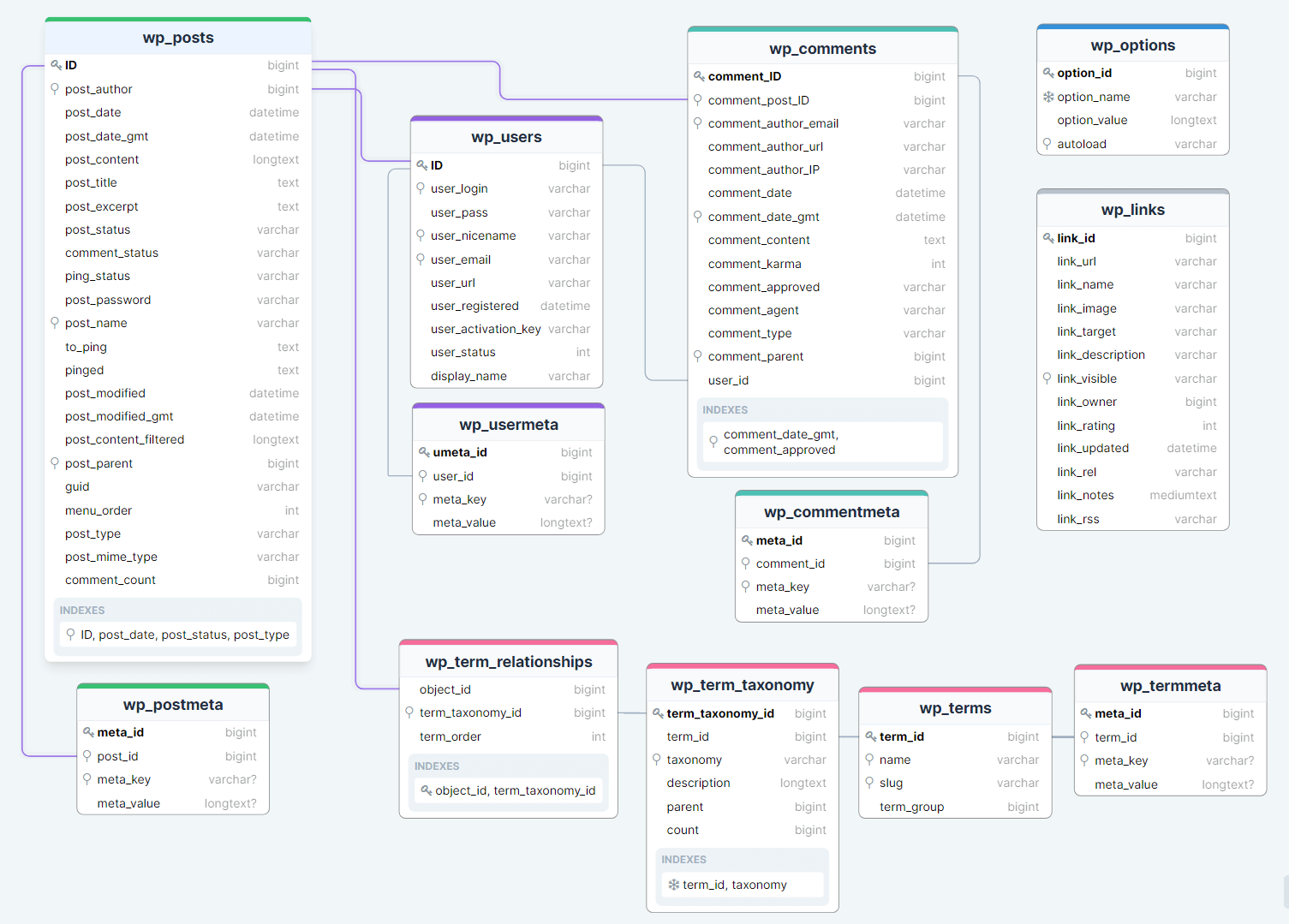
Posts
- wp_posts
Table where posts, static pages, custom post types, attachments, etc. are written.
The posts table is probably the most important table in the WordPress database. Its name is sometimes misleading to people who think it only stores blog posts. However, despite the unfortunate name, it is an extremely powerful table that stores various types of content including posts, pages, menu items, media attachments and any custom post types that the site uses.
The flexibility of the table is provided by the
post_typecolumn, which indicates whether a row is a post, page, attachment, menu item, or other type.- wp_postmeta
Completes
$wpdb->poststable. Stores additional data of posts they are also called metadata.This table stores any additional information about individual posts. This table uses key/value pairs to store the data. This technique is used in WordPress in a number of tables throughout the database, allowing WordPress core, plugins, and themes to store an unlimited amount of data with different keys.
Users
- wp_users
- Table with the data on registered users.
- wp_usermeta
- Additional information about users, such as Name, Nickname, permissions, etc.
Meta-data for$wpdb->userstable.
Comments
- wp_comments
- A table with records of comments.
- wp_commentmeta
- Meta fields for the
$wpdb->commentstable.
Taxonomies
- wp_terms
- A table containing basic information about each element of the taxonomy.
- wp_termmeta
- A table containing additional fields for the
$wpdb->termstable. - wp_term_taxonomy
- Table with information about taxonomies, their description. The data in the
wp_termstable are not yet taxonomies - this table extends the data of each term and assigns to each term the taxonomy to which it belongs. - wp_term_relationships
- A table linking taxonomies to content (posts, entries, etc.). Each row of this table defines a relationship between a post (object) in
wp_postsand a taxonomy term from thewp_term_taxonomytable.
Other tables
- wp_options
- Table of options (settings).
- wp_links
- Table with link. Obsolete table, not used for a long time, but the functionality is still working, but it should be enabled separately.
WordPress Tables (multisite)
When a WordPress site is converted into a multi-site installation, a "network" of sub-sites is created. The current site becomes the first subsite of the network. In the database, this site becomes the network site (wp_site), and each subsite is labelled as a blog (wp_blogs).

- wp_blogs
Stores information about each site in the WordPress Multisite network.
blog_idis the site ID, andsite_idis the network ID. This is legacy WP 2.x, when 'site' was called 'blog'. Thus, when you add a new sub-site (blog), a new record will be added to the wp_blogs table with a new blog_id value and the same site_id.Field Type Key Default Description blog_idbigint(20)PK: blog_idUnique identifier for the blog. site_idbigint(20)0Identifier of the network to which the blog belongs. domainvarchar(200)K: domainDomain name of the blog. pathvarchar(100)K: domainPath of the blog relative to the domain. registereddatetime'0000-00-00 00:00:00'Date and time of blog registration. last_updateddatetime'0000-00-00 00:00:00'Date and time of the last update of the blog. publictinyint(2)1Flag indicating whether the blog is public (1) or private (0). archivedtinyint(2)0Flag indicating whether the blog is archived (1) or not (0). maturetinyint(2)0Flag indicating whether the blog contains adult content (1) or not (0). spamtinyint(2)0Flag indicating whether the blog is marked as spam (1) or not (0). deletedtinyint(2)0Flag indicating whether the blog is deleted (1) or not (0). lang_idint(11)K: lang_id0Language identifier of the blog. - wp_blogmeta
Introduced in WP 5.1. Stores metadata related to blogs - auxiliary information about blogs. For example: db_version, db_last_updated. With the introduction of this table, you no longer need to use the wp_options table to store some data about the sub-site and use switch_to_blog() every time such data is needed.
Field Type Key Default Description meta_idbigint(20) unsignedPK: meta_idUnique identifier for the metadata. blog_idbigint(20)K: blog_id0Identifier of the blog to which the metadata relates. meta_keyvarchar(255)K: meta_keyNULLMetadata key. meta_valuelongtextNULLMetadata value. - wp_registration_log
Logs registrations of new blogs in the network. Contains data on when the network blog was registered.
Users who register a new site after its activation are recorded in this table.Field Type Key Default Description IDbigint(20)PK: IDUnique identifier for the record. emailvarchar(255)Email address used during registration. IPvarchar(30)K: IPIP address from which the registration was made. blog_idbigint(20)0Identifier of the blog associated with the registration. date_registereddatetime'0000-00-00 00:00:00'Date and time of registration. - wp_signups
Stores information about applications for registering new users and sites.
Contains users who were registered through the basic WordPress registration from the page:
Administration > Super Admin > Settings.This table also stores data about sub-sites (blogs) that were registered but not activated. When the network allows new sites to be registered. After the site is activated, the record is deleted and a record is created in wp_blogs.
Field Type Key Default Description signup_idbigint(20)PK: signup_idUnique identifier for the signup. domainvarchar(200)K: domainDomain name requested during registration. pathvarchar(100)K: domainPath requested during registration. titlelongtextBlog title specified during registration. user_loginvarchar(60)K: user_loginUser login specified during registration. user_emailvarchar(100)K: user_emailUser email specified during registration. registereddatetime'0000-00-00 00:00:00'Date and time of registration. activateddatetime'0000-00-00 00:00:00'Date and time of activation. activetinyint(1)0Flag indicating whether the user is active (1) or not (0). activation_keyvarchar(50)K: activation_keyUser activation key. metalongtextAdditional metadata about the registration. - wp_site
Contains information about networks (main sites of the network).
This table will always contain one network, although the structure of the table allows for multiple networks in one database. This has not been implemented in WordPress itself, but can be achieved with plugins such as WP Multi Network or Networks for WordPress.
Field Type Key Default Description idbigint(20)PK: idUnique identifier for the site. domainvarchar(200)K: domainDomain name of the site. pathvarchar(100)K: domainPath of the site relative to the domain. - wp_sitemeta
Stores metadata related to networks (sites) - network options and common options for all its sites.
This table is similar to wp_options, except that it stores options for the entire network of sites, not for a specific sub-site. It stores configuration (options) related to the network, as well as other data, such as plugin settings that should be available for the entire network (for any site in the network).
Field Type Key Default Description meta_idbigint(20)PK: meta_idUnique identifier for the metadata. site_idbigint(20)K: site_id0Identifier of the site to which the metadata relates. meta_keyvarchar(255)K: meta_keyNULLMetadata key. meta_valuelongtextNULLMetadata value. - wp_users
- A list of users from all sites in the network. This is a shared user table for the entire network. This is a familiar table, but in the multisite version, two additional fields are added:
spamanddelete. - wp_usermeta
- Contains metadata for users. User settings for different sites in the network.
- wp_blog_versions
Contains the current version of the database for each site. The data is updated when the database is updated for each site in the network.
When updating the version of WordPress that your site is running, changes to the database sometimes occur. Updating a multisite installation to a new version of WordPress will make these changes in the global tables. However, the update will also need to be applied to the set of tables for subsites in the network. This table records the version of the database for each blog in the network, so WordPress knows which blogs need updating and updates them after it starts.
- Base tables of each site in the network
Network site tables:
wp_posts,wp_options, etc. Identical tables are created for each site in the network, but with different prefixes, for example,wp_2_posts. Here, 2 is the subsite id.A set of tables is created for subsites:
wp_2_options
wp_2_posts
wp_2_postmeta
wp_2_comments
wp_2_commentmeta
wp_2_terms
wp_2_termmeta
wp_2_term_relationships
wp_2_term_taxonomy
wp_2_links
Data Storage Mechanisms in MySQL
The storage engine is the part of the database responsible for reading and writing data. Starting from MySQL version 5.5, the default storage engine is InnoDB. This is the most commonly used data storage engine because it has row-level locking instead of full table locking (which is very important when performing mysqldump exports/backups), supports transactions (allowing SQL queries to be committed and rolled back), and has full support for foreign keys and relationship constraints.
MyISAM was the data storage engine that was previously used in WordPress, and you may still have old WordPress sites running on it. Some sites may even have a mix of tables using both MyISAM and InnoDB.
Tip: Convert MyISAM to InnoDB using phpMyAdmin to improve database performance.
You may have encountered character encoding issues when transferring a WordPress database from one server to another and wondered what character sets and collations are mentioned in support articles. So what are character sets and collations?
A MySQL character set is a set of characters allowed in a string. In the alphabet, there are 26 characters - from a to z. Each letter is assigned a number, for example, a = 1, b = 2, c = 3 and so on. A letter is a character, and the associated number is the encoding.
The combination of all letters from a to z and their corresponding numeric encodings makes up a character set. MySQL supports many character sets that allow virtually any character to be stored in a string.
MySQL collation is a set of rules used for comparing characters in a specific character set. To compare strings, the database uses the character encoding numbers. An example of a collation rule is case-insensitive collation, where strings are compared even if they consist of lowercase or uppercase characters. Collations can be quite complex, as described in the MySQL documentation:
most collations have multiple rules, not only for distinguishing letter case but also for distinguishing accents ("accent" is a mark attached to a character, as in the German
Ö), as well as for matching multiple characters (for example, a rule that statesÖ = OEin one of the two German collations).
MySQL allows character sets and collations to be set at four levels: server, database, table, and column.
For WordPress sites, the recommended character set is utf8mb4, and the recommended collation is utf8mb4_unicode_520_ci. In WordPress 4.2, tables were converted from the utf8 character set to utf8mb4, allowing for the storage of 4-byte characters, meaning that any Unicode characters can be stored in the database. Peter Tasker wrote an excellent guide for developers on how Unicode works.
- Differences between MySQL and MariaDB: https://kinsta.com/blog/mariadb-vs-mysql/
- Useful article about WP tables: https://deliciousbrains.com/tour-wordpress-database/
All class methods
- public __construct(
- public __get( $name )
- public __isset( $name )
- public __set( $name, $value )
- public __unset( $name )
- public _escape( $data )
- public _insert_replace_helper( $table, $data, $format = null, $type = 'INSERT' )
- public _real_escape( $data )
- public _weak_escape( $data )
- public add_placeholder_escape( $query )
- public bail( $message, $error_code = '500' )
- public check_connection( $allow_bail = true )
- public check_database_version()
- public close()
- public db_connect( $allow_bail = true )
- public db_server_info()
- public db_version()
- public delete( $table, $where, $where_format = null )
- public determine_charset( $charset, $collate )
- public esc_like( $text )
- public escape( $data )
- public escape_by_ref( &$data )
- public flush()
- public get_blog_prefix( $blog_id = null )
- public get_caller()
- public get_charset_collate()
- public get_col( $query = null, $x = 0 )
- public get_col_charset( $table, $column )
- public get_col_info( $info_type = 'name', $col_offset = -1 )
- public get_col_length( $table, $column )
- public get_results( $query = null, $output = OBJECT )
- public get_row( $query = null, $output = OBJECT, $y = 0 )
- public get_var( $query = null, $x = 0, $y = 0 )
- public has_cap( $db_cap )
- public hide_errors()
- public init_charset()
- public insert( $table, $data, $format = null )
- public log_query( $query, $query_time, $query_callstack, $query_start, $query_data )
- public parse_db_host( $host )
- public placeholder_escape()
- public prepare( $query, ...$args )
- public print_error( $str = '' )
- public query( $query )
- public quote_identifier( $identifier )
- public remove_placeholder_escape( $query )
- public replace( $table, $data, $format = null )
- public select( $db, $dbh = null )
- public set_blog_id( $blog_id, $network_id = 0 )
- public set_charset( $dbh, $charset = null, $collate = null )
- public set_prefix( $prefix, $set_table_names = true )
- public set_sql_mode( $modes = array() )
- public show_errors( $show = true )
- public strip_invalid_text_for_column( $table, $column, $value )
- public supports_collation()
- public suppress_errors( $suppress = true )
- public tables( $scope = 'all', $prefix = true, $blog_id = 0 )
- public timer_start()
- public timer_stop()
- public update( $table, $data, $where, $format = null, $where_format = null )
- private _do_query( $query )
- private _escape_identifier_value( $identifier )
- protected check_ascii( $input_string )
- protected check_safe_collation( $query )
- protected get_table_charset( $table )
- protected get_table_from_query( $query )
- protected load_col_info()
- protected process_field_charsets( $data, $table )
- protected process_field_formats( $data, $format )
- protected process_field_lengths( $data, $table )
- protected process_fields( $table, $data, $format )
- protected strip_invalid_text( $data )
- protected strip_invalid_text_from_query( $query )
Changelog
| Since 0.71 | Introduced. |