WP_Query{}
The WordPress Query class. Selects posts from the database based on the specified parameters. get_posts(), query_posts() and all other query functions for posts selection from wp_posts table are based on this class.
When creating queries, WP_Query may receive pre-set parameters that need to be taken into account.
For example, the query $query = new WP_Query( 'post_type=post' ); may return only the first 10 "post" type entries, instead of all as expected. This is because the pre-set parameter posts_per_page is taken from the option get_option('posts_per_page').
List of parameters that can be pre-set and may interfere with your query:
post_type
posts_per_page
orderby
order
post_status
offset
Ticket #18408 WP_Query behaves abnormally in the Admin Panel, particularly wp_reset_postdata() may not behave as expected. It's better to use get_posts() in the admin area.
Hooks from the class
Returns
WP_Query object. Object property ->posts contains array of posts (WP_Post objects).
Introduction to WP_Query
WP_Query is a PHP class that allows you to retrieve posts from the database based on various criteria. For example, you can retrieve posts:
- within a specific time frame;
- from a specified category, tags;
- fresh posts, random posts, popular posts;
- posts with specified custom fields or a set of such fields.
WP_Query is used in WordPress for any post-related queries. For example, during the generation of any WP page, the WP_Query request is stored in the global variable $wp_query, and besides post data, it also contains information about the current page. No generation of a basic WP page is complete without using WP_Query.
When building the standard WordPress loop, data is taken from the global variable $wp_query and displayed on the screen through auxiliary functions: the_permalink(), the_content().
In addition to the list of posts in $wp_query, information about the current request is stored. Based on this information, WP determines which page we are currently on (post, archive, tag, etc.). Information about the current request is only relevant for the global object $wp_query (for objects in subqueries, this information is meaningless). You can view what is in the global object like this:
print_r( $GLOBALS['wp_query'] );
Often, we obtain information without directly working with this class and global variables – all of this is hidden under the hood. We use a set of ready-made functions: conditional tags, template tags related to outputting data within the Loop, and other functions. Almost all conditional tags refer to this class.
Let's look at a simple query:
$query = new WP_Query( [ 'category_name' => 'news' ] );
In this way, WordPress will make a request to the database to retrieve entries from the "news" category.
Now, the variable $query contains an object with the query results. Let's process the result using special methods:
while ( $query->have_posts() ) {
	$query->the_post();

	the_title(); // output the post title
}

wp_reset_postdata(); // IMPORTANT to restore global $post
If the_post() is used in the loop, then it is mandatory to call the function wp_reset_postdata() after the loop.
have_posts() checks if there are posts in the loop (in the $query object). the_post() sets global $post – the next post from the loop is recorded there, and it also sets other global variables – see setup_postdata(). All of this allows using familiar WP functions in the loop without passing parameters: the_title(), the_content(), etc.
For more details on how this works, read about have_posts() and the_post().
How not affect global $post
If we don't need standard functions that work with global $post, we can use $query->next_post() instead of $query->the_post(). In this case, the global variable $post is not affected:
while ( $query->have_posts() ) {
	$my_post = $query->next_post();

	$url = get_permalink( $my_post );
}
WP_Query via foreach
If no parameters are passed, no request will be made, and just a WP_Query object will be created.
The loop code may look like this (this is the same as get_posts(), but without pre-set parameters):
// create an instance
$my_posts = new WP_Query;

// make a request
$myposts = $my_posts->query( [
	'post_type' => 'page'
] );

// process the result
foreach( $myposts as $pst ){
	echo esc_html( $pst->post_title );
}
For a better understanding and visual perception of the query functions, study the image:

Usage Examples
#1 Standard Loop
// set the necessary criteria for selecting data from the database
$args = [
	'posts_per_page' => 5,
	'orderby'        => 'comment_count'
];

$query = new WP_Query( $args );

// loop
if ( $query->have_posts() ) {
	echo '<ul>';
	while ( $query->have_posts() ) {
		$query->the_post();
		echo '<li>' . esc_html( get_the_title() ) . '</li>';
	}
	echo '</ul>';
} else {
	// no posts found
}
// Return back the original post data. Reset $post.
wp_reset_postdata();
#2 Standard Loop (Alternate)
<?php

// the query
$the_query = new WP_Query( $args ); ?>

<?php if ( $the_query->have_posts() ) : ?>

	<!-- pagination here -->

	<!-- the loop -->
	<?php while ( $the_query->have_posts() ) : $the_query->the_post(); ?>
		<h2><?php the_title(); ?></h2>
	<?php endwhile; ?>
	<!-- end of the loop -->

	<!-- pagination here -->

	<?php wp_reset_postdata(); ?>

<?php else : ?>
	<p><?php esc_html_e( 'Sorry, no posts matched your criteria.' ); ?></p>
<?php endif; ?>
#3 Multiple Loops
/// 1st loop

$the_query = new WP_Query( $args );
while ( $the_query->have_posts() ) {
	$the_query->the_post();
	echo '<li>' . get_the_title() . '</li>';
}

/*
Restore the original data.
We use new WP_Query, this means we have no impact on the global
variable '$wp_query', so there is no need to reset the query and
only post data can be reset.
*/
wp_reset_postdata();

/// 2nd loop

// Second query (without global variable)
$query2 = new WP_Query( $args2 );
while( $query2->have_posts() ) {
	$query2->next_post();
	echo '<li>' . get_the_title( $query2->post->ID ) . '</li>';
}

wp_reset_postdata(); // restore original post data
#4 get_posts() analogue
$args = [
	'post_type' => 'page'
];
$query = new WP_Query;
$my_posts = $query->query( $args );

foreach( $my_posts as $my_post ){
	echo '<p>'. $my_post->post_title .'</p>';
}
See below the list of all possible parameters or in the code of WP_Query::parse_query() method.
WP_Query Parameters
Category
Gets posts from specified categories.
- cat(int/string/array)
- The ID of the category. You can specify multiple IDs in a comma-separated string or in an array. To exclude category, specify the minus sign (-) before the ID of the category (it also exclude all sub-categories). To skip excluding sub-categories, use the
category__not_in. - category_name(string)
- Category name. Use a slug (alternative name) rather than the category name itself.
- category__and(array)
- Get posts that fall into multiple categories at the same time.
- category__in(array)
- Get posts that fall into one of these categories.
- category__not_in(array)
Get posts that are not in the specified categories.
This parameter does not consider the nested categories. To exclude a category and nested categories, specify the category ID separated by a comma with a minus sign in
catparameter:cat=-25,-32.
Posts from one category
Get posts from category with id 4 (posts from child categories will also be selected):
$query = new WP_Query('cat=4');
Get posts from one category by a slug (alternative name of the category):
$query = new WP_Query('category_name=staff');
Get posts only from category 4 (child categories are not affected):
$query = new WP_Query( 'category__in=4' );
Posts from several categories
Output posts from categories by categories IDs:
$query = new WP_Query('cat=2,6,17,38');
Get posts from categories by their slug:
$query = new WP_Query( 'category_name=staff,news' );
Exclude posts belonging to categories
Let's output all posts, except the ones with categories 12,34,56:
$query = new WP_Query( 'cat=-12,-34,-56' );
Show all posts except those that belong to category 3:
$query = new WP_Query('cat=-3');
Posts from multiple categories simultaneously
Show posts that are in two categories at once:
$query = new WP_Query( [ 'category__and' => [2,6] ] );
Show posts that are in at least one of the categories (child categories will not be considered):
$query = new WP_Query(['category__in' => [2,6]]);
You can exclude several categories, like this:
$query = new WP_Query( ['category__not_in' => [2,6]] );
Tags
Gets posts related to specific tags.
- tag(string)
- Tag slug.
- tag_id(int)
- Tag ID.
- tag__and(array)
- Posts with several tags. You must specify ID.
- tag__in(array)
- Posts with at least one of the specified tags. You must specify ID.
- tag__not_in(array)
- Posts not related to the specified tags. You must specify ID.
- tag_slug__and(array)
- Same as
tag__and, but tag slug (alternative name) should be specified (instead of ID). - tag_slug__in(array)
- Same as
tag__in, but tag slug (alternative name) should be specified (instead of ID).
Posts with one tag
Get posts with the tag cooking. You must specify the tag slug, but not ID.
$query = new WP_Query('tag=cooking');
Get posts that have at least one specified tag:
$query = new WP_Query('tag=bread,baking');
Posts with multiple tags
Get posts that have one of these tags:
$query = new WP_Query( 'tag=bread,baking' );
Get posts having all specified tags at once:
$query = new WP_Query('tag=bread+baking+recipe');
Get posts with two tags (37 and 47). This option is more preferable to the above because of the performance.
$query = new WP_Query( ['tag__and' => [37,47]] );
Get posts with at least one of these tags (37 or 47). This option is more preferable because you specify IDs (so code works more quickly).
$query = new WP_Query( ['tag__in' => [37,47]] );
Get posts that don't have tags with ID 37 and 47:
$query = new WP_Query([ 'tag__not_in'=>[37,47] ]);
Taxonomy
Gets posts related to a particular taxonomy.
- {tax}(string)
- Use taxonomy name and term slug:
['category'=>'wordpress']. Deprecated since version 3.1 in favor of 'tax_query'. - tax_query(array)
Since versions 3.1. You must specify the query parameters for the taxonomy. It can take a number of nested arguments, such as:
-
relation(string)
How to select posts from specified taxonomies. Can be:AND- posts that are simultaneously included in the specified taxonomies terms.OR- posts belonging to any of the specified taxonomies terms.
It is specified in the first array, and the terms queries specified in nested arrays, which can have the following parameters:
-
taxonomy(string)
The name of the taxonomy. -
field(string)
The field that will be specified in thetermsparameter. Can be:idorterm_id- specify term id intermsparameter.name- specify term title (name) intermsparameter.-
slug- specify term slug (alternative name) intermsparameter.Default: 'term_id'
-
terms(int/string/array)
The terms of the taxonomy from which you want to get the posts. -
operator(string)
An operator that specifies how to compare the specified terms in thetermsparameter. Can be:IN- posts from the specified terms (default).NOT IN- posts from all terms except specified.AND- posts simultaneously belonging to all specified terms.EXISTS- posts from taxonomy (any term exists). In this case, you do not need to specify thetermsparameter. Since version 4.1.-
NOT EXISTS- posts not in taxonomy (no one term exists). In this case, you do not need to specify thetermsparameter. Since version 4.1.Default: 'IN'
- include_children(true/false)
Include or not posts from child terms (for tree-like taxonomies). true - enable (include).
Default: true
-
tax_query is an array of arrays. Each nested array defines the taxonomy query, its terms, and how to use these terms in the query.
This approach allows for querying multiple taxonomies. The relation operator specified in the first (outer) array of tax_query determines how the nested arrays should interact with each other.
#1 Retrieve posts from a single taxonomy
Get posts from the term bob, which is an element of people taxonomy:
$query = new WP_Query( [ 'people' => 'bob' ] );
#2 The same but with post type book_author
Get posts with book_author post type with the term bob, which is an element of people taxonomy:
$query = new WP_Query( [
	'post_type' => 'book_author',
	'people'    => 'bob'
] );
Let's do the same as in example above, but using the tax_query:
$query = new WP_Query( [
	'tax_query' => [
		[
			'taxonomy' => 'people',
			'field'    => 'slug',
			'terms'    => 'bob'
		]
	]
] );
#3 Output from multiple taxonomies
Get posts from custom taxonomies: people and language.
$query = new WP_Query( [
	'post_type' => 'post',
	'people'    => 'bob',
	'language'  => 'english'
] );
Same as in the example above. Let's output the posts that also belong to several custom taxonomies using tax_query:
$query = new WP_Query( [
	'tax_query' => [
		'relation' => 'AND',
		[
			'taxonomy' => 'movie_janner',
			'field'    => 'slug',
			'terms'    => [ 'action', 'comedy' ],
		],
		[
			'taxonomy' => 'actor',
			'field'    => 'id',
			'terms'    => [ 103, 115, 206 ],
			'operator' => 'NOT IN',
		]
	]
] );
#4 Using the argument relation=OR
Output posts that are in the quotes category or that have the quote format (formats introduced in version 3.1). Use the relation argument:
$query = new WP_Query( [
	'post_type' => 'post',
	'tax_query' => [
		'relation' => 'OR',
		[
			'taxonomy' => 'category',
			'field' => 'slug',
			'terms' => [ 'quotes' ]
		],
		[
			'taxonomy' => 'post_format',
			'field' => 'slug',
			'terms' => [ 'post-format-quote' ]
		]
	]
] );
#5 Multi-level complex query using operator relation=OR
Let's say we want to get posts of one of the groups of taxonomy elements.
For example, we need to get cars of ford brand with black color or cars of bmw brand with white color.
In this example the first relation=OR operator affects on first child nested arrays. And relation=AND operator in nested arrays affects on arrays of nested arrays.
$query = new WP_Query(
	[
		'tax_query' => [
			'relation' => 'OR',
			[
				'relation' => 'AND',
				[
					'taxonomy' => 'brand',
					'field'    => 'slug',
					'terms'    => [ 'ford' ]
				],
				[
					'taxonomy' => 'color',
					'field'    => 'slug',
					'terms'    => [ 'black' ]
				]
			],
			[
				'relation' => 'AND',
				[
					'taxonomy' => 'brand',
					'field'    => 'slug',
					'terms'    => [ 'bmw' ]
				],
				[
					'taxonomy' => 'color',
					'field'    => 'slug',
					'terms'    => [ 'white' ]

				]
			]
		]
	]
);

$query = new WP_Query( $args );
Usage of get_posts()
#6 Print titles of post type countries from all sub-terms of the term 62, from the country taxonomy:
$args = [
	'tax_query' => [
		[
			'taxonomy' => 'country',
			'field'    => 'id',
			'terms'    => [ 62 ]
		]
	],
	'post_type' => 'countries',
	'posts_per_page' => -1
];
$posts = get_posts( $args );

foreach( $posts as $pst ){
	echo $pst->post_title .'<br>';
}
#7 Output all posts of article custom post type not related to the specified terms ('term-slug',' term-slug-two',' term-slug-three') of taxonomy (artictag):
// get all posts not related to the specified terms
$post_type = 'article';
$tax       = 'artictag';
$terms     = ['term-slug', 'term-slug-two', 'term-slug-three'];

$psts  = get_posts( [
	'posts_per_page' => -1,
	'post_type' => $post_type,
	'tax_query' => [
			'relation' => 'AND',
			[
				'taxonomy' => $tax,
				'terms' => $terms,
				'field' => 'slug',
				'operator' => 'NOT IN',
			]
		],
	'' => '',
] );

$i = 0;
foreach( $psts as $pst ){
	echo ++$i . ' <a href="'. get_permalink( $pst->ID ) .'">'. $pst->post_title .'</a><br>';
}
#8 Get all posts of custom post type func that are not in taxonomy func_cat
I.e. get func posts, with no one term from func_cat taxonomy. For doing this, we use operator=NOT EXISTS parameter.
$posts = get_posts( [
	'tax_query' => [
		[
			'taxonomy' => 'func_cat',
			'operator' => 'NOT EXISTS',
		]
	],
	'post_type' => 'func',
	'posts_per_page' => -1
] );

foreach( $posts as $pst ){
	echo $pst->post_title .'<br>';
}
#9 Get posts from taxonomy and sort by metafield
Get posts of type 'func' that are placed in any element of taxonomy 'tplcat' and sort these posts by numeric metafield 'views_prev_month'.
$query = new WP_Query( [
	'post_type'      => 'func',
	'posts_per_page' => -1,
	'tax_query' => [
		[
			'taxonomy' => 'tplcat',
			'operator' => 'EXISTS',
		]
	],
	'meta_key' => 'views_prev_month',
	'orderby'  => [ 'meta_value_num'=>'DESC' ],
] );
Author
Gets the posts belonging to certain authors.
- author__in(array)
- An array of IDs of the authors whose posts you want to retrieve.
- author__not_in(array)
- An array of IDs of the authors whose posts you want to exclude.
- author(int|string)
- Author ID, or a list of IDs separated by commas.
- author_name(string)
- Author nickname. You need to specify the value of the field
user_nicename.
IMPORTANT: The parameters author and author_name enables archive mode (make a request as the author's archive page: WP_Query->is_author = true, WP_Query->is_archive = true). Then for pagination, posts_per_archive_page is used instead of posts_per_page. In custom queries, to avoid including archive mode, it is better to use the parameter author__in.
#1 Get posts for a single author
Posts by author ID:
$query = new WP_Query( 'author=123' );
Posts by author name (nickname):
$query = new WP_Query( 'author_name=rami' );
#2 Let's output posts of several authors at once
Posts of 4 authors by ID:
$query = new WP_Query( 'author=2,6,17,38' );
#3 Exclude posts by author
Get all posts except his posts except of author 12:
$query = new WP_Query( 'author=-12' );
#4 More example
Show all pages of author 1 (author=1), sort by title (orderby=title) in alphabetical order (order=ASC) and do not show sticky posts at the top.
$query = new WP_Query('ignore_sticky_posts=1&author=1&post_type=page&post_status=publish&orderby=title&order=ASC');
#5 Several authors at the same time
Get all posts of authors with ID 2 and 6:
$query = new WP_Query( [ 'author__in' => [ 2, 6 ] ] );
Get posts of all authors, except authors with ID 2 and 6:
$query = new WP_Query( [ 'author__not_in' => [ 2, 6 ] ] );
Posts & Pages
Gets posts, pages and custom post types.
- p(int)
- ID of the post to be received. Ex:
p=27. - name(string)
post_namefield of post. Ex:name=about-site.- title(string)
- Post title. Example:
name=About Site. Since 4.4. - page_id(int)
- ID of the static page you want to get. Ex:
page_id=27. - pagename(string)
- Name (post_name) of static page. Ex:
pagename=about-site. - post_parent(int)
- Returns child pages of specified post ID. By default, an
empty stringis not processed. - post_parent__in(string/array)
- Select posts whose parents are specified in this array.
- post_parent__not_in(string/array)
- Select posts whose parents are not specified in this array.
- post__in(string/array)
Specify the comma-separated ID of the posts you want to receive. Ex:
post__in=5,12,2,14,7.Note: if there are sticky posts, they will be included automatically. You can disable them by setting
ignore_sticky_postsUseful tip. If you output multiple posts via
post__in, the publications are not displayed in the order you want, and the standard properties oforderbydo not help, useorderby=> 'post__in`.NOTE: Ticket #28099: Passing an empty array to
post__in,post_parent__inwill return the last posts, but not an empty result. To get around this behaviour, you need to check the passed array in advance and if it is empty, don`t run WP_Query.Correct for WP version 6.4.
- post__not_in(string/array)
- Displays all posts except specified.
- post_name__in(string/array)
- Select the specified posts. Specify
post_name(slug) separated by commas or in an array.
Get post by ID:
$query = new WP_Query( 'p=7' );
Get page by ID:
$query = new WP_Query( 'page_id=7' );
Get post by post_name (slug):
$query = new WP_Query( 'name=about-my-life' );
Get page by post_name (slug):
$query = new WP_Query( 'pagename=contact' );
Child posts / pages
Get child page using parent and current post_names separated with a slash: E.g: parent_slug/child_slug.
$query = new WP_Query( 'pagename=contact_us/canada&post_type=page' );
Get the child pages using the parent's ID:
$query = new WP_Query( 'post_parent=93&post_type=page' );
Get top-level pages, except all child pages:
$query = new WP_Query( 'post_parent=0&post_type=page' );
Output the posts whose parents are specified in the array:
$query = new WP_Query( [ 'post_parent__in' => [ 2, 5, 12, 14, 20 ] ] );
Multiple outputing of post/pages
Output only the specified posts:
$query = new WP_Query(
	[ 'post_type'=>'page', 'post__in' => [ 2, 5, 12, 14, 20 ] ]
);
Output all posts except the specified ones:
$query = new WP_Query( [
	'post_type'    => 'post',
	'post__not_in' => [ 2, 5, 12, 14, 20 ]
] );
Note: you cannot combine post__in and post__not_in in one request.
Do not use a comma-separated ID string, this will not work. You need to pass a ready array:
// WRONG
$exclude_ids = '1,2,3';
$query = new WP_Query( [ 'post__not_in' => [ $exclude_ids ] ] );

// CORRECT
$exclude_ids = [ 1, 2, 3 ];
$query = new WP_Query( [ 'post__not_in' => $exclude_ids ] );
Sticky Posts
Controls whether to use "Sticky Posts" functionality.
The "Sticky Posts" feature only works for the “post” post type. If you need it for custom post types you can use plugins, for example this one: https://wordpress.org/plugins/sticky-posts-switch/
- ignore_sticky_posts(true/false):
Whether to ignore sticky posts (true/false). Sticky posts will not be displayed at the top of the list, but they will not be excluded and will appear in the normal order.
Prior to version WP 3.1, this parameter was called
caller_get_posts. Usingcaller_get_postsnow triggers an error via _deprecated_argument().
Retrieve All sticky posts
$sticky = get_option( 'sticky_posts' );
$query = new WP_Query( [ 'post__in' => $sticky ] );
Retrieve Only first sticky post
$sticky = get_option( 'sticky_posts' );
$query = new WP_Query( 'p=' . $sticky[0] );
First sticky post. If there is no sticky post, then the last published
$query = new WP_Query( [
	'posts_per_page'      => 1,
	'post__in'            => get_option( 'sticky_posts' ),
	'ignore_sticky_posts' => 1
] );
First sticky post. If there is no sticky post, then nothing is output
$sticky = get_option( 'sticky_posts' );

if ( ! empty( $sticky[0] ) ) {

	$query = new WP_Query( [
		'posts_per_page'      => 1,
		'post__in'            => $sticky,
		'ignore_sticky_posts' => 1
	] );

	// output...
}
Last sticky posts
$sticky = get_option( 'sticky_posts' ); // all Sticky posts

rsort( $sticky ); // sort - new at the top

$sticky = array_slice( $sticky, 0, 5 ); // get the first 5

$query = new WP_Query( [ 'post__in'=>$sticky, 'ignore_sticky_posts'=>1 ] );
Hide sticky posts
Exclude all sticky posts from the query:
$query = new WP_Query( [ 'post__not_in' => get_option( 'sticky_posts' ) ] );
Exclude sticky posts from the category. The following example returns all posts from the category, but sticky posts will be shown as regular posts (by date):
$query = new WP_Query( [ 'ignore_sticky_posts' => 1, 'posts_per_page' => 3, 'cat' => 6 ] );
Exclude sticky posts from the category. Next example return all posts from the category, and sticky posts will be excluded. Also, add a rule for proper pagination:
$paged  = get_query_var( 'paged' ) ?: 1;
$sticky = get_option( 'sticky_posts' );
$query  = new WP_Query( [
	'cat'                 => 3,
	'ignore_sticky_posts' => 1,
	'post__not_in'        => $sticky,
	'paged'               => $paged
] );
Post Types
Get posts of the specified type.
- post_type(string/array)
Posts of what type should be retrieved. Default:
post. But if specifytax_queryparameter, the default will beany.Can be:
any- include all types, exceptrevision, and types withexclude_from_search=trueparameter specified.attachment- by defaultWP_Querysets the status'post_status'=>'publish'. But attachments has status'post_status'=>'inherit', so to display attachments you need also to changepost_statusparameter toinheritorany.pagepostrevisioncustom_type- name (slug) of any custom post type.[ 'post', 'page' ]- several types specified in array.
Default: post
Posts by type
Get only pages:
$query = new WP_Query( 'post_type=page' );
Fetch all posts, except revisions and post types with registration parameter exclude_from_search = true:
$query = new WP_Query( 'post_type=any' );
Get 4 types of posts at the same time:
$query = new WP_Query( [
	'post_type' => [ 'post', 'page', 'movie', 'book' ]
] );
Custom fields (postmeta)
The main parameter for working with metadata in WP_Query is meta_query. It gets posts by their custom fields keys and values. Principle of meta_query usage is the same as tax_query — array, in which each element is child array with query parameters, i.e. meta_query is an array of arrays.
Such array design allows multiple requests. The first parameter relation in the main array describes the logical connection between the requests. It can take the values AND (used by default. Match all queries) or OR (match any query).
$args = [
	'meta_query' => [
		'relation' => 'OR',
		[
			'key' => 'color',
			'value' => 'blue'
		],
		[
			'key' => 'price',
			'value' => 20
		]
	]
];
Old meta data query variables: meta_key, meta_value, meta_value_num, meta_compare are still supported and can be used for simple queries related to postmeta fields.
List of all metadata-related parameters:
- meta_key(string)
- Key (name) of custom field.
- meta_value(string)
- Value of custom field.
- meta_type(string)
Type of an custom field. The type of the value specified in
meta_valueparameter. This is needed to properly compare or sort values. Can be:NUMERIC,DECIMAL,SIGNED,UNSIGNED,CHAR,BINARY,DATETIME,DATE,TIME.For more details read below in
meta_query>typeparameter.- meta_value_num(int)
- Is meta value Numeric? If 1 (true) the values in
meta_typeparameter will be treated asNUMERIC. - meta_compare_key(строка) (с версии 5.1)
- Operator to check value specified in
meta_keyparameter. Accepts:=orLIKE.
Default: '=' - meta_compare(string)
- Operator to check the specified value of custom field. Accepts:
=,!=,>,>=,<,<=,LIKE,NOT LIKE,IN,NOT IN,BETWEEN,NOT BETWEEN,EXISTS(since 3.5),NOT EXISTS(3.5),REGEXP(3.7),NOT REGEXP(3.7) иRLIKE(3.7);
Default: '=' - meta_type(string)
Type of an custom field. The type of the value specified in
meta_valueparameter. This is needed to properly compare or sort values. Can be:NUMERIC,DECIMAL,SIGNED,UNSIGNED,CHAR,BINARY,DATETIME,DATE,TIME.For more details read below in
meta_query>typeparameter.- meta_query(array)
An array of meta-data parameters defining the output (this parameter includes
meta_key,meta_valueandmeta_compareand replaces them). Since 3.1.You can specify the following parameters in this array:
-
relation(string)
This parameter is specified as a string in the mainmeta_queryarray and specifies how to compare several arrays (with query parameters) specified in this main array.
This parameter accept two values:
OR— select meta-fields suitable for any (at least one) query parameters array.
AND(default) — select meta-fields suitable for all query parameters arrays.-
key(string|array)
Field Key. You can specify multiple keys in an array.
Note: If you use regular expression here, whencompare_key = REGEXP, you should NOT use/symbol at the edges. -
compare_key(string) (since 5.1)
How to compare the value specified inkey. Can be:=- equal.!=- is not equal. (WP 5.3)LIKE- contains a specified substring.NOT LIKE- does NOT contain a specified substring. (WP 5.3)IN- is equal to one of the values. (WP 5.3)NOT IN- is NOT equal to one of the values. (WP 5.3)REGEXP- is equal to a regular expression. (WP 5.3)NOT REGEXP- Does NOT match a regular expression. (WP 5.3)RLIKE- synonymous of REGEXP. (WP 5.3)EXISTS- alias of=''. (WP 5.3)NOT EXISTS- alias of!=''. (WP 5.3)
NOT EXISTScan significantly slow down the query because it requires using "LEFT JOIN." INNER JOIN immediately excludes rows, allowing the optimizer to use indexes more efficiently, whereas LEFT JOIN first gathers all rows, which may lead to temporary tables and additional sorting.A real-life example: 2000 posts, query:
meta_query => [
	[ key => active,  value => 1 ]
	[
		relation => OR
		[ key => verification,  compare => NOT EXISTS ]
		[ key => verification,  value => 0 ]
	]
	[ key => score,  type => NUMERIC ]
]
But if you use
compare_keyinstead ofcompare, the query will execute in 0.11 sec. 13 times faster!!!Or you can fill non-existent fields with empty values—the result will be the same. 13 times faster!
Default: '=', or 'IN', when the array is specified in $key
-
type_key(string) (since 5.3)
The MySQL data type to use in CAST(). If specified, the value of columnmeta_keywill first be converted to the specified type and only then will be compared to the specified value. It can be:BINARY- needed when case of characters is important in regular expression.
Default: ''
-
value(string/array)
Meta value. Not necessary ifcompareparameter specified as:EXISTSorNOT EXISTS(since 3.9).
Note: If you use regular expression here, whencompare = REGEXP, you should NOT use/symbol at the edges. -
compare(string)
How to compare the value specified invalueparameter. Accepts:=— equally.!=— not equal.>— greater than.>=— greater than or equal to.<— less than.<=— less than or equal to.LIKE— the substring specified invalueparameter is present in meta value as'%value%'in sql query.NOT LIKE— opposite meaning ofLIKEparameter.IN— you specify several values invalueparameter (in array) and query search for at least one of specified values.NOT IN— any value except those specified in array ofvalueparameter.BETWEEN— you specify 2 values (large and small) invalueparameter (in array) and query search between specified values. Example:'value' => [5, 25]— from 5 to 25 (inclusive).NOT BETWEEN— any value outside the range specified in value. Example:'value' => [5, 25]- less than 5 and more than 25.EXISTS— retrieve all posts with meta_key (specified inkeyparameter). 'value' parameter no need to be specified in this case. (since 3.5)NOT EXISTS— retrieve all posts, except posts with meta_key (specified inkeyparameter). 'value' parameter no need to be specified in this case. (since 3.5).REGEXP— you specifies a search regular expression invalueparameter. Example:'value'=>'^bar', (match: 'bar is'). (since 3.7)NOT REGEXP— invalueyou specify a regular expression to search for. Gets everything that is not match to this expression. (since 3.7)RLIKE— a synonym forREGEXP. (since 3.7)
-
Default: 'IN' if value is an array. '=' in other cases.*
-
type(string)
Type of meta value (for example, if meta contains only numbers we need to specify here NUMERIC, in order to not sort numbers values as strings).Specified here type directly passes to mysql CAST() function.
Can be:
NUMERIC— integer. You can specify the lengthDECIMAL(p,s).DECIMAL— float number. You can specify the lengthDECIMAL(p,s). For example:DECIMAL(5,2)- number with maximum 5 digits (3 before separator) and 2 digits after separator.SIGNED— integer (positive and negative)UNSIGNED— integers (only positive)CHAR— string (case-insensitive)BINARY— string (case-sensitive)DATETIME— date and timeDATE— only the dateTIME— only time
If specify any other type (or don't specify type) then the type will be
CHAR.Default:
CHAR
The
DATEtype works withBETWEENcomparation only if the date is specified in theYYYY-MM-DDformat and compared with the same format. -
-
Without meta_query examples
The meta query parameters in this case are specified in the main WP_Query parameter array. This is done for convenience, as a result, the query will be built under the hood as if we were using meta_query.
The disadvantage of this approach is that we will not be able to create complex meta-queries, but we will be able to create a query using only one meta-key. If we need to make a more complex query with several meta keys we need to use meta_query.
#1 Posts with meta field key color, value doesn't matter:
$query = new WP_Query( 'meta_key=color' );
#2 Posts with blue value of meta field, name of the key doesn't matter:
$query = new WP_Query( 'meta_value=blue' );
#3 Posts with color meta field and blue value of this field:
$query = new WP_Query( [ 'meta_key' => 'color', 'meta_value' => 'blue' ] );
#4 Posts with color meta key and the field value is not equal to blue:
$query = new WP_Query(
	 [ 'meta_key' => 'color', 'meta_value' => 'blue', 'meta_compare' => '!=' ]
);
#5 Products with price meta key and meta value less than or equal to 22
If use "meta_value" parameter, the value of 99 will be greater than 100 because these values are recognized as strings (not numbers). For numbers to be interpreted correctly, use the "meta_value_num" parameter":
$query = new WP_Query(
	 [ 'meta_key' => 'price', 'meta_value_num' => '22', 'meta_compare' => '<=', 'post_type' => 'product' ]
);
#6 Posts with custom field value equal to 0 (no matter what the key)
$query = new WP_Query( array ( 'meta_value' => '_wp_zero_value' ) );
meta_query usage examples
#1 Posts with one custom field
Output products (product) with color meta key and not blue value:
$query = new WP_Query( [
	'post_type'  => 'product',
	'meta_query' => [
		[
			'key'     => 'color',
			'value'   => 'blue',
			'compare' => 'NOT LIKE'
		]
	]
] );
Note: for meta_query you must specify an array in an array, even if you specify a single query.
#2 Posts that have two custom fields at the same time
Get posts with several custom fields and specify different conditions for the values of these custom fields:
$query = new WP_Query( [
	'post_type'  => 'product',
	'meta_query' => [
		[
			'key'     => 'color',
			'value'   => 'blue',
			'compare' => 'NOT LIKE'
		],
		[
			'key'     => 'price',
			'value'   => [ 20, 100 ],
			'type'    => 'numeric',
			'compare' => 'BETWEEN'
		]
	]
] );
#3 Posts with at least one of the fields
Get posts with color meta key and value not (LIKE) blue or (OR) posts with price key with field values from 20 to 100:
$query = new WP_Query( [
	'post_type'    => 'product',
	'meta_query'   => [
		'relation' => 'OR',
		[
			'key'     => 'color',
			'value'   => 'blue',
			'compare' => 'NOT LIKE'
		],
		[
			'key'     => 'price',
			'value'   => [ 20, 100 ],
			'type'    => 'numeric',
			'compare' => 'BETWEEN'
		]
	]
] );
#4 Posts with two fields sorted by a third one
Suppose we have a toys post type, and in custom fields we specify the material: strong, soft toy and toy weight in grams: 100 300 500.
Get soft toys whose weight from 200 to 500 grams and sort them by price in descending order:
$query = new WP_Query( [
	'post_type'  => 'toys',
	'meta_query' => [
		[
			'key'   => 'type',
			'value' => 'soft',
		],
		[
			'key'     => 'weight',
			'value'   => [ 200, 500 ],
			'compare' => 'BETWEEN',
			'type'    => 'NUMERIC',
		],
	],
	'meta_key' => 'price',
	'orderby'  => 'meta_value_num',
	'order'    => 'DESC'
] );
#5 Get posts with specified custom field
This example shows how to get posts for which thumbnails are set (which have custom field _thumbnail_id)):
$args = array(
	'posts_per_page' => 3,
	'post_type'  => 'post',
	'meta_query' => array(
		array(
			'key'     => '_thumbnail_id',
			'compare' => 'EXISTS'
		)
	)
);
$query = new WP_Query( $args );
#6 Nested complex queries
Since 4.1, you can create subqueries. For example, let's mutch following condition: show products of orange color (color=orange) OR small (size=small) products of red color (color=red):
$args = [
	'post_type'  => 'product',
	'meta_query' => [
		'relation' => 'OR',
		[
			'key'     => 'color',
			'value'   => 'orange',
			'compare' => '=',
		],
		[
				'relation' => 'AND',
				[
						'key'     => 'color',
						'value'   => 'red',
						'compare' => '=',
				],
				[
						'key'     => 'size',
						'value'   => 'small',
						'compare' => '=',
				],
		],
	],
];
$query = new WP_Query( $args );
#7 Sorting by a custom field
Since version 4.2, arrays in meta_query can specify keys to later sort by that key. That is, to sort by a field, you need to specify the field's key and then use that key in the orderby parameter:
$args = [
	'post_type'  => 'book',
	'meta_query' => [
		'book_color' => [
			'key'     => 'color',
			'value'   => 'blue',
			'compare' => 'NOT LIKE',
		],
	],
	'orderby' => 'book_color',
];

$query = new WP_Query( $args );
If a custom field is specified using the meta_key and meta_value parameters, then to sort by this field, specify the values in the orderby parameter: meta_value or meta_value_num (for numbers). See the description of the orderby parameter.
'meta_key=color&meta_value=blue&orderby=meta_value&order=ASC'
Post MIME Type
Selects attachments with specified MIME type. See wp_get_mime_types() for a full list of MIME types.
- post_mime_type(string/array)
What type of attachment you want to get. You can use this parameter when the
post_type = attachmentandpost_status = inheritonly. I.e. only attachments have MIME-type.You can specify several mime types in an array instead of just one. List of mime types:
- image/jpeg
- image/png
- image/gif
- image - для любых картинок
- audio/mpeg
- application/pdf
- application/zip
- See here for a complete list of mime types.
Get only pictures of any type
$query = new WP_Query( array(
	'post_mime_type' => 'image',
	'post_type'      => 'attachment',
	'post_status'    => 'inherit',
) );
Get only pictures of the gif type
$query = new WP_Query( array(
	'post_mime_type' => 'image/gif',
	'post_type'      => 'attachment',
	'post_status'    => 'inherit',
) );
Get all types of attachments except images
$query = new WP_Query( [
	'post_mime_type' => [ 'application', 'text', 'video', 'audio' ],
	'post_type'      => 'attachment',
	'post_status'    => 'inherit',
] );
Post Status
Receives posts with the specified status.
- post_status(string/array)
The status of the post.
Default is
publish, and if user is authorized theprivatestatus is also added. If the request is launched from the admin part protected status types are added too:future,draftandpending.All status types:
publish- published post.pending- post on moderation.draft- draft posts.auto-draft- draft saved by WordPress (auto-save).future- scheduled post.private- personal post.inherit- revision or attachment.trash- removed post (in trash). Since 2.9.any- all statuses, except status with parameterexclude_from_search=true. See register_post_status() and get_post_stati().
Default: 'publish'
Posts by status
Get only drafts:
$query = new WP_Query( 'post_status=draft' );
Get posts with different statuses:
$query = new WP_Query(
	 [ 'post_status' => [ 'pending', 'draft', 'future' ] ]
);
Get attachments with any post status:
$query = new WP_Query(
	  [ 'post_status' => 'any', 'post_type' => 'attachment' ]
);
Date (time)
Displays posts belonging to a certain period of time.
- year(int)
- 4 year digits (e.g. 2013)
- monthnum(int)
- The number of the months (1 - 12)
- w(int)
- Week of the year (from 0 to 53)
- day(int)
- Day of month (1 - 31)
- hour(int)
- Hour (0 - 23)
- minute(int)
- Minute (0 - 60)
- second(int)
- Second (0 - 60)
- m(int)
- YearMonth (e.g. 201306)
- date_query(array)
Date parameters to build query. Works based on WP_Date_Query class.
This parameter is specified as an array that can contain nested arrays. Parameters:
column,compare,relationfor the main array work as default parameters for nested arrays (if any).For possible date formats, see PHP documentation.
-
column — database field for the query. Can be:
post_date
post_date_gmt
post_modified
post_modified_gmt
comment_date
comment_date_gmt
user_registered
Default: 'post_date'
-
compare — A comparison operator for all nested arrays by default. Can be:
=,!=,>,>=,<,<=,IN,NOT IN,BETWEEN,NOT BETWEEN.
Default: '=' -
relation — operator, if there are multiple dates arrays:
AND(take into account simultaneously all the specified arrays).
OR(if there is a match with at least one specified array).
Default:ORThe parameters below should be used in nested arrays. They define a query for a single date. All parameters below can be used in the main array as well.
-
before(string/array) — The date "to" which posts will be received. Takes a string that understand
strtotime()function: all possible formats.
Or you can pass an array with indexes:year,month,day:[ 'year'=>'2015', 'month'=>'5', 'day'=>'28' ]
Relative to the current site time (not UTC). -
after(string/array) — The date "after" which posts will be received. Takes a string that understand
strtotime()function: all possible formats.
Or you can pass an array with indexes:year,month,day:[ 'year' => '2015', 'month' => '5', 'day' => '28' ]
Relative to the current site time (not UTC). -
column(string) — see above. For specific date only. Default: the value of the upper array.
-
compare(string) — see above. For specific date only. Default: '='.
-
inclusive(true/false) — if true the
beforeandafterarguments are processed inclusive. Default: false. - year(int/array) — year, for example 2013.
- dayofyear(int/array) — day of the year, 1-366.
- month(int/array) — month, 1-12
- week(int/array) — week, 0-53
- day(int/array) — day, 1-31
- dayofweek(int/array) — day of the week, 1-7, where 1 is Sunday.
- dayofweek_iso(int/array) — day of the week, 1-7, where 1 is Monday.
- hour(int/array) — hour, 0-23
- minute(int/array) — minute, 0-60
- second(int/array) — second, 0-60
In parameters:
year,month,week,dayofyear,day,dayofweek,dayofweek_iso,hour,minute,secondyou can specify multiple values as an array if thecompareparameter allow. -
-
#1. Get posts for today:
$today = getdate();
$query = new WP_Query( [
	'year'     => $today['year'],
	'monthnum' => $today['mon'],
	'day'      => $today['mday'],
] );
#2. Get posts for the last week:
$week = date('W');
$year = date('Y');
$query = new WP_Query( 'year=' . $year . '&w=' . $week );
#3. Get posts for 20 December:
$query = new WP_Query( 'monthnum=12&day=20' );
#4. Get posts over a period of time from 1 March to 15 March 2010:
// Create a new function that adds a where clause to the query
function where_clause__filter( $where = '' ){
	// from March 1 to March 15, 2010
	$where .= " AND post_date >= '2010-03-01' AND post_date < '2010-03-16'";
	return $where;
}

add_filter( 'posts_where', 'where_clause__filter' );
$query = new WP_Query( $query_string );
remove_filter( 'posts_where', 'where_clause__filter' );
Examples above retrieve posts for the specified period of time (in history): "Posts for x month, x day". They can't retrieve posts for any period of time in relation to the current time. Therefore, requests such as "Posts for the last 30 days" or "Posts for the last year" are not possible in the basic version. For such requests, you need to use posts_where filter. The examples below show how to do this.
#5. Get posts for the last 30 days:
// Create a new function that adds a where clause to the query
function where_clause__filter( $where = '' ) {
	// for the last 30 days
	$where .= " AND post_date > '" . date('Y-m-d', strtotime('-30 days')) . "'";
	return $where;
}

add_filter( 'posts_where', 'where_clause__filter' );
$query = new WP_Query( $query_string );
remove_filter( 'posts_where', 'where_clause__filter' );
#6. Get posts for the interval from 30 to 60 days, up to the present:
// Create a new function that adds a where clause to the query
function where_clause__filter( $where = '' ) {
	// 30 to 60 days
	$where .= " AND post_date >= '" . date('Y-m-d', strtotime('-60 days')) . "'" . " AND post_date <= '" . date('Y-m-d', strtotime('-30 days')) . "'";
	return $where;
}

add_filter( 'posts_where', 'where_clause__filter' );
$query = new WP_Query( $query_string );
remove_filter( 'posts_where', 'where_clause__filter' );
m parameter can be set only for posts list in the admin panel. It is useful when you select from the select drop-down list where the date is set as YYYYmm number.
Examples with date_query parameter
#1. Get posts between 9 and 17 hours:
$args = [
	'date_query' => [
		[
			'hour'      => 9,
			'compare'   => '>=',
		],
		[
			'hour'      => 17,
			'compare'   => '<=',
		],
		[
			'dayofweek' => [ 2, 6 ],
			'compare'   => 'BETWEEN',
		],
	],
	'posts_per_page' => -1,
];
$query = new WP_Query( $args );
#2. Get posts for the time period: 1 January to 28 February:
Dates can be specified as numbers and strings, because the arguments before and after are handled by the PHP function strtotime(), it understands date in a string format.
$args = [
	'date_query' => [
		[
			'after'     => 'January 1st, 2013',
			'before'    => [
				'year'  => 2013,
				'month' => 2,
				'day'   => 28,
			],
			'inclusive' => true,
		],
	],
	'posts_per_page' => -1,
];
$query = new WP_Query( $args );
#3. Get posts published a year ago, but changed in the last month:
$args = [
	'date_query' => [
		[
			'column' => 'post_date_gmt',
			'before' => '1 year ago',
		],
		[
			'column' => 'post_modified_gmt',
			'after'  => '1 month ago',
		],
	],
	'posts_per_page' => -1,
];
$query = new WP_Query( $args );
#4. Get posts for the last 2 weeks using the string '2 weeks ago':
$query = new WP_Query( [
	'date_query' => [
		'after' => '2 weeks ago',
	],
] );
#5. Get posts for the last 2 months, published on weekdays:
$query = new WP_Query( [
	'date_query' => [
		'after' => '2 months ago',
		[
			'dayofweek' => [ 1, 5 ],
			'compare' => 'BETWEEN',
		],
	],
] );
The date_query argument works with the WP_Comment_Query class as well, so it can be used in get_comments() function.
Sort & Order
Sorts and sets the sort direction.
- order(string)
The sort direction for the
orderbyparameter. Can be:ASC- in order, from less to more (1, 2, 3 or a, b, c).DESC- in reverse order, from more to less (3, 2, 1 or c, b, a).
- orderby(string/array)
Fields on which you can sort posts. Can be:
none— do not sort, output as is in the database. Equivalent to sorting by ID. Since 2.8.ID— sort by ID.author— sort by author ID.title— sort by title.name— by post name (post slug).date— sort by publication date.modified— sort by modification date.type— by post type (post_type). Since 4.0.parent— sort by the value of thepost_parentfield.rand— random order.RAND(x)— in a random order for numeric values. Here "x" is an integer.comment_count— sort by the number of comments. Since 2.9.relevance— by search terms (parameters) in the following order: 1) whether the entire sentence is matched. 2) all search terms are in the post title. 3) any of the search terms appear in the post title. 4) the full sentence is found in the post content.menu_order— used for pages and attachments. The sequence number is specified on the edit-post admin page.-
meta_value— by the value of a custom field.Important: the
meta_keyparameter must also be defined. Note: the sorting will be alphabetical and it's not logical if the values of custom field is a numbers (for example 1, 3, 34, 4, 56, 6 etc., not 1, 3, 4, 6, 34, 56). meta_value_num— sort by custom field whose values are numbers. Since 2.8.array key from meta_query— in this case, the sorting will be based on the value of custom field specified in themeta_queryarray.post__in— takes into account the order of ID specified inpost__inparameter.orderparameter is ignoredpost_name__in— takes into account the order of names specified in thepost_name__inparameter.orderparameter is ignoredpost_parent__in— takes into account the order of ID specified inpost_parent__inparameter.orderparameter is ignored.
The prefix
post_in table fields is omitted for convenience. For example, instead ofdateyou can writepost_date, instead ofcontentpost_contentetc.- orderby = []
Since WordPress 4.0 you can specify the combination of
orderbyandorderparameters as an array inorderbyparameter. It is for sorting by several columns simultaneously. Syntax is:'orderby' => [ 'title' => 'DESC', 'menu_order' => 'ASC' ]
#1 Sorting by title
$query = new WP_Query( [
	'orderby' => 'title',
	'order'   => 'DESC'
] );
#2 Display a random post:
$query = new WP_Query( [
	'posts_per_page' => '1',
	'orderby'        => 'rand',
] );
#3 Sorting by comment count:
$query = new WP_Query( [ 'orderby' => 'comment_count' ] );
#4 Sort products by price (numeric field):
$query = new WP_Query( [
	'post_type' => 'product',
	'orderby'   => 'meta_value_num',
	'meta_key'  => 'price'
] );
#4 Sorting by numeric value of a meta-field
Let's sort posts by the "age" field, specifying meta_value_num — that the field value is an integer and should be sorted as integers.
Also the example includes a filter — to show only posts with the meta-field value 3 or 4:
$query = new WP_Query( [
	'orderby'    => 'meta_value_num',
	'order'      => 'ASC',
	'meta_query' => [
		[
			'key'     => 'age',
			'value'   => [ 3, 4 ],
			'compare' => 'IN',
		]
	]
] );
#5 Sorting by multiple fields
Let's output posts sorted by two fields: first menu_order, then title:
$query = new WP_Query( [
	'post_type' => 'page',
	'orderby' => 'menu_order  title',
	'order'   => 'DESC'
] );
#6 Sorting by multiple fields (using an array)
Get pages sorted by title (title) and menu order (menu_order) in different orders (ASC/DESC):
$query = new WP_Query( [
	'orderby' => [
		'menu_order' => 'DESC',
		'title' => 'DESC',
	]
] );
#7 Sorting by multiple meta-fields
To sort the result by two different meta-fields, for example first by city , and then by state, you need to specify keys for the arrays in the meta_query array and then use those keys in the orderby parameter:
$query = new WP_Query( [
	'meta_query' => [
		'relation'     => 'AND',
		'state_clause' => [
			'key'   => 'state',
			'value' => 'Wisconsin',
		],
		'city_clause' => [
			'key'     => 'city',
			'compare' => 'EXISTS',
		],
	],
	'orderby' => [
		'city_clause'  => 'ASC',
		'state_clause' => 'DESC',
	],
] );
#8 Sorting by multiple meta-fields
Task: the meta-field exchange_sticky_pos is not filled for all posts, but we need to sort by this field, including posts that do not have this field at all.
In this case only DESC sorting is suitable.
$args = [
	'post_type'  => 'exchange',
	'orderby' => [
		'orderkey__sticky_pos' => 'DESC', // only DESC makes sense here
		'orderkey__rank'       => 'ASC',
		'title'                => 'ASC',
	],
	'meta_query' => [
		'relation' => 'AND',
		'orderkey__rank' => [
			'key'  => 'exchange_rank',
			'type' => 'NUMERIC',
		],
		'_sticky_pos' => [
			'relation' => 'OR',
			[
				'key'  => 'exchange_sticky_pos',
				'type' => 'NUMERIC',
				'compare' => 'EXISTS',
			],
			'orderkey__sticky_pos' => [
				'key'     => 'exchange_sticky_pos',
				'type'    => 'NUMERIC',    // need type for correct sorting
				'compare' => 'NOT EXISTS',
			],
		],
	],
];
$query = new WP_Query( $args );
In the parameters we specify the same meta-field exchange_sticky_pos twice with EXISTS and NOT EXISTS, and then sort by one of them.
The resulting query will look like this:
SELECT SQL_CALC_FOUND_ROWS wp_posts.ID
FROM wp_posts
	LEFT JOIN wp_postmeta        ON (wp_posts.ID = wp_postmeta.post_id)
	LEFT JOIN wp_postmeta AS mt1 ON (wp_posts.ID = mt1.post_id)
	LEFT JOIN wp_postmeta AS mt2 ON (wp_posts.ID = mt2.post_id AND mt2.meta_key = 'exchange_sticky_pos')
WHERE 1 = 1
	AND (
		wp_postmeta.meta_key = 'exchange_rank'
		AND
		(
			mt1.meta_key = 'exchange_sticky_pos'
			OR
			mt2.post_id IS NULL
		)
	)
	AND wp_posts.post_type = 'exchange'
	AND wp_posts.post_status = 'publish'
GROUP BY wp_posts.ID
ORDER BY CAST( mt2.meta_value AS SIGNED ) DESC,
		 CAST( wp_postmeta.meta_value AS SIGNED ) ASC,
		 wp_posts.post_title ASC
Pagination & Offset
- nopaging(true/false)
- Turn off pagination, displays all posts on one page.
- posts_per_page(int)
Number of posts per page. If set "-1", all posts will be displayed (without pagination).
Since 2.1 replaces the
showpostsparameter. Set thepagedparameter if pagination does not work after using this parameter.Note: if the query made in the feed part, WP overwrites this parameter with the
posts_per_rssoption. To affect the output of the feed, usepost_limitsorpre_option_posts_per_rssfilters.- posts_per_archive_page(int)
- Number of posts for archive pages: for pages that meet the conditions is_archive() or is_search(). This option overwrites parameters
posts_per_pageandshowposts. - offset(int)
How many posts to skip from the top of the selection (top indent). For example, by default the query returns 5 last posts, and if you add the parameter
offset=1into the same query, it will also return 5 posts, but the one last post will be skipped.This parameter overrides the
pagedparameter and can break pagination. If this happens read solution to the problem.- paged(int)
- Pagination page number. Shows posts that normally have to be shown on X pagination page. Overwrites
posts_per_pageparameter. - page(int)
- Pagination page number for the static home page. Shows posts that normally have to be shown on X pagination page of the main static page (front page).
#1 Posts per page
Get 3 posts:
$query = new WP_Query( 'posts_per_page=3' );
Get all posts:
$query = new WP_Query( 'posts_per_page=-1' );
Get all posts and disable pagination:
$query = new WP_Query( 'nopaging=true' );
#2 The indentation from the top (offset)
Get posts starting with the fourth (skip the first 3):
$query = new WP_Query( 'offset=3' ) );
Get 5 posts that follow after first 3 posts:
$query = new WP_Query( [ 'posts_per_page' => 5, 'offset' => 3 ] );
Let's skip the first/one post (offset=1) and return the next 5:
$query = new WP_Query( 'posts_per_page=5&offset=1' );
#3 Posts from the pagination page 6
$query = new WP_Query( 'paged=6' );
#4 Posts from current pagination page
Useful for building custom pagination:
$query = new WP_Query( [ 'paged' => get_query_var( 'paged' ) ] );
Get posts from the current pagination page and set the paged parameter to 1 when the variable is not defined on the first page of pagination:
$paged = get_query_var('paged') ?: 1;
$query = new WP_Query( [ 'paged' => $paged ] );
Use get_query_var('page'); if you want to get the pagination page number for a static home page (is_front_page()). The "page" query variable contains pagination page number, when the <!--nextpage--> tag is used in post content to split post content.
Get posts of pagination page for static home page:
$paged = get_query_var('page') ?: 1;
$query = new WP_Query( [ 'paged' => $paged ] );
Comment
The parameters below allow to get posts by some comments data. Also, comments data are added into the WP_Query object if the query made for a single post; and some parameters below control such comments.
- comment_status(string)
- Status of the comment.
- ping_status(int)
- Status of the ping.
- comments_per_page(int)
- Number of comments to retrieve for a separate comment page. By default value of WP option
comments_per_page. - comment_count(int/array)
Number of comments retrieved posts should have. Since 4.9.
- Number — if specify a number, query retrieve posts with the specified number of comments (search operator
=). - Array — you can specify an array, it allows you to set option how to compare specified number. Allowed array keys:
- value(int) — number of comments posts should have.
- compare(string) — how to compare specified number. Can be:
=(default),!=,>,>=,<,<=.
- Number — if specify a number, query retrieve posts with the specified number of comments (search operator
Search
- The default search is based on the fields
post_title,post_excerpt,post_content. - If a search phrase consists of more than 10 words, it is treated as a sentence
sentence=true.
- s(string)
Search phrase. A phrase consisting of several words is divided into separate words by default. Each word is searched separately in this form:
word1 OR word2 OR ....To separate words are used the
\t ",+characters (tab, space, comma, plus, double quote).A regular expression that splits a phrase into words:
".*?("|$)|((?<=[\t ",+])|^)[^\t ",+]+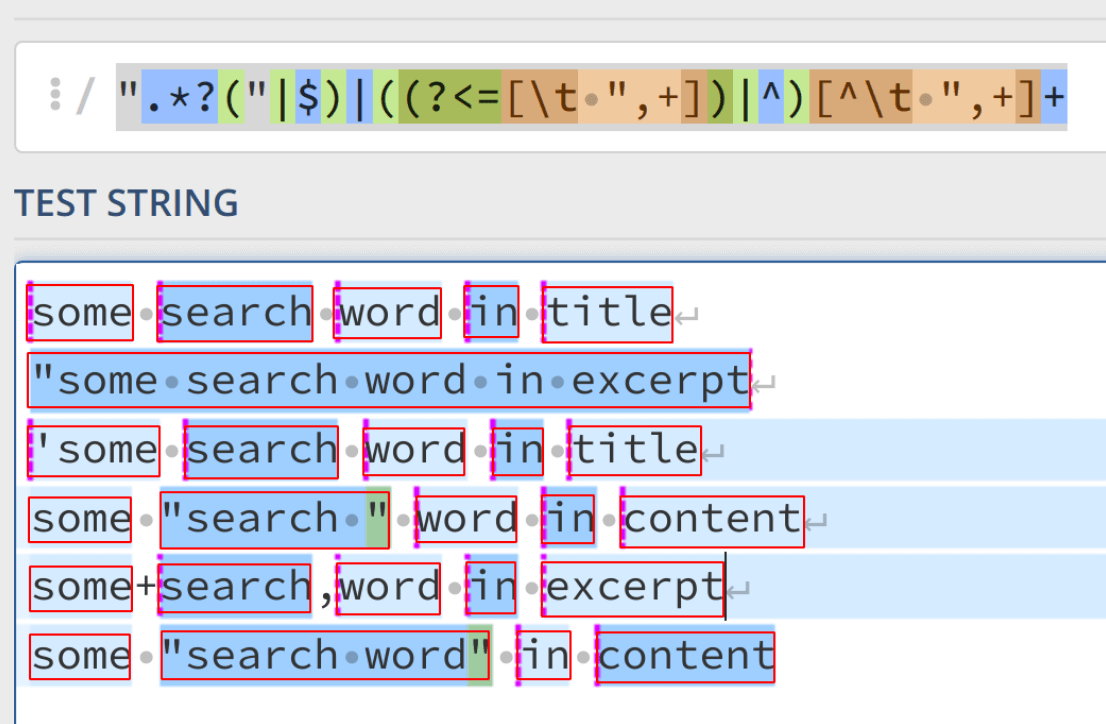
SQL part of search query is created by WP_Query::parse_search() method, it also split the phrase into words.
Each individual word (term) is then processed by WP_Query::parse_search_terms().
-
Symbol "— words or phrase framed in double quotes will participate in the search as is.For example, we want to find the word
station, by default the records containing the wordelectric-stationwill be found, but if you specify the search query in quotes and add a space at the beginning, then this space will be used in the search" station".Or we can search by exact phrase occurrence by framing the desired part of the search phrase or the whole phrase in double quotes (for the whole phrase you can simply add quotation marks to the beginning of the phrase), for example:
"WP Search is not that simple   →  WP Search is not that simple
"WP Search is not that simple"  →  WP Search is not that simple
 WP Search is "not that simple" →  WP | Search | is | not that simple
"WP Search is" not that simple  →  WP Search is | not | that | simple
-
Symbol -— The word exclusion symbol. Adding a hyphen at the beginning of the search word will indicate that the word should not be in the search text. For example:pillow -sofawill return posts containingpillowbut not containing the wordsofa.The exclusion character can be changed through the filter wp_query_search_exclusion_prefix.
-
Word Filtering- dashes, single letters a-z and stop words are removed from search terms (words) after splitting search phrase into terms (words).Stop words are determined by WP_Query::get_search_stopwords(). By default they include a localized list of the following words:
_x( 'about,an,are,as,at,be,by,com,for,from,how,'.
	'in,is,it,of,on,or,that,the,this,to,was,what,'.
	'when,where,who,will,with,www',
	'Comma-separated list of search stopwords in your language'
)
You can change the list of these stop words through the filter wp_search_stopwords.
-
- search_columns(array) (WP 6.2)
An array of columns of the
wp_poststable to search in.Can be:
post_title
post_excerpt
post_content
Default: [] — post_title, post_excerpt, post_content
- exact(logical)
true- do not add%to the ends of search phrases in the SQL query. Settruehere makes sense ifsentence=trueand we need to find the post in the title/content/excerpt of which is exactly the specified phrase. For example,'looking for such a phrase'will be handled so= 'looking for such a phrase', but notLIKE '%looking for such a phrase%'.Default: false
- sentence(true/false)
true- search for the full search phrase (not split it to separate words).'seeking such a phrase'will be processed byLIKE '%seeking such a phrase%'.
false- the search phrase is divided into words and the search is performed by words.Default: false
#1 Search posts with words
Search result returns posts which contains all of the words search and phrase.
$query = new WP_Query( 's=search phrase' );
#2 Search posts by sentence
Search result returns posts which contains sentence search phrase.
$query = new WP_Query( 's=search phrase &sentence=1' );
#2 Exclude words
Search result returns posts which contains word search and not contains word phrase.
$query = new WP_Query( 's=search -phrase' );
Returned fields
Sets which fields the query should return.
- fields(string)
What fields to return. By default, all fields are returned.
- no_found_rows(true/false)
true — don't count the number of found rows.
false - addsSELECT SQL_CALC_FOUND_ROWSto the query.In some cases, it may speed up the request.
Default: false
Cache
The parameters below control the data addition to the object cache when executing queries.
- cache_results(true/false)
- Whether to cache information about the post.
Default: true - update_post_meta_cache(true/false)
- Whether to cache information about postmeta data.
Default: true - update_post_term_cache(true/false)
- Whether to cache information aboute post terms and taxonomies.
Default: true - lazy_load_term_meta(true/false)
- Whether to lazy-load term meta. Setting to false will disable cache priming for term meta, so that each
get_term_meta()call will hit the database.
Default: value of $update_post_term_cache - update_menu_item_cache(true/false) (WP 6.1)
- Whether to update the menu item cache.
Default: false
#1 Get 50 posts, but don't add information about posts to the cache:
$query = new WP_Query( [ 'posts_per_page' => 50, 'cache_results' => false ] );
#2 Get 50 posts, but don't add meta data of the post to the cache:
$query = new WP_Query( [ 'posts_per_page' => 50, 'update_post_meta_cache' => false ] );
#3 Get 50 posts, but don't add information about the terms of posts to the cache:
$query = new WP_Query( [ 'posts_per_page' => 50, 'update_post_term_cache' => false ] );
Usually, this functionality do not need to be used — the cache is necessary! However, this approach can be useful in some cases. For example, if you need to get a list of post titles and don't need any other information about posts: neither about taxonomies nor about meta data. You can avoid unnecessary SQL queries if do not load this unnecessary information.
Note: if a persistent cache plugin is used, all these parameters are set to false by default because there is no need to update the cache every time the page loads.
Filters
- suppress_filters(true/false)
Whether to suppress filters — disable work of some hooks of WP_Query class. Enabling this parameter cancels all SQL query modification filters.
uppress_filters = truedoes not affect the pre_get_posts filter.true — turn off handling of following filters:
posts_search
posts_search_orderby

posts_where
posts_join

posts_where_paged
posts_groupby
posts_join_paged
posts_orderby
posts_distinct
post_limits
posts_fields
posts_clauses

posts_where_request
posts_groupby_request
posts_join_request
posts_orderby_request
posts_distinct_request
posts_fields_request
post_limits_request
posts_clauses_request

posts_request
posts_results
the_posts

comment_feed_join
comment_feed_where
comment_feed_groupby
comment_feed_orderby
comment_feed_limits
Default: false
Permission
Shows posts if the user has sufficient permissions.
- perm(string)
Determines which posts to consider based on access permissions:
-
readable- only posts that the current user has the right to view. editable- only posts that the current user has the right to edit.
Used in the admin area and when working with custom queries to filter by capability.
Example: Output published private posts if the user has sufficient rights to view them:
$query = new WP_Query( [
	'post_status' => [ 'publish', 'private' ],
	'perm' => 'readable'
] );
-
Passwords
- has_password(true|false|null)
Filters posts by the presence of a password set for viewing.
In WP, posts can be password-protected; this parameter allows filtering such posts:
true— will get only posts for which a password is set (field post_password).false— will get all posts that do not have a password.nullornot set— will get all posts without filtering by password.
Get only posts without a password:
$query = new WP_Query( [ 'has_password'=> false ] );
Get only posts with a password (password-protected):
$query = new WP_Query( [ 'has_password'=> true ] );
- post_password
For selecting posts with the password specified in this parameter.
Get all posts whose viewing password is
12345:$query = new WP_Query( [ 'post_password' => '12345' ] );
Parameters Combination
#1. Combining in a string
You may have noticed in some examples above that parameters are joined by the ampersand symbol - &. By this symbol, parameters can be joined (combined).
Posts from category 3 for 2004 year:
$query = new WP_Query( 'cat=3&year=2004' );
Get all posts from category 1 with the apples tag:
$query = new WP_Query( 'cat=1&tag=apples' );
#2. Adding parameters to the query
Get posts from category 13 for the current month on the main site page:
if ( is_home() ) {
	$query = new WP_Query( $query_string . '&cat=13&monthnum=' . date( 'n', current_time('timestamp') ) );
}
#3. Parameters in an array
Get 2 posts, from category 1 and 3, sorted in reverse order by title:
$query = new WP_Query( [
   'category__and'  => [ 1,3 ],
   'posts_per_page' => 2,
   'orderby'        => 'title',
   'order'          => 'DESC',
] );
Examples
#1. Exclude posts from the category 3 on the main page of the site
To exclude posts that are in category 3 on the main page of the blog, you need to insert the following code into the index.php file before the WordPress Loop:
if ( is_home() ) {
	query_posts( $query_string .'&cat=-3' );
}
#1.2. You can add more categories:
if ( is_home() ) {
	query_posts( $query_string .'cat=-1,-2,-3' );
}
#2. Get a certain post (post with ID = 5):
// retrieve one post with an ID of 5
$query = new WP_Query( 'p=5' );
#3. If you want to use the read more function with a new query, you need switch the global variable $more to 0:
// retrieve one post with an ID of 5
$query = new WP_Query( 'p=5' );

global $more;
// set $more to 0 in order to only get the first part of the post
$more = 0;

// the Loop
while ( have_posts() ) : the_post();
  // the content of the post
  the_content( 'Read the full post »' );
endwhile;
#4. Get a specific page (page 7):
$query = new WP_Query('page_id=7'); // get only page with ID 7
or
$query = new WP_Query('pagename=aboute-site'); // get only the "aboute-site" page
#4.1. For child pages, you need specify the name of the parent page and the child page itself.
Names are separated by a slash (/). Example:
$query = new WP_Query( 'pagename=aboute-site/authors'); // get page "authors", which is child page of the "aboute-site"
Inserting variables into query parameters
You can create dynamic query parameters, if you need change query depending on any circumstances. To do this save parameter value to a variable, and then pass this variable to the query parameters. You can do it in several ways:
#1. Building a query using single quotes ' ':
$category_var = $cat;
$query = 'cat=' . $category_var . '&orderby=date&order=ASC'; // collect query
$query = new WP_Query( $query ); // run a query
#2. Building a query using double quotes " "
Variables inside double quotes are interpreted by PHP as variables, not as plain text:
<?php
$current_month = date('m');
$current_year  = date('Y');

$query = new WP_Query( "cat=22&year=$current_year&monthnum=$current_month&order=ASC" );
?>
<!-- WordPress Loop here -->
#3. Using global variable $query_string
That contains a basic query for the query_posts() function. If you don't need to break the standard WordPress posts output (for example, on the category page), but need to remove the pagination (display all posts on one page), we can extend the basic query_posts() parameters with posts_per_page=-1:
global $wp_query;
$wp_query = new WP_Query( $query_string . '&posts_per_page=-1' );
while( have_posts() ){
	the_post();
	// here is the WordPress Loop
}

wp_reset_query(); // reset global $wp_query
You can change the value of posts_per_page to a specific number of posts you need on a single page. For example, posts_per_page=10 displays only 10 posts, and if you put the template tag posts_nav_link() at the end of the loop, a link will appear below the loop to go to the next 10 posts (pagination link).
#4. Parameters can also be passed as an array
Specifying parameters as an array is more readable. Example 2 can be written as:
$query = new WP_Query( [
	'cat'      => 22,
	'year'     => $current_year,
	'monthnum' => $current_month,
	'order'    => 'ASC',
] );
As you can see you can put each variable on a separate line, and it is more readable.
Adding parameters to a query
Save the base query of the current page and add your own parameters to it.
The query_posts() function completely overwrites the main WP query, if, for example, we write query_posts('cat=1'), then other query parameters that are used for the current page (for example, sorting, pagination, etc.) will be lost and posts of category 1 will be displayed only. To save the basic parameters of the query and add/replace them with your own, you need to use array_merge() PHP function (combines 2 arrays into one):
global $wp_query;
query_posts(
	array_merge(
		[ 'cat' => 1 ], // this is the parameter we add
		$wp_query->query     // this is the base request array of the current page
		это массив базового запроса текущей страницы
	)
);
This example is essentially the same as example 3 (using the global variable $query_string), but uses array to set query parameters.
Filters/Hooks notes
To modify the SQL query, you can use the following filters:
Note: if the parameter suppress_filters = true is specified, none of these filters will work - they will be skipped.
Filters triggered before setting the pagination query:
posts_where- modifies the SQL 'WHERE'posts_join- modifies the SQL 'JOIN'
Filters triggered after setting the pagination query:
posts_where_paged- modifies the SQL 'WHERE' during paginationposts_groupby- modifies the SQL 'GROUP BY'posts_join_paged- modifies the SQL 'JOIN' during paginationposts_orderby- modifies the SQL 'ORDER BY'posts_distinct- modifies the SQL 'DISTINCTROW'post_limits- modifies the SQL 'LIMIT'posts_fields- modifies the retrieved table fields-
posts_clauses- allows modifying all parts simultaneously, passing an array:[ [where] => AND 1 = 1 AND wp_posts.post_type = 'post' AND (wp_posts.post_status = 'publish' OR wp_posts.post_status = 'private') [groupby] => wp_posts.ID [join] => INNER JOIN wp_postmeta ON ( wp_posts.ID = wp_postmeta.post_id ) [orderby] => wp_posts.post_date DESC [distinct] => [fields] => wp_posts.* [limits] => LIMIT 0, 10 ]
Properties and Methods
WP_Query properties
- $query
- Stores the query string.
- $query_vars
- Associative array with query data.
- $tax_query
- A query for a taxonomy. Object that is passed to
get_tax_sql(). - $meta_query
- Request parameters for custom fields.
- $date_query
- Request parameters for dates.
- $queried_object
- Used in queries such as category, author, post or page. Contains information about category, author, post, or page.
- $queried_object_id
- If the request relates to a category, author, post or page, it contains the corresponding ID.
- $request
- Full SQL query that was built on the basis of the passed query parameters.
- $posts
- Filled with posts data obtained from Database.
- $post_count
- The number of posts displayed on a page.
- $current_post
- Available during the loop. The index of the current post that is displayed.
- $in_the_loop
- Logical variable. Determines whether the loop is started and the called object is in the loop.
- $post
- Available during the loop. Post which is displayed at the moment.
- $comments
- List of comments for the current post.
- $comment_count
- Number of comments for the current post.
- $current_comment
- The current comment in the comment loop.
- $comment
- ID of the current comment.
- $found_posts
- Number of all posts in the query.
- $max_num_pages
- Count of pagination pages:
$found_posts/$posts_per_page $is_single,$is_page,$is_archive,$is_preview,$is_date,$is_year,$is_month,$is_time,$is_author,$is_category,$is_tag,$is_tax,$is_search,$is_feed,$is_comment_feed,$is_trackback,$is_home,$is_404,$is_comments_popup,$is_admin,$is_attachment,$is_singular,$is_robots,$is_posts_page,$is_paged- Boolean value. Determine which page type the current request belongs to.
- $stopwords
- Cached list of stopwords for search query.
WP_Query Class methods
- public init()
- public parse_query_vars()
- public fill_query_vars( $query_vars )
- public parse_query( $query = '' )
- public parse_tax_query( &$query_vars )
- public set_404()
- public get( $query_var, $default_value = '' )
- public set( $query_var, $value )
- public get_posts()
- public next_post()
- public the_post()
- public have_posts()
- public rewind_posts()
- public next_comment()
- public the_comment()
- public have_comments()
- public rewind_comments()
- public query( $query )
- public get_queried_object()
- public get_queried_object_id()
- public __construct( $query = '' )
- public __get( $name )
- public __isset( $name )
- public __call( $name, $arguments )
- public is_archive()
- public is_post_type_archive( $post_types = '' )
- public is_attachment( $attachment = '' )
- public is_author( $author = '' )
- public is_category( $category = '' )
- public is_tag( $tag = '' )
- public is_tax( $taxonomy = '', $term = '' )
- public is_comments_popup()
- public is_date()
- public is_day()
- public is_feed( $feeds = '' )
- public is_comment_feed()
- public is_front_page()
- public is_home()
- public is_privacy_policy()
- public is_month()
- public is_page( $page = '' )
- public is_paged()
- public is_preview()
- public is_robots()
- public is_favicon()
- public is_sitemap()
- public is_search()
- public is_single( $post = '' )
- public is_singular( $post_types = '' )
- public is_time()
- public is_trackback()
- public is_year()
- public is_404()
- public is_embed()
- public is_main_query()
- public setup_postdata( $post )
- public generate_postdata( $post )
- public reset_postdata()
- public lazyload_term_meta( $check, $term_id )
- public lazyload_comment_meta( $check, $comment_id )
- private init_query_flags()
- protected parse_search( &$query_vars )
- protected parse_search_terms( $terms )
- protected get_search_stopwords()
- protected parse_search_order( &$query_vars )
- protected parse_orderby( $orderby )
- protected parse_order( $order )
- private set_found_posts( $query_vars, $limits )
- protected generate_cache_key( array $args, $sql )
Changelog
| Since 1.5.0 | Introduced. |
| Since 4.5.0 | Removed the $comments_popup property. |