How the WordPress Sitemap Works
Below we will look in detail at how the WordPress sitemap works. Understanding the principle of operation can simplify some aspects when modifying an existing or creating your own Sitemap.
Request Processing
WP_Sitemaps is the main class responsible for:
- Creating rewrite rules (SEO-friendly URLs). See WP_Sitemaps::register_rewrites().
- Processing requests:
/wp-sitemap.xmlor/wp-sitemap-posts-post-1.xml— Sitemap pages.wp-sitemap-index.xslorwp-sitemap.xsl— Sitemap style pages.
- Registering providers. See: WP_Sitemaps::register_sitemaps().
- Link in the robots.txt file. See: WP_Sitemaps::add_robots().
- Handling redirects to the sitemap. For example, you can go to the URL
/sitemap-xml(depends on the SEO-friendly URLs of your posts) and it will redirect you with a 302 code to the Sitemap page/wp-sitemap.xml.
This class is initialized by the function wp_sitemaps_get_server() at the time of the init event:
add_action( 'init', 'wp_sitemaps_get_server' );

// wp_sitemaps_get_server() triggers WP_Sitemaps::init()
$wp_sitemaps = new WP_Sitemaps();
$wp_sitemaps->init();
The initialization function WP_Sitemaps::init() looks like this:
public function init() {
	// These will all fire on the init hook.
	$this->register_rewrites();

	add_action( 'template_redirect', array( $this, 'render_sitemaps' ) );

	if ( ! $this->sitemaps_enabled() ) {
		return;
	}

	$this->register_sitemaps();

	// Add additional action callbacks.
	add_filter( 'pre_handle_404', array( $this, 'redirect_sitemapxml' ), 10, 2 );
	add_filter( 'robots_txt', array( $this, 'add_robots' ), 0, 2 );
}
As we can see from the code, at the time of initialization, rewrite rules (SEO-friendly URLs) are created and the method WP_Sitemaps::render_sitemaps() is hooked to the template_redirect event.
Next, the method render_sitemaps() checks the request parameters and if this is:
- Any Sitemap page (or style page):
- If the sitemap is disabled, a 404 response status is set.
- If the sitemap is enabled, the content of the page is displayed and PHP execution is terminated with
exit;.
- Another page, the method stops executing.
This looks like in code:
public function render_sitemaps() {

	$sitemap         = sanitize_text_field( get_query_var( 'sitemap' ) );
	$object_subtype  = sanitize_text_field( get_query_var( 'sitemap-subtype' ) );
	$stylesheet_type = sanitize_text_field( get_query_var( 'sitemap-stylesheet' ) );
	$paged           = absint( get_query_var( 'paged' ) );

	// not a sitemap page
	if ( ! ( $sitemap || $stylesheet_type ) ) {
		return;
	}

	// sitemap is disabled
	if ( ! $this->sitemaps_enabled() ) {
		$wp_query->set_404();
		status_header( 404 );
		return;
	}

	// sitemap is enabled, displaying content (XML Sitemap or Stylesheet).

	exit;
}
If the sitemap is not disabled and we visit any other page of the site (not the sitemap), the registration of Sitemap providers still triggers, this code from the init() method always runs.
    $this->register_sitemaps();

	// Add additional action callbacks.
	add_filter( 'pre_handle_404', array( $this, 'redirect_sitemapxml' ), 10, 2 );
	add_filter( 'robots_txt', array( $this, 'add_robots' ), 0, 2 );
The purpose of hooks is clear, to redirect to the sitemap or if this is a request for robots.txt to add a link to the sitemap there. But why registration of providers is needed on every WP page on the front end is something I do not understand. This point should be known so as not to execute any logic at the time of registering your provider!
SEO-friendly URL rules for the Sitemap
Above, I mentioned that SEO-friendly URL rules are created for the Sitemap, here is what the code of the method WP_Sitemaps::register_rewrites() looks like:
public function register_rewrites() {
	// Add rewrite tags.
	add_rewrite_tag( '%sitemap%', '([^?]+)' );
	add_rewrite_tag( '%sitemap-subtype%', '([^?]+)' );

	// Register index route.
	add_rewrite_rule( '^wp-sitemap\.xml$', 'index.php?sitemap=index', 'top' );

	// Register rewrites for the XSL stylesheet.
	add_rewrite_tag( '%sitemap-stylesheet%', '([^?]+)' );
	add_rewrite_rule( '^wp-sitemap\.xsl$', 'index.php?sitemap-stylesheet=sitemap', 'top' );
	add_rewrite_rule( '^wp-sitemap-index\.xsl$', 'index.php?sitemap-stylesheet=index', 'top' );

	// Register routes for providers.
	add_rewrite_rule(
		'^wp-sitemap-([a-z]+?)-([a-z\d_-]+?)-(\d+?)\.xml$',
		'index.php?sitemap=$matches[1]&sitemap-subtype=$matches[2]&paged=$matches[3]',
		'top'
	);
	add_rewrite_rule(
		'^wp-sitemap-([a-z]+?)-(\d+?)\.xml$',
		'index.php?sitemap=$matches[1]&paged=$matches[2]',
		'top'
	);
}
From the code, it is clear what parameters the request can have on the Sitemap page. These are:
// sitemap provider
// posts, taxonomies, users, index - this is the main page
get_query_var( 'sitemap' );

// type of the provider: post type, taxonomy name: post, page, category, post_tag
get_query_var( 'sitemap-subtype' );

// pagination page: 1, 2, 3 ...
get_query_var( 'paged' );

// style type: index - main styles, sitemap - link map styles
get_query_var( 'sitemap-stylesheet' );
How Styles Work
If you look at the source code of any sitemap page, you will not see styles there, however, the browser displays the sitemap not as XML code.
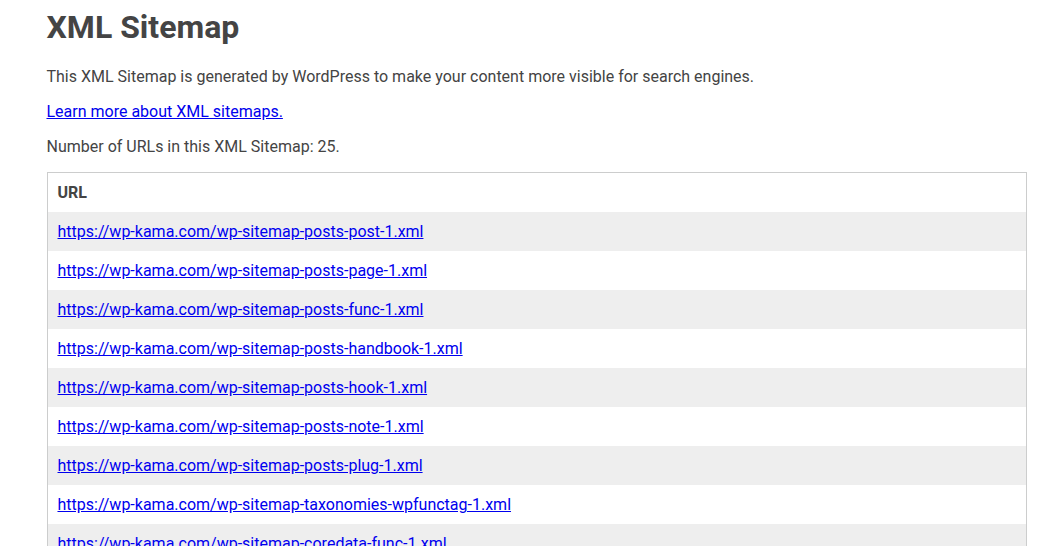
This happens because of this line:
<?xml-stylesheet type="text/xsl" href="https://example.com/wp-sitemap-index.xsl" ?>
It points to the style schema. In this file (which is generated on the fly), it explains to the browser how to display the current XML code. For example, the text "XML Sitemap" can be found on the style page.
The style page can be modified through the following filters:
| Styles (Stylesheets): | |
|---|---|
| wp_sitemaps_stylesheet_css | Filters the CSS styles of the sitemap. |
| wp_sitemaps_stylesheet_content | Filters the appearance of the sitemap. |
| wp_sitemaps_stylesheet_index_content | Filters the appearance of the main page of the sitemap. |