Customize API
The Customizer is an API for creating real-time preview functionality of any changes in WordPress on the front end without reloading the page. It is a universal interface for configuring various theme options: colors, markers, widgets, menus, and so on.
Disabling the Customizer by Default
When using themes that support FSE (Full Site Editing), such as Twenty Twenty-Two, the item "Appearance > Customize" will be hidden. Instead, there will be a new item "Editor".
However, the customizer is still accessible via a direct link: https://example.com/wp-admin/customize.php
See: /filecode.php#L225
// Hide Customize link on block themes unless a plugin or theme
// is using 'customize_register' to add a setting.
if ( ! wp_is_block_theme() || has_action( 'customize_register' ) ) {
	$submenu['themes.php'][7] = array( __( 'Customize' ), 'customize', esc_url( $customize_url ), '', 'hide-if-no-customize' );
}
To restore the link to the customizer, you just need to add any callback to the 'customize_register' event, for example like this:
add_actoin( 'customize_register', '__return_true' );

The Customizer provides a mechanism for managing capabilities, meaning you can display certain settings to, for example, administrators, others to editors, some settings for one page, and some for another.
Customizer Objects
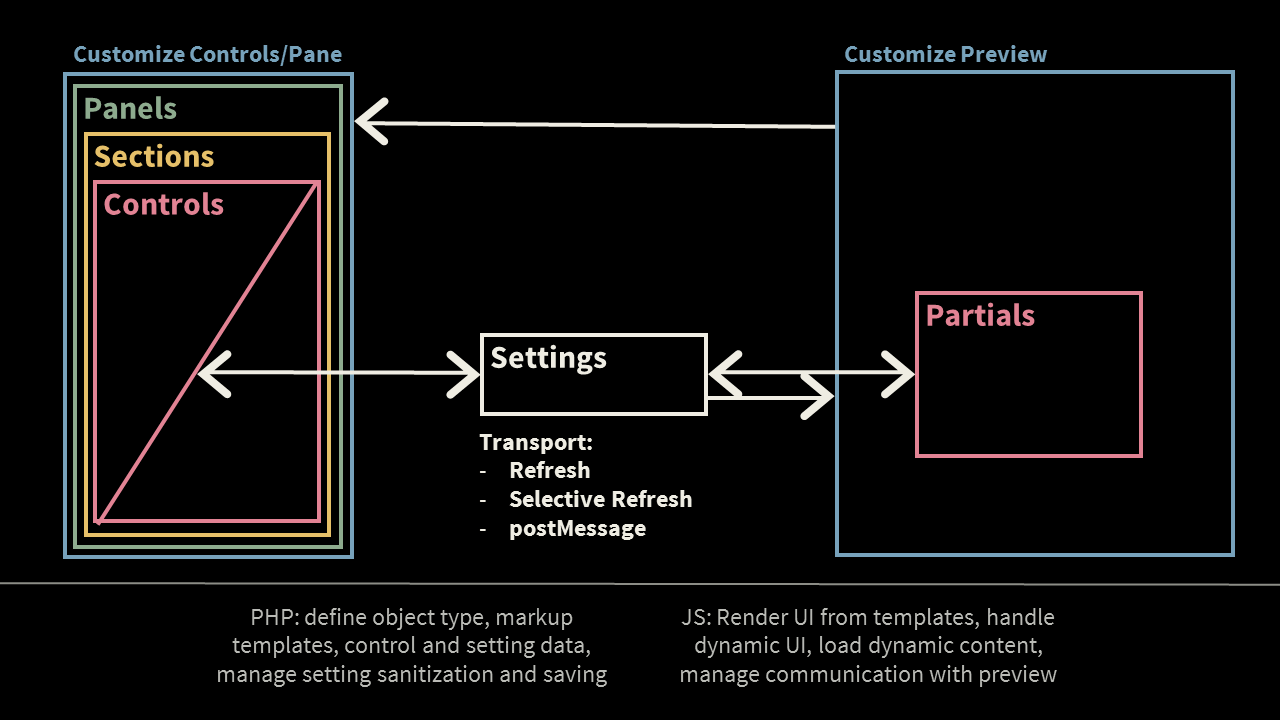


There are four types of Customizer objects:
- Panels (panel) — Panels group sections. A section can exist outside a panel, meaning creating a panel is optional and beneficial when there are many sections that need to be grouped together.
- Sections (sections) — Sections group controls (text fields, radio buttons, dropdowns, etc.).
- Controls (controls) — Controls cannot exist outside a section.
- Settings (settings) — Customizer settings link user interface elements (controls) with settings stored in the database.
For example, the structure of the Twenty Seventeen theme Customizer is as follows:
- Site Properties (section), containing 6 controls
- Logo Selection (image selection)
- Site Title (text field)
- Tagline (text field)
- Display Title and Tagline (checkbox)
- Site Icon (image selection)
- Colors (section), containing 2 controls
- Color Scheme (radio buttons and slider)
- Header Text Color (color selection with a color picker)
- Header Media (section)
- Header Video (video selection and link field)
- Header Image (image selection)
- Menu (panel), containing sections for your menu names, let's say three
- Top Menu (section), inside menu items are controls
- Menu Item 1
- Menu Item 2
- Menu Item 3
- Vendor Menu (section)
- Menu Item 1
- Menu Item 2
- Bottom Menu (section)
- Menu Item 1
- Menu Item 2
- Menu Item 3
- Menu Item 4
- Create Menu (section)
- Menu Name (text field)
- Menu Areas (checkboxes)
- Accordion (type selection) and lists for selecting menu items
- Top Menu (section), inside menu items are controls
- Widgets (panel), containing sections for menu area names, let's say two
- Blog Sidebar (section), inside widgets (sections), containing widget controls
- Widget 1
- Widget 2
- Footer (section)
- Widget 1
- Widget 2
- Widget 3
- Blog Sidebar (section), inside widgets (sections), containing widget controls
- Homepage Settings (section)
- Display on Homepage (radio buttons)
- Additional Styles (section)
- Add Custom CSS (text area with CSS highlighting)
Using methods of the WP_Customize_Manager object, you can add/remove/change Customizer objects (panels, sections, controls...).
The main work is done on the customize_register hook, to which the WP_Customize_Manager object is passed:
add_action( 'customize_register', 'my_theme_customize_register' );

function my_theme_customize_register( WP_Customize_Manager $wp_customize ) {
	// Here we do something with $wp_customize - the object of the WP_Customize_Manager class, for example

	// Actions with panels
	$wp_customize->add_panel();     // add panel
	$wp_customize->get_panel();     // get panel
	$wp_customize->remove_panel();  // remove panel

	// Actions with sections
	$wp_customize->add_section();    // add section
	$wp_customize->get_section();    // get section
	$wp_customize->remove_section(); // remove section

	// Actions with settings
	$wp_customize->add_setting();    // add setting
	$wp_customize->get_setting();    // get setting
	$wp_customize->remove_setting(); // remove setting

	// Actions with controls
	$wp_customize->add_control();    // add control
	$wp_customize->get_control();    // get control
	$wp_customize->remove_control(); // remove control
}
Settings
Settings provide a preview of changes made, their clearing, and saving. Settings "watch" the controls. For example, if a change is made (choosing the site's background color) - it changes without reloading the page. If everything is satisfactory - you publish the changes for all users of the site to see. Before saving, the data is cleared.
When adding a new setting, several parameters are available:
$wp_customize->add_setting( 'setting_id', array(
	'type'                 => 'theme_mod',          // Or 'option'
	'capability'           => 'edit_theme_options', // Rights to modify Customizer settings.
	'theme_supports'       => '',                   // Rarely required.
	'default'              => '',                   // Default value.
	'transport'            => 'refresh',            // Or 'postMessage'.
	'sanitize_callback'    => '',                   // Data sanitization on the PHP side.
	'sanitize_js_callback' => '',                   // Data sanitization on the JavaScript side. Mainly 'to_json'.
) );
For more details, see the method WP_Customize_Manager::add_setting().
Some setting IDs are occupied by the engine, these are:
widget_*sidebars_widgets[*]nav_menu[*]nav_menu_item[*]
So use suffixes when creating names, for example: homepage_widget.
There are two types of settings possible, parameter type: option (options) and theme_mod (theme modifications).
- Options (
option) Stored in the
wp_optionstable. The option name in the database will be exactly as specified in the first parameter ('setting_id').These options are commonly retrieved using the get_option() function.
These options can be used independently of the active theme. This type of setting is suitable for data such as "Site Title," which does not depend on which theme is installed and what will change in the future.
- Theme Modifications (
theme_mod) Used for the theme and stored separately for each theme. Data is stored as a serialized array in the
wp_optionstable, in an option namedtheme_mods_THEME_NAME. These options are commonly retrieved using the get_theme_mod() or get_theme_mods() functions.This type of setting is suitable for example, the header color of articles or the site's background. Suppose you had "Theme A," you configured it. Then you decided to try "Theme B," switched, and configured it as well. Now when switching themes, each will have its (different) options. However, if you use the
optiontype here, setting "Theme B" would overwrite the settings of "Theme A."
Where are intermediate settings saved?
During changes to Customizer options, but before they are published (applied), WordPress saves the current modified options in the wp_posts table, as a record of type customize_changeset with the status auto-draft.
To identify a specific session of Customizer option changes, you can look at the record name: the unique id is recorded in the post_name field: customize_changeset_uuid, which looks like this: 653acb14-b389-4d19-ba98-8968c976befa.
Thus, you can get modified options (not yet published) by retrieving the content of the record named customize_changeset_uuid. The content, in the form of a JSON string, stores the current modified options:
{
	"my_show_per_page": {
		"value": "10",
		"type": "option",
		"user_id": 5,
		"date_modified_gmt": "2019-06-21 16:28:30"
	},
	"my_main_swiper_effect": {
		"value": "flip",
		"type": "option",
		"user_id": 5,
		"date_modified_gmt": "2019-06-21 16:28:30"
	}
}
Adding Settings to the Customizer
To retrieve values, use the get_theme_mod():
echo get_theme_mod( 'my_setting_name' );
PHP
<?php

add_action( 'customize_register', 'customizer_init' );
add_action( 'customize_preview_init', 'customizer_js_file' );
add_action( 'wp_head', 'customizer_style_tag' );

function customizer_init( WP_Customize_Manager $wp_customize ){

	// how to update site preview:
	// 'refresh'     - by reloading the frame (you can completely avoid JavaScript)
	// 'postMessage' - by sending an AJAX request
	$transport = 'postMessage';

	// Section
	if( 'basic - colors' ){

		// setting
		$setting = 'link_color';

		$wp_customize->add_setting( $setting, [
			'default'     => '#000000',
			'transport'   => $transport
		] );

		$wp_customize->add_control(
			new WP_Customize_Color_Control( $wp_customize, $setting, [
				'label'    => 'Link Color',
				'section'  => 'colors',
				'settings' => $setting
			] )
		);

	}

	// Section
	if( $section = 'display_options' ){

		$wp_customize->add_section( $section, [
			'title'     => 'Display',
			'priority'  => 200,                   // loading priority
			'description' => 'Site Appearance', // description is optional
		] );

		// setting
		$setting = 'display_header';

		$wp_customize->add_setting( $setting, [
			'default'    =>  'true',
			'transport'  =>  $transport
		] );

		$wp_customize->add_control( $setting, [
			'section' => $section,
			'label'   => 'Display Header?',
			'type'    => 'checkbox',
		] );

		// setting
		$setting = 'color_scheme';

		$wp_customize->add_setting( $setting, [
			'default'   => 'normal',
			'transport' => $transport
		] );

		$wp_customize->add_control( $setting, [
			'section'  => $section,
			'label'    => 'Color Scheme',
			'type'     => 'radio',
			'choices'  => [
				'normal'    => 'Light',
				'inverse'   => 'Dark',
			]
		] );

		// setting
		$setting = 'font';

		$wp_customize->add_setting( $setting, [
			'default'   => 'arial',     // this font will be used by default
			'type'      => 'theme_mod', // use get_theme_mod() to get settings, if 'option' is specified, then you will need to use get_option()
			'transport' => $transport
		] );

		$wp_customize->add_control( $setting, [
			'section'  => 'display_options', // section
			'label'    => 'Font',
			'type'     => 'select', // dropdown select
			'choices'  => [ // list of values and labels for the dropdown in the form of an associative array
				'arial'     => 'Arial',
				'courier'   => 'Courier New'
			]
		] );

		// setting
		$setting = 'footer_copyright_text';

		$wp_customize->add_setting( $setting, [
			'default'            => 'All rights reserved',
			'sanitize_callback'  => 'sanitize_text_field',
			'transport'          => $transport
		] );

		$wp_customize->add_control( $setting, [
			'section'  => 'display_options', // section id
			'label'    => 'Copyright',
			'type'     => 'text' // text field
		] );

	}

	// section
	if( $section = 'advanced_options' ){

		// Adding another section - Background Settings
		$wp_customize->add_section( $section, [
			'title'    => 'Background Settings',
			'priority' => 201,
		] );

		// setting
		$setting = 'bg_image';

		$wp_customize->add_setting( $setting, [
				'default'      => '', // by default - background image is not set
				'transport'    => $transport
			]
		);

		$wp_customize->add_control(
			new WP_Customize_Image_Control( $wp_customize, $setting, [
				'label'    => 'Site Background',
				'settings' => 'bg_image',
				'section'  => 'advanced_options'
			] )
		);

		// Add a button in the site design in the Customizer for quick access to the current setting
		// when transport = postMessage here you can specify a function,
		// which will replace part of the design (thus you can avoid writing JS code)
		if ( isset( $wp_customize->selective_refresh ) ){

			$wp_customize->selective_refresh->add_partial( $setting, [
				'selector'            => '.site-footer .inner',
				'container_inclusive' => false,
				'render_callback'     => 'footer_inner_dh5theme',
				'fallback_refresh'    => false, // Prevents refresh loop when document does not contain .cta-wrap selector. This should be fixed in WP 4.7.
			]);

			// fix style so the button is visible
			add_action( 'wp_head', function(){
				echo '<style>.site-footer .inner .customize-partial-edit-shortcut{ margin: 10px 0 0 38px; }</style>';
			});

		}

	}

}

function customizer_style_tag(){

	$style = [];

	$body_styles = [];

	switch( get_theme_mod( 'font' ) ){
		case 'arial':
			$body_styles[] = 'font-family: Arial, Helvetica, sans-serif;';
			break;
		case 'courier':
			$body_styles[] = 'font-family: "Courier New", Courier;';
			break;
		default:
			$body_styles[] = 'font-family: Arial, Helvetica, sans-serif;';
			break;
	}

	if( 'inverse' === get_theme_mod( 'color_scheme' ) )
		$body_styles[] = 'background-color:#000; color:#fff;';
	else
		$body_styles[] = 'background-color:#fff; color:#000;';

	if( $bg_image = get_theme_mod( 'bg_image' ) ){
		$body_styles[] = "background-image: url( '$bg_image' );";
	}

	$style[] = 'body { '. implode( ' ', $body_styles ) .' }';

	$style[] = 'a { color: ' . get_theme_mod( 'link_color' ) . '; }';

	if( ! get_theme_mod( 'display_header' ) )
		$style[] = '#header { display: none; }';

	echo "<style>\n" . implode( "\n", $style ) . "\n</style>\n";
}

function customizer_js_file(){
	wp_enqueue_script( 'theme-customizer', get_stylesheet_directory_uri() . '/js/theme-customizer.js', [ 'jquery', 'customize-preview' ], null, true );
}
theme-customizer.js
jQuery(function( $ ) {

	// setting
	wp.customize( 'link_color', function( value ) {
		value.bind( function( newVal ) {
			$( 'a' ).css( 'color', newVal );
		} );
	});

	// setting
	wp.customize( 'display_header', function( value ) {
		value.bind( function( newVal ) {
			false === newVal ? $( '#header' ).hide() : $( '#header' ).show();
		} );
	});

	// setting
	wp.customize( 'color_scheme', function( value ) {
		value.bind( function( newVal ) {
			if ( 'inverse' === newVal ) {
				$( 'body' ).css({
					'background-color': '#000',
					'color'           : '#fff'
				});
			}
			else {
				$( 'body' ).css({
					'background-color': '#fff',
					'color'           : '#000'
				});
			}
		});
	});

	// setting
	var sFont;
	wp.customize( 'font', function( value ) {
		value.bind( function( newVal ) {
			switch( newVal.toString().toLowerCase() ) {
				case 'arial':
					sFont = 'Arial, Helvetica, sans-serif';
					break;
				case 'courier':
					sFont = 'Courier New, Courier';
					break;
				default:
					sFont = 'Arial, Helvetica, sans-serif';
					break;
			}
			$( 'body' ).css({
				fontFamily: sFont
			});
		});

	});

	// setting
	wp.customize( 'footer_copyright_text', function( value ) {
		value.bind( function( newVal ) {
			$( '#copyright' ).text( newVal );
		});
	});

	// setting
	wp.customize( 'background_image', function( value ) {
		value.bind( function( newVal ) {
			0 === $.trim( newVal ).length ? $( 'body' ).css( 'background-image', '' ) : $( 'body' ).css( 'background-image', 'url( ' + newVal + ')' );
		});
	});

});
Methods
Methods for adding settings/sections.
$wp_customize->add_panel( $id, $args )
Adds a panel.
$wp_customize->add_section( $id, $args )
Adds a section.
$wp_customize->add_setting( $id, $args )
Adds a new setting/option. The method is based on the WP_Customize_Setting() class.
- $id(string) (required)
- The option name.
- $args(array)
Parameters for the setting. Possible keys in the array, all properties of the
WP_Customize_Setting{}class:-
$type(string)
Type of the setting.
Default: 'theme_mod' -
$capability(string)
Capability required for the setting.
Default: 'edit_theme_options' -
$theme_supports(string/array)
Theme features required to support the panel.
Default: none -
$default(string)
Default value for the setting.
Default: '' -
$transport(string)
Parameters for displaying the preview of changes in the Theme Customizer. Can be:
refresh— applies changes by reloading the frame (can completely avoid JavaScript).
postMessage— applies changes via JavaScript.
Default: 'refresh' -
$validate_callback(callable)
Server-side validation callback for the setting's value.
The function will receive parameters$validity, $value, $this, see the hook customize_validate_(id)
Default: '' -
$sanitize_callback(callable)
Callback to filter a Customize setting value in un-slashed form.
The function will receive parameters$value, $this, see the hook customize_sanitize_(id)
Default: '' -
$sanitize_js_callback(callable)
Callback to convert a Customize PHP setting value to a value that is JSON serializable.
The function will receive parameters$value, $this, see the hook customize_sanitize_js_(id)
Default: '' - $dirty(true/false)
Whether or not the setting is initially dirty when created.
Default: false
Default: presets
-
$wp_customize->add_control( $id, $args )
Adds a control.
- $id(WP_Customize_Control/string) (required)
The Customize Control object or ID.
Strings that can be used:
text,checkbox,textarea,radio,select,dropdown-pages, andemail,url,number,hidden,date.Objects that can be used as the
$idparameter.Different:
- WP_Customize_Color_Control
- WP_Customize_Background_Position_Control
- WP_Customize_Code_Editor_Control
- WP_Customize_Date_Time_Control
- WP_Customize_Theme_Control
Image:
- WP_Customize_Image_Control
- WP_Customize_Background_Image_Control
- WP_Customize_Cropped_Image_Control
- WP_Customize_Header_Image_Control
- WP_Customize_Media_Control
- WP_Customize_Upload_Control
Nav_Menu:
- WP_Customize_Nav_Menu_Control
- WP_Customize_Nav_Menu_Item_Control
- WP_Customize_Nav_Menu_Location_Control
- WP_Customize_Nav_Menu_Locations_Control
- WP_Customize_Nav_Menu_Name_Control
- WP_Customize_New_Menu_Control
- WP_Customize_Nav_Menu_Auto_Add_Control
Widget:
- $args(array)
Array of properties for the new control object.
The parameter needs to be specified only when a string is specified in $id; if an object is specified in $id, the parameters are passed to the created object.
-
$settings(array)
All settings tied to the control. If undefined. IDs in the array correspond to the ID of a registered WP_Customize_Setting. Default: $setting -
$setting(string)
The primary setting for the control (if there is one). Default: 'default' -
$capability(string) Capability required to use this control. Normally derived from $settings.
-
$priority(number)
Order priority to load the control. Default: 10 -
$section(string)
The section this control belongs to. Default: '' -
$label(string)
Label for the control. Default: '' -
$description(string)
Description for the control. Default: '' -
$choices(array)
List of choices for 'radio' or 'select' type controls, where values are the keys, and labels are the values. Default: array() -
$input_attrs(array)
List of custom input attributes for control output, where attribute names are the keys and values are the values. Default: array() -
$allow_addition(true/false)
Show UI for adding new content, currently only used for the dropdown-pages control. Default: false -
$type(string)
The type of the control. Default: 'text' - $active_callback(callback)
Active callback.
Default: array()
-
- $wp_customize->selective_refresh->add_partial( $id, $args )
- Adds a partial.
-
Official documentation: Theme Customization API